huang-chunc/dsh-user-message-timeline
dsh-user-message-timeline
dsh-user-message-timeline is a community DeepSeek Harness plugin. Read the repository README before installing.
Install
npx @deepseek-ai/dsh plugin --profile web add dsh-user-message-timelineRestart `dsh web` after install. Bundle APIs can change during the developer preview.
README badge

[](https://dshhub.dev/plugins/dsh-user-message-timeline)Paste this into your README. The star count updates with every catalog sync.
From the README
Excerpt from huang-chunc/dsh-user-message-timeline, cleaned of badges and images.
dsh-user-message-timeline
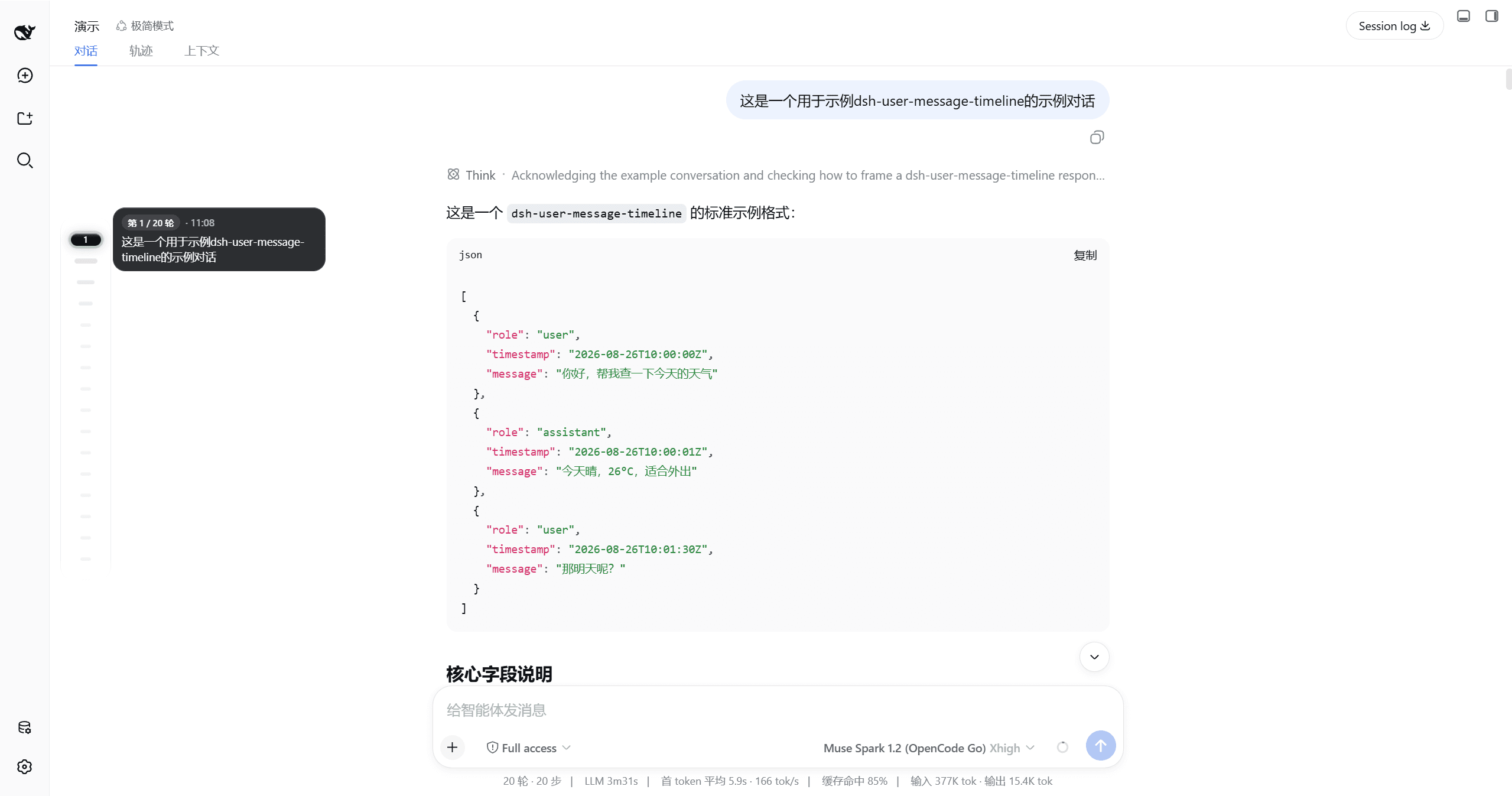
<p align="center"><strong>在对话列内侧,为每一条用户消息点亮一颗药丸</strong></p>DSH User Message Timeline — 对话内悬浮药丸导轨,悬停预览、拖拽跳转、分页加载<br/> 轻量时间线,悬停即预览、点击即跳转,视口可滚动,左右贴边一键切换
<a href="./README.md"><b>中文</b></a> · <a href="./README_EN.md">English</a>
演示
| 浅色 | 深色 |
|---|---|
| 浅色完整链路 | 深色完整链路 |
|---|---|
| 悬停漏斗放大 → 气泡 240px 预览 → 点击跳转 → 拖拽 Scrub HUD | 同左,深色墨玉玻璃 |
| 设置开关与左右切换 |
|---|
| 开关关闭隐藏 · 左右贴边(右侧仅适配 dsh-better-sidebar) |
功能
| 功能 | 说明 |
|---|---|
| 药丸漏斗 | 常态 12×4,距 hover/active 分 5 档 36→26→20→16→12 放大,gap 10px |
| sticky 预览 | 悬停 150ms/连续 60ms 弹出,墨玉玻璃 240×48~108,clamp 6 行,可复制 |
| 拖拽 scrub | setPointerCapture + elementFromPoint,Scrub HUD「第X/N轮·预览首行」跟手,松手 smooth 收尾 |
| 分页头丸加载 | 顶部 is-older 空心脉冲,点击循环 加载更多 20 次,HUD/tooltip · 还有更早 |
| 视口可滚动 | ≤16 颗一屏精致,>16 颗导轨内 max-height 386px 可滚,mask 淡化 |
| 丝滑体验 | 侧边栏推式 120fps ResizeObserver+rAF,prefers-reduced-motion 适配 |
| 偏好设置 | 设置 → 插件 → 插件配置 卡片:开关与左右位置,深浅主题自适应(白底黑点/黑底灰点) |
安装
前置:已装好 DSH(dsh web 能正常运行),Node.js ≥ 20。
支持的 DSH 版本:
dsh plugin --profile web add dsh-user-message-timeline
装完硬刷新浏览器(Cmd/Ctrl+Shift+R)即可看到导轨(DSH 对 client 改动热加载,无需重启)。
方式二:让 DSH 自己装——把下面这段提示词发给任意一个 DSH 会话:
帮我安装 dsh-user-message-timeline 插件(对话列悬浮药丸导轨),步骤:
1. 执行 dsh plugin --profile web add dsh-user-message-timeline
2. 完成后提醒我硬刷新浏览器(Cmd/Ctrl+Shift+R)
<b>更新</b>
dsh plugin --profile web add dsh-user-message-timeline
改完硬刷新浏览器即可。
<b>常见问题</b>
| 现象 | 原因与解决 |
|---|---|
报 minimum release age | 装的版本发布不足 24 小时,等 24h 或在 ~/.dsh/profiles/web/pnpm-workspace.yaml 加白名单 |
报 file: 旧代码 | 同版本 pnpm file: 缓存,dsh plugin --profile web remove dsh-user-message-timeline && dsh plugin --profile web add file:~/dsh-user-message-timeline |
| 调试 | localStorage.setItem('umtl:debug','1') 后看控制台 [umtl] 日志 |
更新日志
见 CHANGELOG.md 与 Releases。
致谢与 License
MIT © huang-chunc,见 LICENSE。

