y2zyyr/dsh-token-usage-sidebar
dsh-token-usage-sidebar
Persistent Today / Yesterday / Total token usage sidebar for DeepSeek Harness.
Install
npx @deepseek-ai/dsh plugin --profile web add @y2zyyr/dsh-token-usage-sidebarRestart `dsh web` after install. Bundle APIs can change during the developer preview.
README badge

[](https://dshhub.dev/plugins/dsh-token-usage-sidebar)Paste this into your README. The star count updates with every catalog sync.
From the README
Excerpt from y2zyyr/dsh-token-usage-sidebar, cleaned of badges and images.
dsh-token-usage-sidebar
English | 简体中文
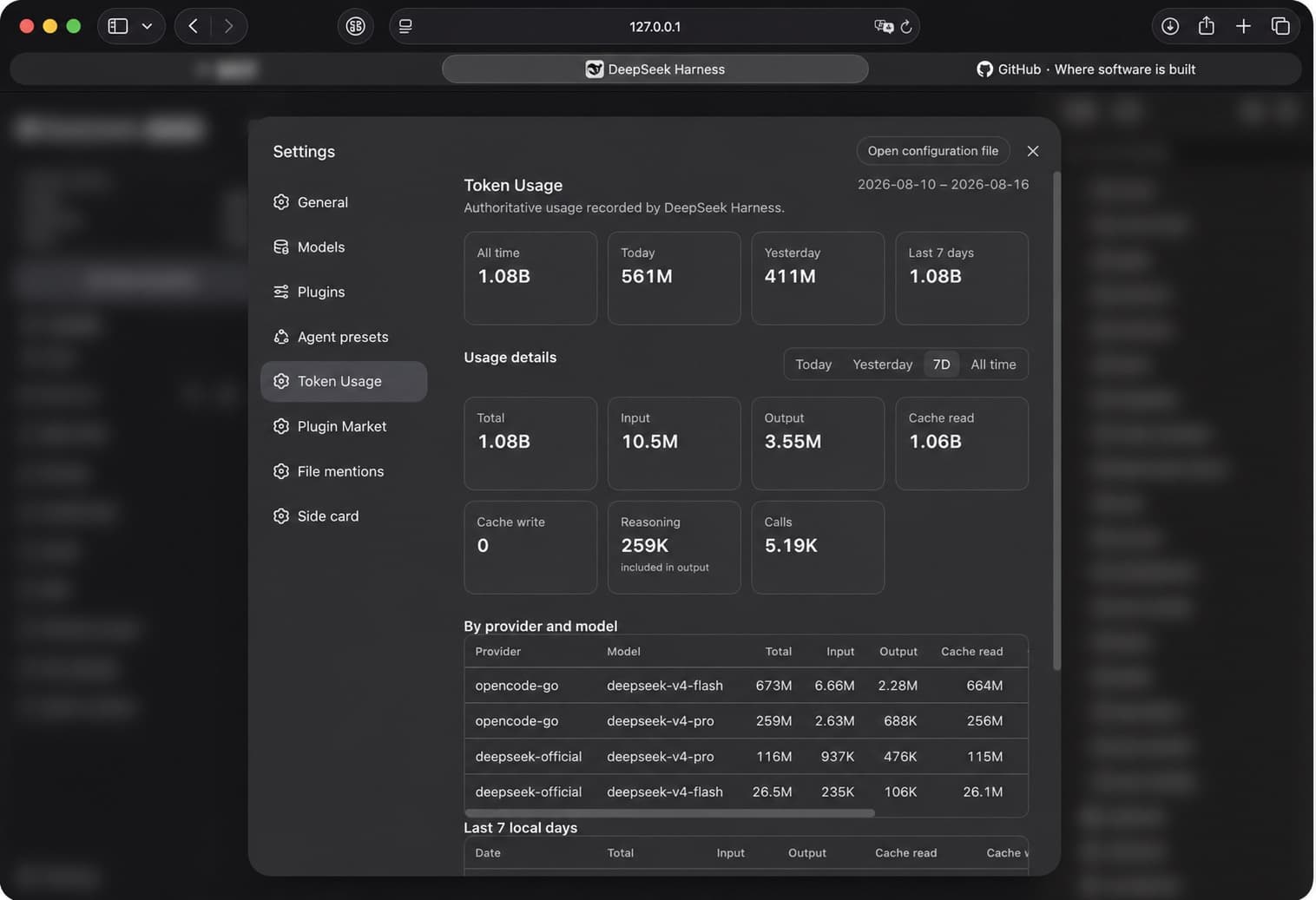
A community DeepSeek Harness (DSH) web-profile plugin that keeps provider-reported token usage locally. It provides both a persistent sidebar summary and a native Token Usage settings page.
TOKEN USAGE
Today       …
Yesterday   …
Total       …
This is a community plugin, not an official DeepSeek plugin.
Features
- Sidebar summary: Today, Yesterday, and lifetime Total.
- Native Settings → Token Usage page, placed after Agent Presets and before Plugin Market.
- Four overview cards: All time, Today, Yesterday, and Last 7 days.
- Detail range selector: Today, Yesterday, 7D, and All time.
- Per-range totals for Input, Output, Cache Read, Cache Write, Reasoning, and call count.
- Provider/model table, sorted by Total, plus a seven-local-day table that retains zero-value days.
- Persistent local accounting that survives DSH restarts.
- Scalable durable ledger (v1.1). The lifetime accounting store is backed by a
plugin-owned SQLite database (Node's built-in
node:sqlite, WAL journal) instead of a monolithic JSON root. A new invocation is one small row-level upsert, so write latency stays effectively flat no matter how many historical records accumulate. - Automatic verified migration (v1.1). Existing v1.0.1 totals are migrated into the new ledger automatically, verified for exact equivalence (lifetime total, record count, per-day and provider/model), and only then cut over. No totals are lost or double-counted, and a backup of the v1 ledger is made before cutover.
- Shutdown-safe persistence: dirty usage is flushed before the store closes, so a usage event followed by a quick DSH restart is not lost.
- Historical recovery from available authoritative session usage records, with honest scan/coverage reporting (a partial or failed scan never claims complete lifetime coverage).
- Replay-safe, deduplicated accounting: an invocation is counted once.
- Native placement in the DSH web sidebar.
Installation
Recommended package: @y2zyyr/dsh-token-usage-sidebar (published on the npm registry).
Recommended — DeepSeek Harness
Install the plugin into the DSH web profile, then restart DSH:
dsh plugin --profile web add @y2zyyr/dsh-token-usage-sidebar
# Restart `dsh web` after installation.
dsh plugin accepts the scoped package name directly; the plugin is added to the
profile's bundle list and its loader entry keeps the stable id token-usage-sidebar.
You can also ask an agent that can access your DSH installation to install the npm
package @y2zyyr/dsh-token-usage-sidebar into the web profile (source: https://github.com/y2zyyr/dsh-token-usage-sidebar). Review
third-party source before authorizing an agent to install it. Pin a commit when your
workflow requires a reproducible dependency revision.
npm
The package can be installed from npm directly:
npm install @y2zyyr/dsh-token-usage-sidebar
Source
GitHub is the source repository (code, issues, release history, source inspection): https://github.com/y2zyyr/dsh-token-usage-sidebar
A direct GitHub install also keeps working
(dsh plugin --profile web add github:y2zyyr/dsh-token-usage-sidebar), but the npm
scoped package is the recommended distribution channel.
Update
Update the installed plugin, then restart DSH:
…

