lcthe/dsh-timeline-rail
dsh-timeline-rail
dsh-timeline-rail is a community DeepSeek Harness plugin. Read the repository README before installing.
Install
npx -y @deepseek-ai/dsh plugin --profile web add @lcthe/dsh-timeline-railRestart `dsh web` after install. Bundle APIs can change during the developer preview.
README badge

[](https://dshhub.dev/plugins/dsh-timeline-rail)Paste this into your README. The star count updates with every catalog sync.
From the README
Excerpt from lcthe/dsh-timeline-rail, cleaned of badges and images.
@lcthe/dsh-timeline-rail
A message timeline rail for the DeepSeek Harness web chat.
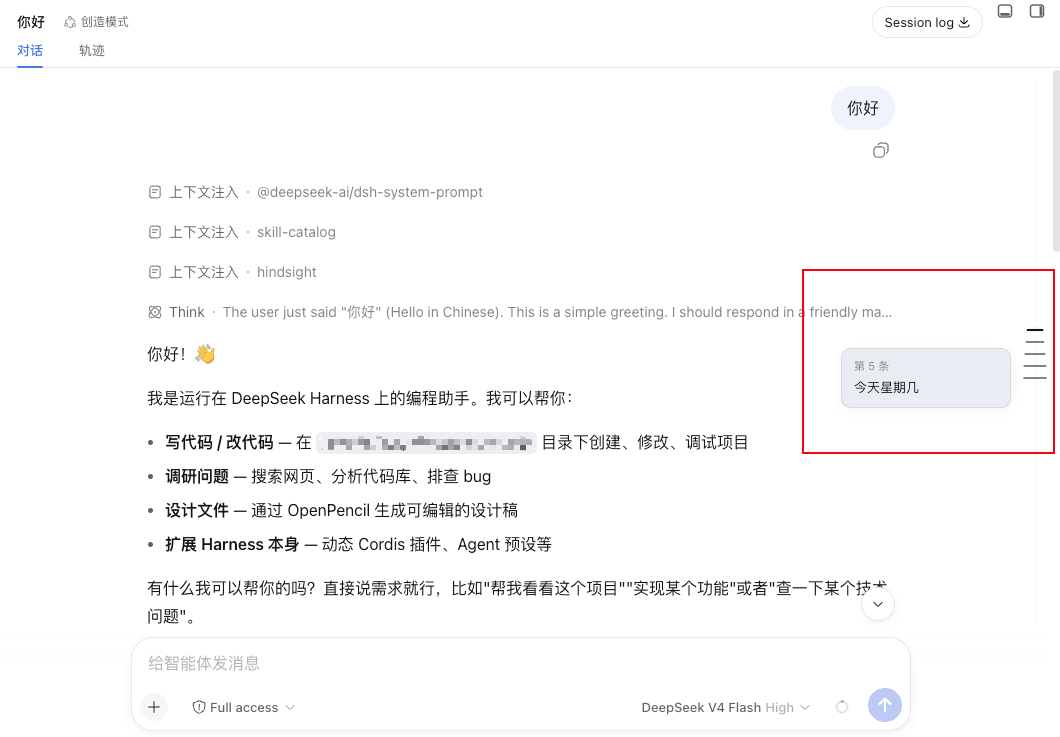
Along the right edge of the conversation, above the composer, it draws a low-contrast, evenly spaced column of thin tick marks — one tick per durable user message, styled after a meeting-notes / editor timeline. Hover a tick to preview that message; click it to jump the conversation straight to it.
Desktop & Web both supported. The DeepSeek Harness desktop app is an Electron shell that embeds the same browser client served over a localhost web server, so a "web" plugin renders identically on both. This package targets the browser-side conversation slot and works wherever that client runs — Desktop and Web. Only headless / TUI profiles have no composer slot and render nothing.
Features
- Evenly spaced ticks — one short horizontal line per user message along a 1px track, so a conversation reads as a clean time axis instead of a clamped map.
- Click to jump — aligns the selected user message to the top of the visible message area.
- Hover to preview — a compact wide card shows which message it is (
用户 · 第 N 条) plus the first lines of its text; image/attachment-only messages get a labelled placeholder. - Theme aware — colors come from
--dsw-*tokens, so it follows the light/dark theme with no extra config. - Slim and out of the way — pointer-events are none except on the ticks themselves; the rail never blocks clicks on the messages.
How it works
DSH's web GUI is a Cordis composition. This package is a client plugin that registers a single entry into the conversation.input.dock slot (the additive band above the composer card). It reads the live ConversationSnapshot through the slot's useSession hook, maps each durable kind: 'user' node to a tick, and measures the scrollport ([data-conversation-scroll], [data-composer-seat]) to lay the rail out on the right edge. It defines no service and no host-side behavior.
Positioning is computed against the same stable data attributes the product itself uses ([data-conversation-scroll], [data-chat-flow], [data-chat-anchor-key], [data-composer-seat]), so the rail stays correct across sidebar collapse, the details panel, theme changes, and live message appends.
Install
Requires a DeepSeek Harness deployment with the browser client — that is the desktop app (Web UI embedded) or the web version alike. The rail is pure presentation; it renders only where the conversation composer exists.
pnpm add @lcthe/dsh-timeline-rail
Then add the plugin row to your cordis.yml at the same include level as the bundle rows:
- insert:
    - id: dsh-timeline-rail
      name: '@lcthe/dsh-timeline-rail'
Full wiring details live in INSTALL.cordis.yml.md.
Alternative: load in-session as a dynamic plugin
DSH web also ships a first-class dynamic-Cordis tool. If you are in a session and just want to try it, ask the agent to load the plugin (it can cordis_define + cordis_run this package). This is the recommendable route for quick evaluation; the npm package is the stable, shareable form.
Peer dependencies
…

