LeemanCheung/dsh-task-dag
dsh-task-dag
Persistent live DAG visualization for DeepSeek Harness subagents and workflows
Install
npx @deepseek-ai/dsh plugin --profile web add github:LeemanCheung/dsh-task-dagRestart `dsh web` after install. Bundle APIs can change during the developer preview.
README badge

[](https://dshhub.dev/plugins/dsh-task-dag)Paste this into your README. The star count updates with every catalog sync.
From the README
Excerpt from LeemanCheung/dsh-task-dag, cleaned of badges and images.
A live task topology for DeepSeek Harness Web.<br> See Sessions, delegated subagents, and durable workflows as one navigable DAG.
English · <a href="README.zh.md">中文</a>
At a glance
dsh-task-dag turns DSH's existing Client projections into a top-to-bottom dependency graph. It keeps no parallel workflow database and sends no polling requests: when Session state changes, the graph changes with it.
| Capability | Behavior |
|---|---|
| Live topology | Reacts to Session and subagent catalog snapshots without Host polling. |
| Durable workflows | Reconstructs workflow phases and members from workflow-run Conversation Nodes after restart. |
| Clear ownership | Groups workflow members under workflow nodes instead of drawing duplicate root-to-child edges. |
| Direct navigation | Opens healthy, list-visible subagent Sessions from their graph nodes. |
| Canvas control | Fits the whole graph or pans the original-size canvas; nodes can be dragged and keep their rearranged positions while the current Session panel is reopened. |
| Bounded layout persistence | Manual node positions live only in the current page's current-Session React state; switching Sessions, refreshing the page, or restarting DSH restores deterministic automatic layout. Workflow topology itself is rebuilt from durable Conversation Nodes. |
| Robust projection | Rejects broken or cyclic lineage while retaining deterministic layers for valid deep dependency chains. |
| Native presentation | Uses DSH theme semantics, restrained status colors, and custom SVG icons in light and dark modes. |
| Lifecycle safe | Registers UI and styles through Cordis lifecycle ownership and removes them on unload. |
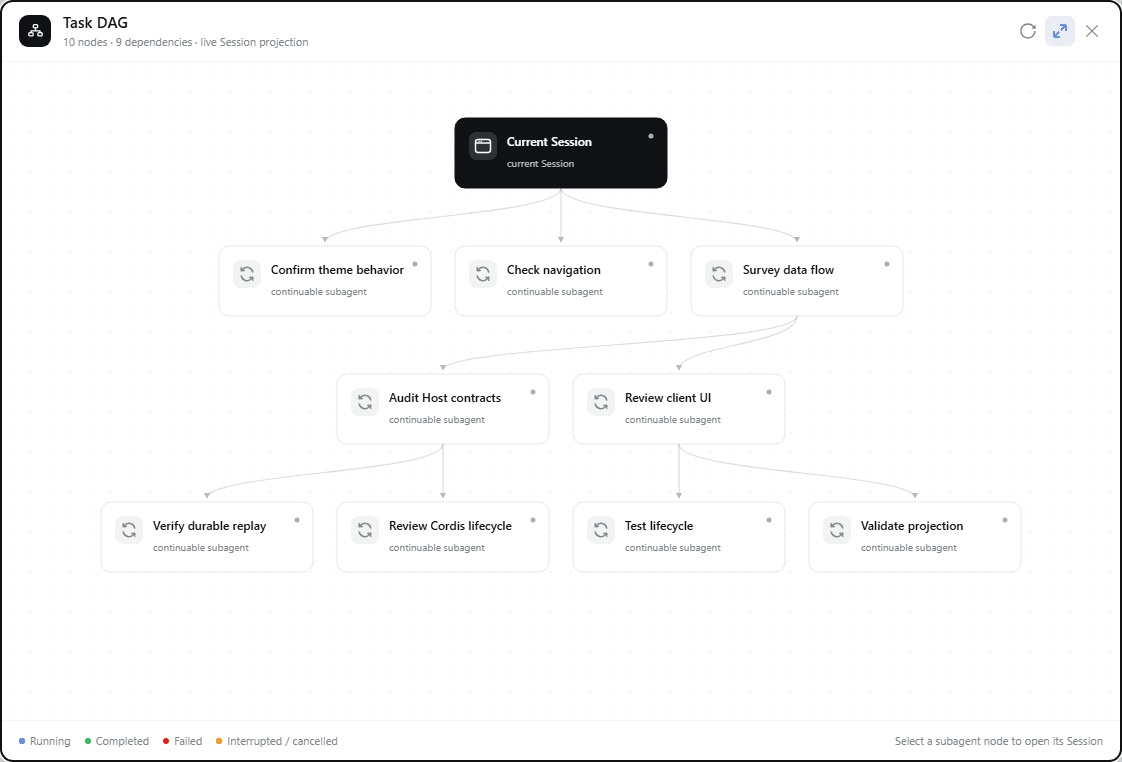
Live screenshot
Captured from a running DSH Web Session with task labels anonymized. The panel, layout, edges, controls, and status presentation are the actual plugin UI.
Install
dsh plugin --profile web add github:LeemanCheung/dsh-task-dag
Restart the current DSH Web process once after the first installation, then refresh the page. The Task DAG action appears in the Session header.
For a version-pinned installation:
dsh plugin --profile web add github:LeemanCheung/dsh-task-dag#v1.2.0
Using the graph
| Action | Result |
|---|---|
| Select Task DAG | Opens the Session-scoped graph panel, enables the related parent catalogs, and refreshes them. |
| Drag empty canvas | Pans the scrollable original-size canvas. |
| Drag a node | Rearranges it while its edges stay in sync; the layout survives close and reopen for the current Session. |
Select a subagent node, or press Enter / Space on it | Opens that Session when it is available in the Session list. |
| Toggle fit mode | Switches between a whole-graph overview and the original scrollable canvas. |
| Refresh | Refreshes observed subagent catalogs; workflow nodes remain projection-driven. |
| Drag the title bar | Repositions the panel without capturing toolbar controls. |
Press Escape or select close | Closes the panel and restores focus to the trigger. The dialog has no focus trap and does not offer keyboard dragging for the panel, canvas, or nodes. |
Status colors are deliberately limited to business blue, success green, error red, and warning amber. All other hierarchy is expressed through spacing, typography, borders, and line styles.
Architecture
…

