linhut/dsh-stock-terminal
dsh-client-ui-skin-stock
dsh-client-ui-skin-stock is a community DeepSeek Harness plugin. Read the repository README before installing.
Install
npx @deepseek-ai/dsh plugin --profile web add github:linhut/dsh-stock-terminalRestart `dsh web` after install. Bundle APIs can change during the developer preview.
README badge

[](https://dshhub.dev/plugins/dsh-stock-terminal)Paste this into your README. The star count updates with every catalog sync.
From the README
Excerpt from linhut/dsh-stock-terminal, cleaned of badges and images.
📈 dsh-stock-terminal · 股市行情皮肤 + 功能插件
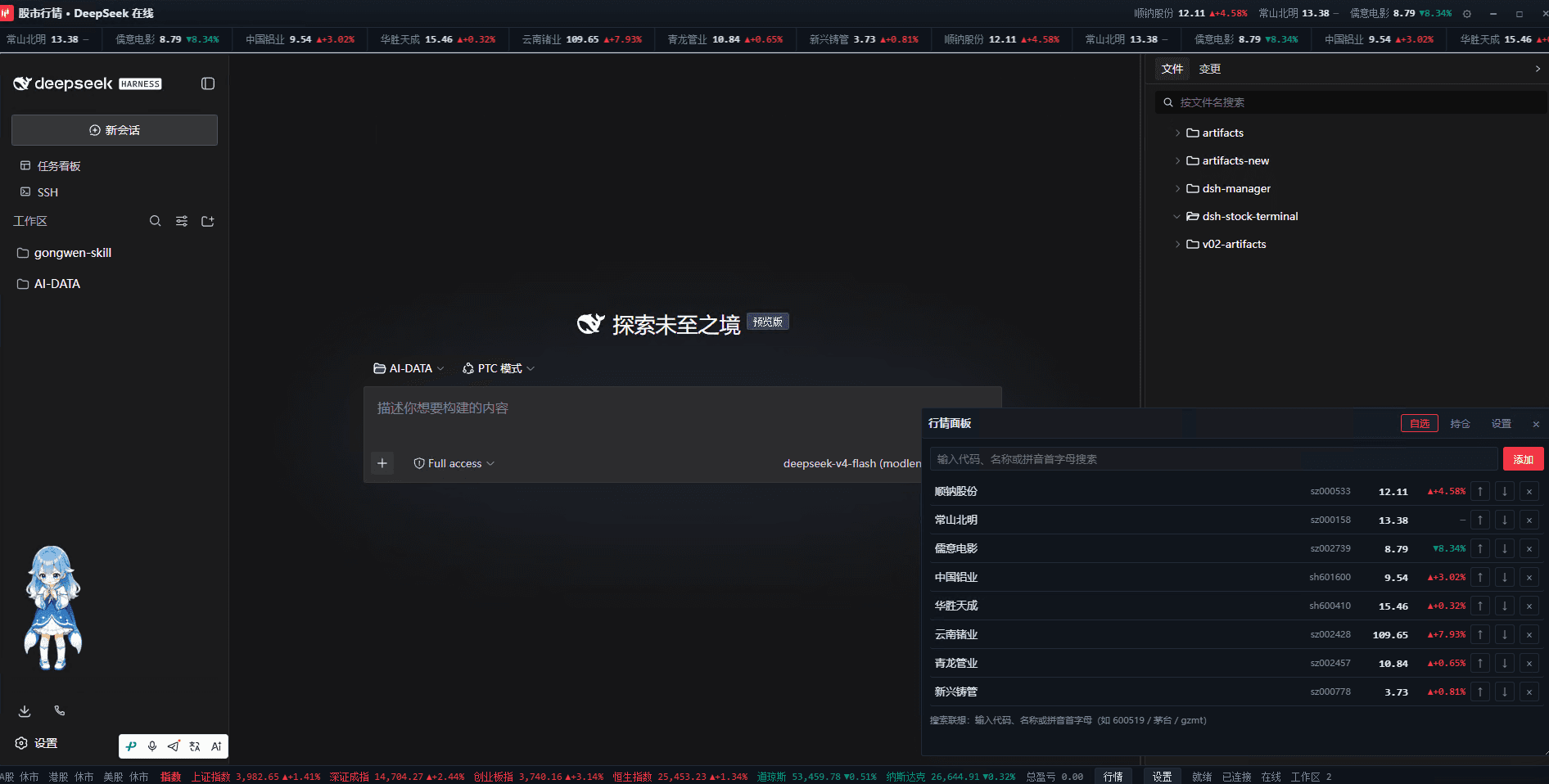
DSH Web GUI(DeepSeek Harness)行情皮肤与功能插件:全局交易终端视觉 + 实时行情面板。 自选跑马灯、首字母模糊搜索、持仓盈亏管理,A股 / 港股 / 美股 / 指数 / 加密 / 外汇一站式盯盘。
✨ 功能亮点
| 能力 | 说明 |
|---|---|
| 🎨 交易终端皮肤 | 顶栏 K 线品牌图标 + 标题 + 持仓摘要芯片 + 设置齿轮 + 仿终端窗口按钮;红涨绿跌(亮/暗双主题完整 CSS 变量切换);自定义 K 线 favicon 和页面标题 |
| 📢 实时行情跑马灯 | 自选列表无缝循环滚动,hover 暂停;点击任一品种弹出个股 K 线图(日K/周K/月K 可切换) |
| 📈 个股 K 线弹窗 | 日K / 周K / 月K 一键切换;鼠标滚轮缩放(锚点缩放,20~200 根)+ 拖拽平移查看历史/近期;十字光标(hover 竖线+横线 + OHLC 浮层 + 价格轴/日期轴联动标注);蜡烛图 + MA5/MA10 均线 + 成交量幅图 + 价格/日期轴 + 网格 + 区间涨跌统计;Esc/遮罩/✕ 关闭;窗口 resize 自适应重绘;A股/港股/指数走腾讯前复权,美股腾讯不足时回退 Yahoo,加密货币走 Binance;服务端 60s 缓存 + 在途去重 |
| 🧭 自选列表 | 增删 / ↑↓ 排序 / 移除;拼音首字母 + 代码 + 名称模糊搜索联想(如 gzmt → 贵州茅台、600519、茅台),内置 130+ 品种词典 + 在线 API 兜底,键盘 ↑↓ Enter Esc 操作 |
| 💼 持仓管理 | 模糊搜索添加持仓(与自选同款联想体验);代码 + 数量 + 成本价 → 现价 / 市值 / 浮动盈亏 / 盈亏率,底部汇总总市值 / 总盈亏 / 总盈亏率;编辑 / 删除持仓 |
| 🔔 持仓盯盘提醒 | 每个持仓可设「盯盘高价 / 盯盘低价」(≥高价触发涨提醒、≤低价触发跌提醒),一次预警后标记已触发可手动重置重新武装;持仓行🔔快捷设置 + 表单字段双入口;状态栏实时显示激活盯盘数;触发时页面 Toast + 浏览器桌面通知(Notification API)双重提醒,首次设置时自动请求授权 |
| 🏷 标题栏持仓摘要 | 持仓个股名称 + 涨跌幅按标题栏宽度自适应显示,超宽时自动收起为「等 N 只」+ 总盈亏芯片;窗口 resize 重新适配 |
| 📏 伸缩条 | 拖动面板顶部伸缩条调整面板高度(替代 CSS resize 右下角把手),高度持久化到 localStorage |
| ⏱ 交易时段 | 状态栏实时显示 A股 / 港股 / 美股 盘中·午休·盘前·休市,每分钟自动刷新(Intl.DateTimeFormat 按 Asia/Shanghai、Asia/Hong_Kong、America/New_York 判定) |
| 📊 指数快照 | 状态栏中部实时快照:上证 / 深成 / 创业板 / 恒指 / 道指 / 纳指 |
| 🔔 状态栏总盈亏 | 状态栏右侧显示持仓总盈亏 / 总盈亏率,随行情实时更新 |
| ⚙ 三入口设置 | 状态栏「行情」按钮 + 标题栏齿轮 + 面板内「设置」页签;DSH 系统设置侧边栏出现独立「股市行情」分区(可管理刷新间隔 / 跑马灯开关 / 自选 / 持仓) |
| 🔄 刷新间隔可调 | 15 / 30 / 60 秒可调(系统设置卡与面板内设置同步),页面隐藏时暂停轮询、回到前台立即刷新 |
| 🗃 数据持久化 | 自选 / 持仓 / 面板高度 / 刷新间隔 / 跑马灯开关 全部存浏览器 localStorage,重开不丢 |
| 🌙 亮暗双主题 | 完整跟随 DSH 深色/浅色主题,全套 CSS 变量切换,跑马灯 / K 线 / 面板 / 状态栏所有元素适配 |
| 🛡 故障容错 | 全部数据源失败 toast 一次性提示并自动重试;代理失败自动降级浏览器直连;宿主 apply 全部 try/catch 容错,模块零第三方依赖,坏也只影响自身功能,不影响 DSH 本体 |
📦 安装
本插件为 DSH Web GUI 外部插件,支持以下三种安装方式。
方式一:CLI 一键安装(推荐 ⭐)
DSH 自带 dsh plugin 命令(对 pnpm 的封装),会自动完成依赖安装 + bundle 注册:
dsh plugin --profile web add github:linhut/dsh-stock-terminal
执行后你会看到类似输出:
dependencies:
+ @linxin666/dsh-client-ui-skin-stock github:linhut/dsh-stock-terminal
Done in 8.3s using pnpm v11.22.0
它自动做了三件事:
- 安装依赖 → 写入
~/.dsh/profiles/web/package.json的dependencies - 注册 bundle → 把
@linxin666/dsh-client-ui-skin-stock追加进dsh.profile.bundles(与dsh-web-ui-all、modlens同队列) - 文件就位 →
node_modules/@linxin666/dsh-client-ui-skin-stock/下 lib/skin.json/patch 齐全
然后重启 dsh web 使 bundle 加载生效:
# 找到当前 dsh web 进程 PID 杀掉后重新启动
# 重启命令:node E:\npm-global\node_modules\@deepseek-ai\dsh\lib\bin.js web
常见问题
- 提示
allowBuilds/Ignored build scripts→ 把@linxin666/dsh-client-ui-skin-stock加入~/.dsh/profiles/web/pnpm-workspace.yaml的allowBuilds列表后重跑该命令dsh plugin命令不存在 → DSH 版本过旧,升级至 0.1.0-rc.6 或更新- 已安装过旧版本想更新 →
dsh plugin --profile web update @linxin666/dsh-client-ui-skin-stock
方式二:手动安装
适合离线环境 / 二次开发调试:
① 编辑 ~/.dsh/cordis.patch.yml(home 层补丁,只写这一处,勿在多层重复写同一 id):
- insert:
    - id: ui-skin-stock
      name: '@linxin666/dsh-client-ui-skin-stock'
② 把仓库复制到 profile 的 node_modules:
git clone https://github.com/linhut/dsh-stock-terminal.git \
  ~/.dsh/profiles/web/node_modules/@linxin666/dsh-client-ui-skin-stock
③ 重启 dsh web(见方式一的重启说明),刷新浏览器即可。
方式三:插件市场安装
…

