caoyiwei850/dsh-ssh-ops
dsh-ssh-ops
dsh-ssh-ops is a community DeepSeek Harness plugin. Read the repository README before installing.
Install
npx @deepseek-ai/dsh plugin --profile web add github:caoyiwei850/dsh-ssh-ops#v0.2.13Restart `dsh web` after install. Bundle APIs can change during the developer preview.
README badge

[](https://dshhub.dev/plugins/dsh-ssh-ops)Paste this into your README. The star count updates with every catalog sync.
From the README
Excerpt from caoyiwei850/dsh-ssh-ops, cleaned of badges and images.
English · 中文
DSH SSH Ops
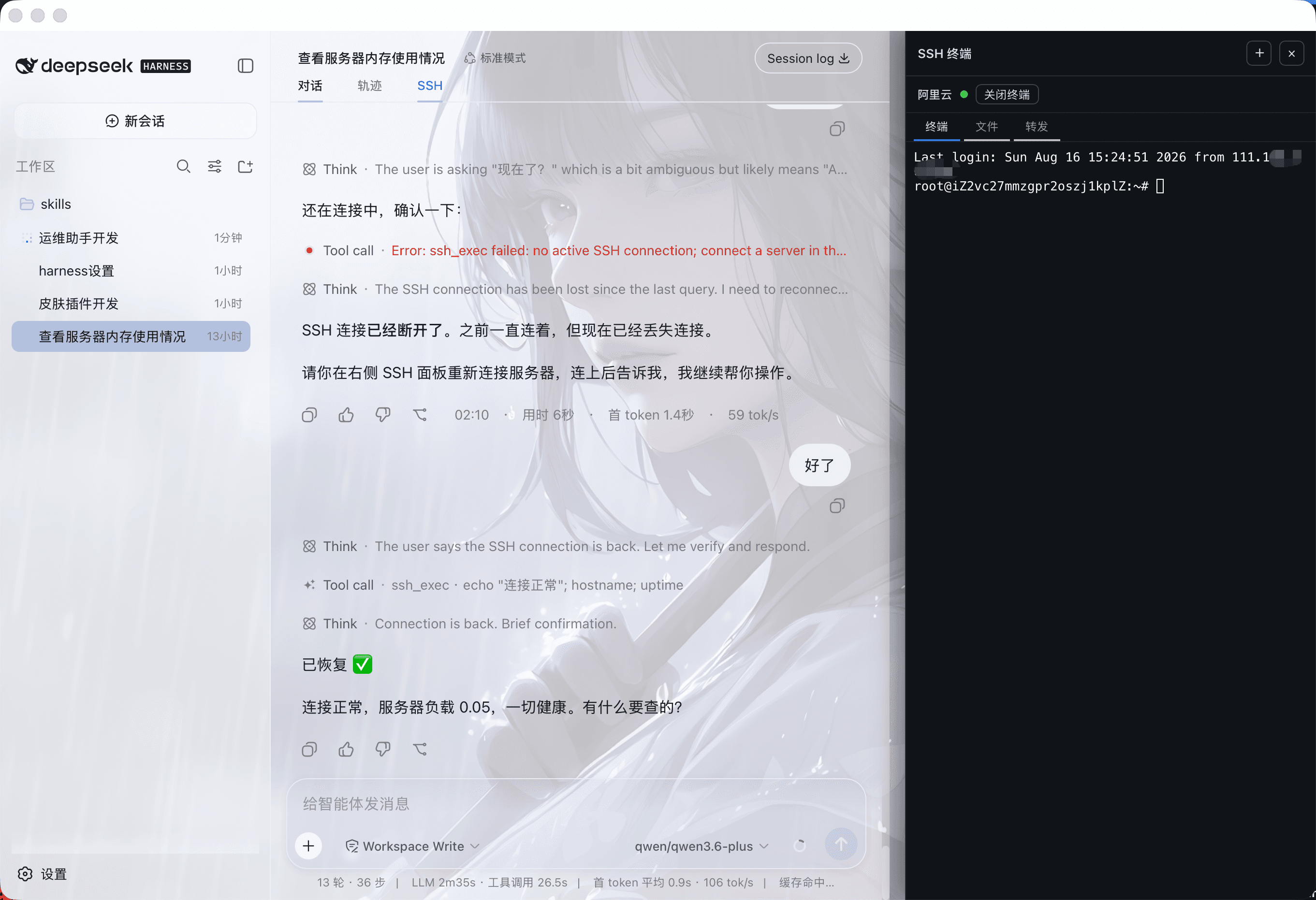
An SSH operations plugin for DeepSeek Harness: drive the current server from the main conversation while keeping a real interactive terminal on the right, with built-in file management, port forwarding, and database management.
Screenshots
Drive the connected server directly from the main conversation, with a real interactive terminal on the right and panels for files (SFTP), tunnels, and databases:
What it does
- Open a resizable xterm.js SSH terminal on the right of a session. When DSH-better-sidebar is also enabled, the terminal docks to the left of the sidebar instead of covering the file sidebar or the top-right controls.
- Manage any number of servers and groups under Settings → Plugins → SSH Resources; the top SSH toggle only shows or hides the right-side terminal.
- Server name, address, port, username, auth type, and group are stored in DSH local storage; there is no count limit.
- Passwords, PEM private keys, and passphrases are stored only in DSH's official local credentials store
~/.dsh/.credentials.yaml(owner-only permissions). Browser storage, agent context, tool results, and resource lists never read or display secrets. - The main conversation auto-detects the currently-connected server on the right; the agent never has to ask the user for an internal connection id.
- Commands the agent runs via
ssh_execare echoed in the right-side terminal, and the exit code, output, duration, timeout, and truncation status are returned to the main conversation for analysis. - Manual terminal output is read on demand via
ssh_read; it is never silently injected into the conversation context. - Output sent to the model is redacted for private keys, Bearer tokens, common passwords/API keys (including bare
sk--prefixed keys), and database passwords. - Connection stability: SSH connections enable keepalive (20s interval, 3 checks), so NAT/firewalls no longer silently drop idle connections. Transport drops trigger exponential-backoff auto-reconnect (capped at 30s); a command that drops mid-run is retried once transparently. Transient connection failures auto-retry 3 times (auth failures excluded). Explicit disconnect or plugin unload never triggers reconnect; remote tunnels re-register automatically after a reconnect.
- Host-key verification (TOFU): SSH connections verify the server's host public-key fingerprint — first connect records and trusts it, later changes are rejected (guards against MITM / re-provisioned servers). Per-server
hostKeyModeselectsaccept-new(default) /verify(reject unseen) /off; on a changed fingerprint the connection is not retried and not auto-reconnected. Settings → SSH Resources lets you set the mode per server and manage trusted fingerprints with one-click forget. Verification runs before user authentication, so it is independent of who logs in or which password they use — the same server with an unchanged key never blocks another admin or vendor. - File management: a Files tab in the SSH panel browses the server's filesystem over SFTP with upload, download, mkdir, delete, and rename. The
sftp_*tools can also be used directly in the conversation. - Port forwarding: a Tunnels tab starts local forwards (this machine → server-reachable target) and remote forwards (server → this machine), with a live tunnel list and stop control. The
tunnel_*tools can also be used directly. - Databases
…

