a735624258/dsh-skill-picker
dsh-skill-picker
dsh-skill-picker is a community DeepSeek Harness plugin. Read the repository README before installing.
Install
npx @deepseek-ai/dsh plugin --profile web add "git+ssh://[email protected]:a735624258/dsh-skill-picker.git"Restart `dsh web` after install. Bundle APIs can change during the developer preview.
README badge

[](https://dshhub.dev/plugins/dsh-skill-picker)Paste this into your README. The star count updates with every catalog sync.
From the README
Excerpt from a735624258/dsh-skill-picker, cleaned of badges and images.
dsh-skill-picker
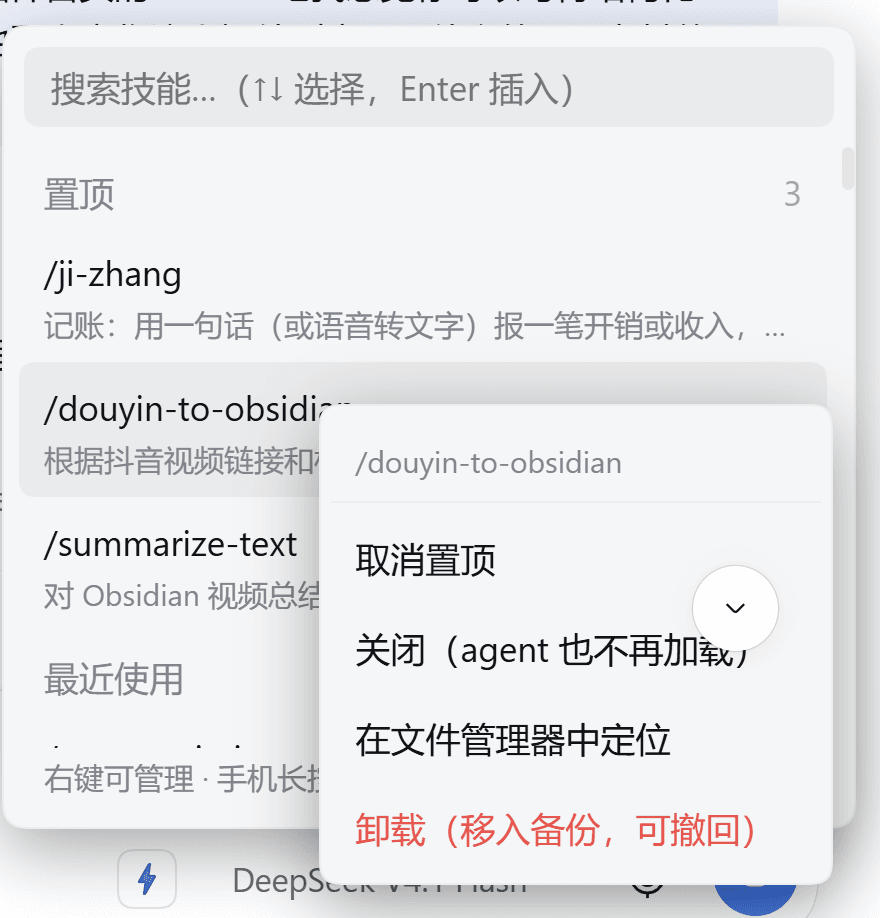
给 DSH 的输入框加一个 ⚡ 按钮:点开是你装过的全部技能(带说明),搜一下、点一下,
/技能名就进了发送框,DSH 自己把技能加载起来执行。
English — A skill picker for the DSH Web GUI. A ⚡ button in the composer lists every installed skill with its description; picking one inserts the official /skill-name gesture into your draft, so DSH loads that skill with your message.
| 当前版本 | v0.5.29 |
| 许可 | MIT |
| 平台 | DSH 网页端 / 桌面端(Electron)/ 手机浏览器 |
| 内核 | DSH 0.1.x 与 0.2.x(见 4.4) |
1、为什么要做
DSH 本来就会认 /技能名 这个手势 —— 你在消息里写 /ji-zhang 午饭 12 块,它自动加载「记账」技能来执行。官方只配了一个 / 补全,而它靠两样东西:
- 前缀匹配 —— 你得打对技能名的开头几个字母
- 你的记忆 —— 装了五六十个技能,谁记得住每个叫什么
于是最常见的场面是:明明装了「备份记忆」,却想不起来它叫 backup-memory,翻不到就放弃了。
2、它做什么
- 看得见 —— 输入框旁边一个 ⚡,点开是全部技能 + 完整描述
- 搜得到 —— 中文、拼音(
jiyi/ji yi/jy)、英文都行,技能名和描述一起搜 - 选得快 —— 最近使用靠前、可手动置顶、
↑↓+Enter全程键盘 - 管得了 —— 右键(手机长按):置顶 / 关闭 / 在文件管理器中定位 / 卸载(移入备份,可撤回)
- 到处一致 —— 置顶和最近使用在桌面端、网页端、手机之间共用同一份
它和官方 / 补全不冲突,可以同时用:记得住名字用官方,记不住用它。
3、怎么用
- 看输入框右下角(模型选择器旁边),点 ⚡
- 敲关键字(中文 / 拼音 / 英文),列表实时过滤;也可以直接
↑↓翻 - 点中技能(或按
Enter)—— 发送框里出现/技能名,光标停在末尾 - 接着把话说完,回车发送 —— DSH 自动加载这个技能
例子:点 ⚡ → 搜 jiyi → 点 /ji-zhang → 打上「今天午饭 12 块」→ 发送。
| 操作 | 效果 |
|---|---|
| 点 ⚡ | 打开技能面板 |
↑ ↓ / Enter / Esc | 选择 / 插入 / 关闭 |
| 右键技能行(手机长按 500ms) | 管理菜单:置顶 / 关闭 / 定位 / 卸载 |
| 面板右下角「已关闭 N」 | 查看并恢复被关闭的技能 |
输入框直接打 / | 官方斜杠菜单(本插件同样增强了它的匹配与排序) |
4、安装
4.1 三条路,按需要选一条
- 要最新版 —— GitHub 直装(git 依赖直接拉最新 commit,不受 npm 24 小时门禁影响)
dsh plugin --profile web add "git+ssh://[email protected]:a735624258/dsh-skill-picker.git" - 要 npm 正式版 —— 先查版本号,再按版本号装(别用裸名)
npm view dsh-skill-picker version # 例如 0.5.28 dsh plugin --profile web add [email protected] - 要改代码 —— clone 下来用 link 模式装
git clone https://github.com/a735624258/dsh-skill-picker.git
dsh plugin --profile web add link:/path/to/dsh-skill-picker
⚠️ 裸名安装(
add dsh-skill-picker)在新版本发布后 24 小时内会被 pnpm 的minimumReleaseAge门禁拦下、自动落回旧版。照上面三条走就不会装错。
4.2 装完必须重启
host 路由是进程启动时加载的,只开个新标签页不生效:
| 你用的是 | 怎么重启 |
|---|---|
| 网页端 | 重启 dsh web 进程,必要时 Ctrl+F5 硬刷 |
| 桌面端 | 重启 DeepSeek Harness.exe 进程 |
4.3 网络与卸载
- HTTPS 慢或不通 → 改用 SSH:
git clone [email protected]:a735624258/dsh-skill-picker.git - 想让 pnpm 一律走 SSH:
git config --global url."[email protected]:".insteadOf "https://github.com/" dsh被 PowerShell 执行策略挡下 →powershell -ExecutionPolicy Bypass -Command "dsh plugin --profile web add link:C:\path\to\dsh-skill-picker"- 卸载:
dsh plugin --profile web remove dsh-skill-picker
4.4 兼容性与注意事项
| 内核版本 | 状态 |
|---|---|
0.1.0-rc.6 ~ 0.1.x | 支持 |
0.2.0-rc.1 / rc.2 及 0.2.x | 支持(当前主用、实测) |
1.0.0 及以上 | 需要重新确认 |
- peer 范围写得宽是故意的 ——
^0.1.0-rc.6 || >=0.2.0-rc.1 <1.0.0-0。内核包与内核锁步同版本,钉死一个小版本线会让插件在内核升级时被误拒(日志一句skipping profile bundle,表现是 ⚡ 按钮凭空消失) - 技能读哪些目录 —— 项目级
<工作区>/.dsh/skills、<工作区>/.agents/skills;用户级~/.dsh/skills、~/.agents/skills($DSH_AGENTS_HOME可覆盖);同名时项目级优先 - 符号链接 / Junction 型技能会被跟随读取;
user-invocable: false的技能不列出(列出来点了也会被官方静默跳过) - 桌面端无需任何手工处理(v0.5.15 起):官方技能 UI 在
app.asar里还是普通目录都不影响 - 手机端需配套 ——
dsh-pocket的「切会话不抢焦点」补丁与本插件的window.__dshSkillPickerFocusing豁免牌是一对,只装一边会出现「切会话抢焦点」或「插完技能光标不回」 - 暂不支持自定义技能目录(官方
customSkillDirs)—— 欢迎 PR
5、它是怎么做到的
…