Fishquito7/dsh-skill-mcp-panel
dsh-skill-mcp-panel
dsh-skill-mcp-panel is a community DeepSeek Harness plugin. Read the repository README before installing.
Install
npx @deepseek-ai/dsh plugin --profile web add https://github.com/Fishquito7/dsh-skill-mcp-panel/releases/download/v2.0.1/dsh-skill-mcp-panel-2.0.1.tgzRestart `dsh web` after install. Bundle APIs can change during the developer preview.
README badge

[](https://dshhub.dev/plugins/dsh-skill-mcp-panel)Paste this into your README. The star count updates with every catalog sync.
From the README
Excerpt from Fishquito7/dsh-skill-mcp-panel, cleaned of badges and images.
dsh-skill-mcp-panel
English | 简体中文
DSH 插件,在 Web 设置页同时提供「技能」与「MCP」两个管理面板,并随包提供统一终端命令 dsh-panel(skill / mcp 两个子命令族)。
注意:本项目提供的参考命令默认指定profile为默认的--profile web,需要更改profile的请自行注意。
功能
技能面板
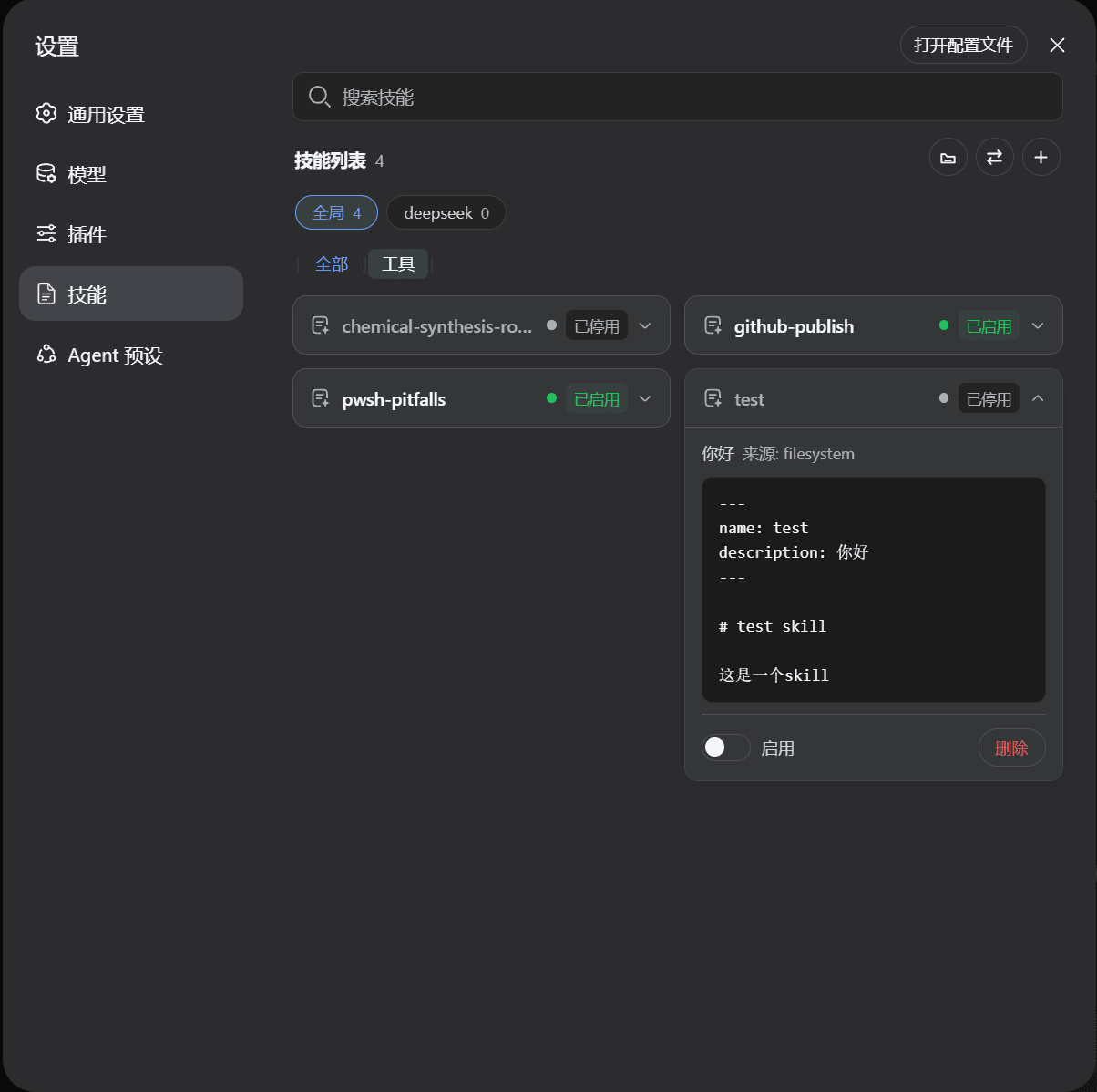
- skill 卡片列表:预览已注册安装的 skill,点击卡片可展开查看完整内容
- skill 状态:启用、停用状态标签,与内置插件列表同款样式
- skill 管理:开关热启用/停用、删除;按名称搜索;进入页面自动刷新
- skill 添加(0.7.0 统一入口):点“+”直接选文件(
.md/.zip),或把文件、压缩包、 技能文件夹直接拖进页面——自动识别目录束/单文件/压缩包结构,不合规内容会被拒绝并提示原因 - 工作区分栏(0.3.0):技能实体直接存放在其所属位置里——全局在
~/.dsh/skills,限定工作区在该工作区的.dsh/skills。页面“技能列表”下方 有一条工作区横栏(全局 + 各工作区,可横向滚动),点击即只显示该工作区下的技能。 - 批量迁移:“+”号左侧的迁移按钮:源工作区、目标工作区(可多选)与技能都在 对话框内手动选择,批量复制或移动(默认不勾选任何技能;逐个迁移、失败不影响 其余;移动模式限单个目标)。源工作区有分组时,可在技能列表上方按分组筛选(0.7.0)。
- 技能分组(0.5.0):工作区横栏下方新增分组横栏(全部 + 分组名,可横向滚动),
点击只显示该分组下的技能。“分组”按钮(迁移按钮左侧)打开分组编辑器:新建/重命名/
删除分组、选择工作区、命名并批量勾选成员。分组只写入插件自己的显示配置
(
~/.dsh/skills/.system/skill-viewer/groups.json),不修改技能目录。 - 作用域化管理(0.6.4):同名技能同时存在于全局与某工作区时,删除、启停、
查看内容均按(名称+作用域)精确操作——页面各行独立展开、独立操作,绝不影响
其它作用域里的副本;找不到指定作用域的条目会直接报错,不会回退误操作。
命令行同名技能也需用
--global/--project/--workspace显式指定。
MCP 面板(v2.0.0)
- 设置页「技能」下方新增「MCP」页,管理 profile
cordis.patch.yml中的 MCP 服务器受管块; - 支持 Stdio(本地命令)与 HTTP(streamable-http)两种调用方式;
- 支持新增、编辑、启停、删除、测试连接;保存后由 DSH HMR 热加载,无需重启网关;
env/headers密钥在 RPC 与页面中脱敏,编辑时缺省 key 保留旧值;cordis.patch.yml面板块外的用户内容逐字节保留。
安装
-
安装本包(bundle 层自动挂载,无需编辑配置文件)
dsh plugin --profile web add https://github.com/Fishquito7/dsh-skill-mcp-panel/releases/download/v2.0.1/dsh-skill-mcp-panel-2.0.1.tgz首选发行版 tarball:不走 Git,不受 pnpm v11 的构建脚本限制。 也可以从 Git 安装(Git 来源的依赖默认禁止运行 prepare 构建脚本;若报 “git-hosted plugins build on install...”,把 pnpm 在上面打印的 key 加到 profile 目录
pnpm-workspace.yaml的allowBuilds下再重跑):dsh plugin --profile web add github:Fishquito7/dsh-skill-mcp-panel -
重启网关
dsh-restart重启后刷新页面:设置 → “插件”下方为“技能”,其下方为“MCP”。
命令行
统一父命令为 dsh-panel。
技能子命令
dsh-panel skill --help
dsh-panel skill list                                  # 列出技能(含工作区:全局 / 工作区)
dsh-panel skill add <path>                            # 添加到全局(.md 文件、目录束或 .zip 压缩包)
dsh-panel skill add <path> --workspace D:\项目A       # 直接添加到指定工作区
dsh-panel skill scope <name> --global                  # 迁移单个技能到全局
dsh-panel skill scope <name> --workspace D:\项目A      # 迁移单个技能到指定工作区(--copy 复制)
dsh-panel skill migrate <name...|--all> --from <全局|路径> --to <全局|路径> [--copy] [--yes]
dsh-panel skill update [--profile <name>]  # 检查并更新插件(默认 web 配置)
                                                 # 批量迁移(复制/移动)
dsh-panel skill disable <name>       # 停用
dsh-panel skill enable <name>        # 启用
dsh-panel skill delete <name>        # 删除(需确认)
MCP 子命令
dsh-panel mcp list [--profile <name>]
dsh-panel mcp add --name <serverName> --stdio --command <cmd> [--args <arg> ...] [--env KEY=VALUE ...] [--cwd <path>] [--profile <name>]
dsh-panel mcp add --name <serverName> --http --url <url> [--header KEY=VALUE ...] [--profile <name>]
dsh-panel mcp enable|disable <serverName> [--profile <name>]
dsh-panel mcp remove <serverName> [--yes] [--profile <name>]
dsh-panel mcp test <serverName> [--profile <name>]
dsh-panel mcp update [--yes] [--profile <name>]
dsh-panel update [--yes] [--profile <name>]      # 更新整个 dsh-skill-mcp-panel
…