alone-tree/dsh-skill-mcp-manager
dsh-skill-mcp-manager
dsh-skill-mcp-manager is a community DeepSeek Harness plugin. Read the repository README before installing.
Install
npx @deepseek-ai/dsh plugin --profile <profile> add dsh-skill-mcp-managerRestart `dsh web` after install. Bundle APIs can change during the developer preview.
README badge

[](https://dshhub.dev/plugins/dsh-skill-mcp-manager)Paste this into your README. The star count updates with every catalog sync.
From the README
Excerpt from alone-tree/dsh-skill-mcp-manager, cleaned of badges and images.
Capability (能力库) — dsh-skill-mcp-manager
One-stop SKILL & MCP manager — a host-level plugin for DeepSeek Harness with MCP on-demand loading: no more worrying about too many MCP tools burning your tokens.
Screenshots
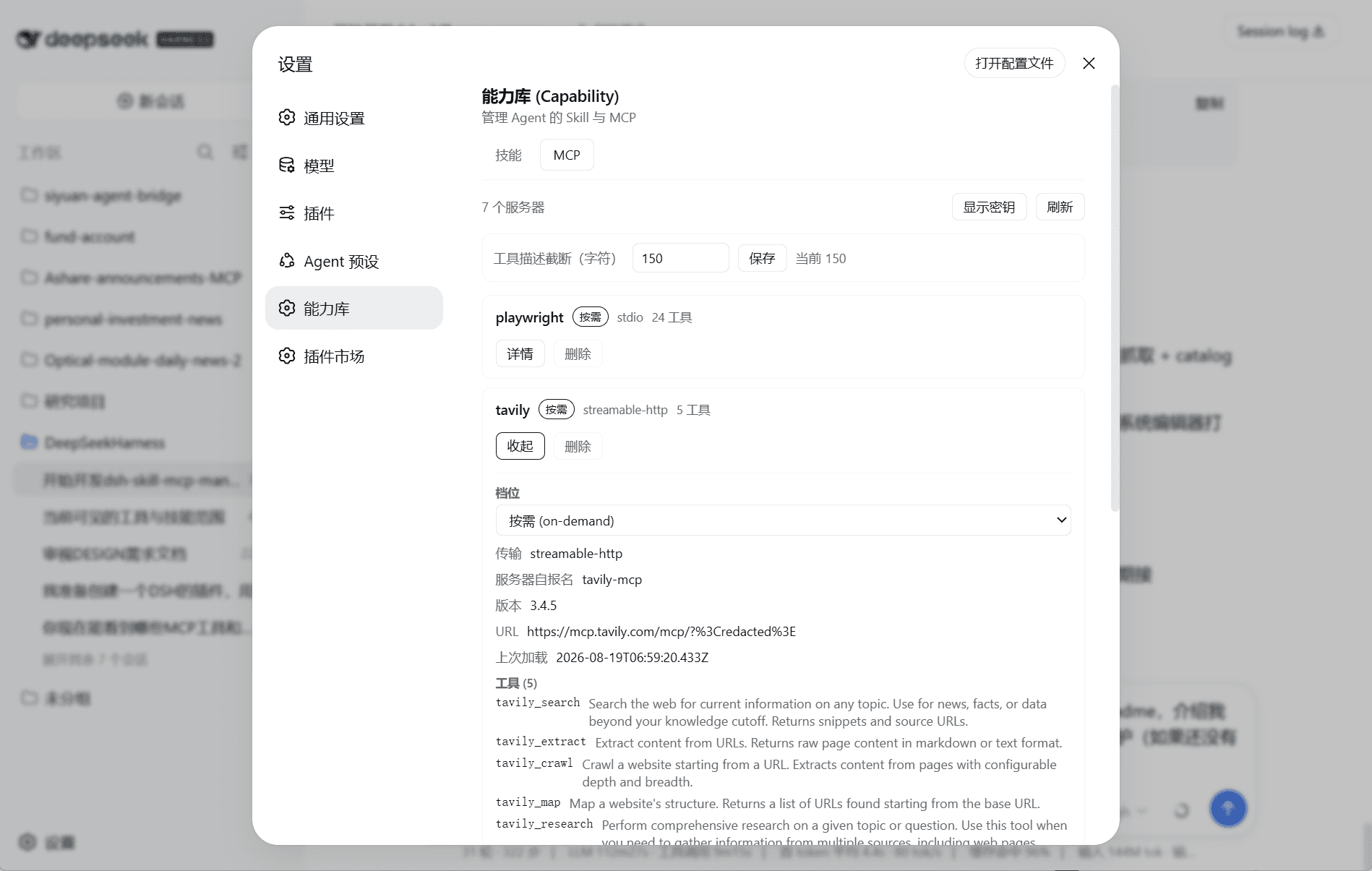
MCP management
SKILL management
Core features
1. One-stop visual management
Which Skills and MCPs are installed? Are they enabled? What does each one do? All visible directly in the settings page — no digging through layers. Enable/disable and delete MCPs and Skills from the UI, and click a SKILL to view its source (opens with your local default markdown reader).
2. MCP on-demand loading (the core feature, carefully polished)
At session start, an on-demand server exposes only its name + short tool descriptions. The AI knows each tool exists and what it does, without the full schemas. That means:
- A balance between token bill and full context — exposing only the manager means everything else requires a tool call to inspect, which risks the AI never realizing something exists and never going to check what's available; but sending the full schemas bloats the context. This plugin treats MCP and SKILL the same way: it provides the basic name + description and lets the AI decide what to load.
- No startup latency — the server connects only when the AI actually needs it.
- No failed-load dead end — loading is on demand, and a failure is non-fatal (retry / reload later).
3. In-session MCP hot reload
Updated your own local MCP server? Just mcp_load it in the session — reconnect, re-list tools, fresh snapshot. No new session, no DSH restart — extremely friendly to MCP development.
4. SKILL deep scan, external libraries, temporary hide
- Recursively discovers
<dir>/SKILL.mdat any depth — connect any number of external skill-library directories, at any depth, so you can group SKILLs flexibly. The plugin only scans<dir>/SKILL.md, so other files in a folder (e.g.readme.md,reference.md, backup files) are never picked up as skills. - Hiding a skill = invisible to the model (writes
disable-model-invocation), while your/nameslash command still works. - Delete moves the whole
<dir>/folder to the recycle bin — recoverable when needed.
Other helpful features
To make the plugin easy and reassuring to use, it also includes:
5. Native MCP config takeover — nothing lost on uninstall
On install it automatically takes over your existing MCP config: every @deepseek-ai/dsh-mcp-client row in the profile is imported into the registry and taken over (on-demand by default; already-disabled stays disabled).
Uninstall is safe: whenever an MCP is added, the plugin also syncs the MCP config into the original config file but keeps it disabled. /mcp prepare-uninstall flips those disabled MCPs back to enabled and hands every managed entry (with full config) back to the native client. Removing the plugin never loses your MCP config.
6. Your note on every MCP
Attach a user note to any MCP; it is shown to the AI in the session catalog and is never overwritten by server/developer updates. For example: "If server A goes down, use server B as a backup."
7. Auto warm-up
…