cheshireez/dsh-skill-hub
dsh-skill-hub
dsh-skill-hub is a community DeepSeek Harness plugin. Read the repository README before installing.
Install
npx @deepseek-ai/dsh plugin --profile web add dsh-skill-hubRestart `dsh web` after install. Bundle APIs can change during the developer preview.
README badge

[](https://dshhub.dev/plugins/dsh-skill-hub)Paste this into your README. The star count updates with every catalog sync.
From the README
Excerpt from cheshireez/dsh-skill-hub, cleaned of badges and images.
dsh-skill-hub
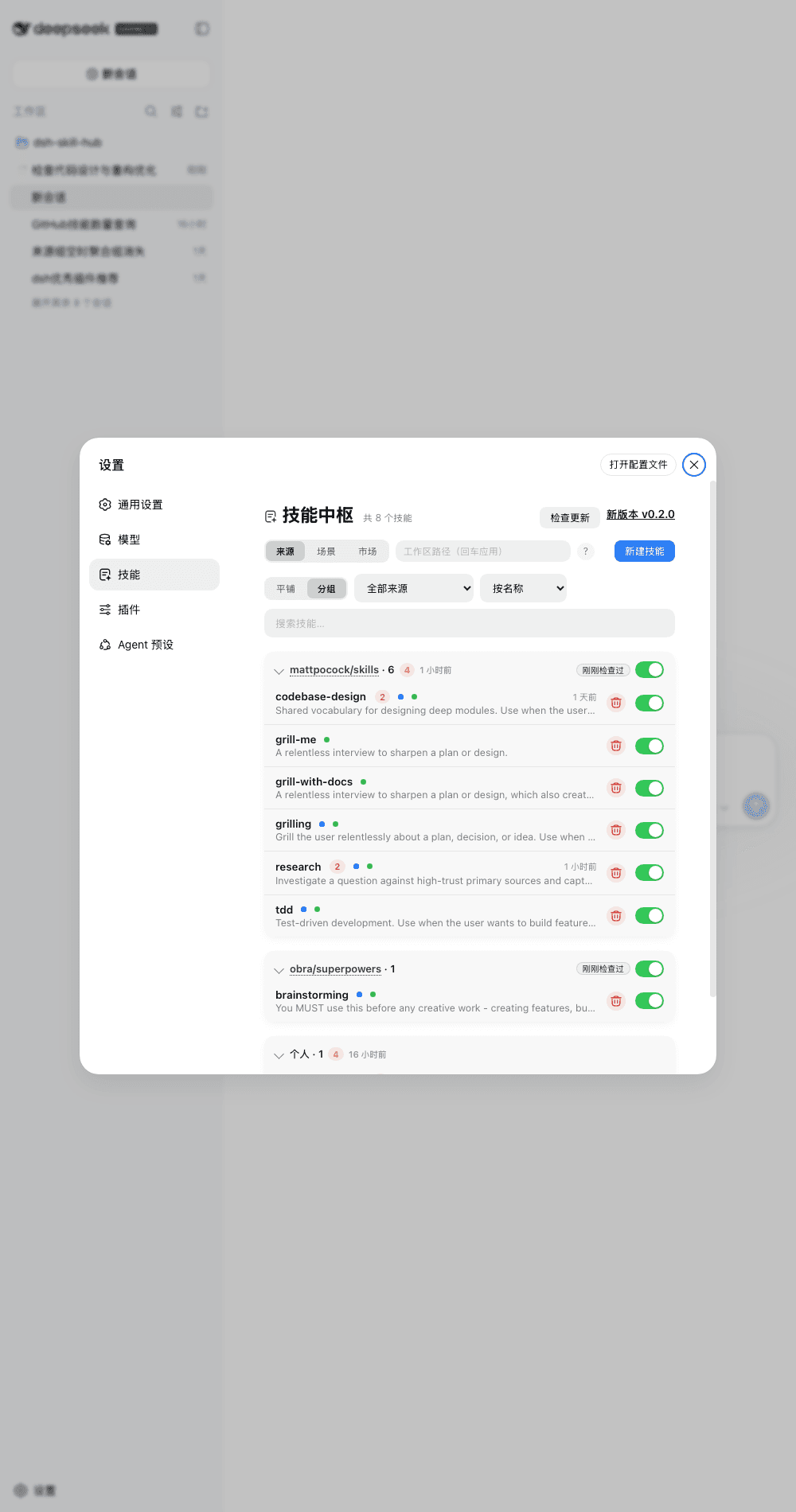
In-GUI skill hub for DeepSeek Harness — browse the full ctx.skills catalog, toggle skills, inspect bodies, fix discovery issues, install from the market, and scaffold new ones.
Host runs in the dsh process via official SDKs only; browser renders through official slots. No dsh source changes.
Quick start
dsh plugin --profile web add dsh-skill-hub
# restart dsh web → Settings → 技能 → Market → scan → import
Requires Node ^22.19 || >=24 + dsh web >=0.1.7-alpha.1 <0.3.
Two surfaces — the hub panel lives at Settings → 技能, and this plugin's own configuration card sits on the plugin's page in the Plugins manager (sidebar → 插件 → dsh-skill-hub). The card is registered by the plugin itself into the plugins.bundle.config slot — dsh has no auto-generated config page — and covers the master switch, announce-to-agent, dot colors, usage display and the stats window/interval.
Features
Settings → 技能 — 3 tabs: Sources (skills, flat/grouped + project tree), Scenes (custom tag groups), Market (install + update).
- Browse — every root of the
ctx.skillsregistry: project / user / bundled + third-party providers. Search across name, description,displayName; filter by source and invocation (model / user); sort by name, added time, or usage. Same-name skills from different sources get a duplicate badge instead of silently hiding. - Toggle — per-skill switches and per-group tri-state switches with a conflict dialog (close all / keep on). Disabling renames the discovery file (never deletes); disabled skills stay inspectable and re-enableable from their detail page. Only
~/.dsh/skills&~/.agents/skillsare writable; everything else is read-only. - Organize — scenes (tags) plus auto-aggregated source collections, all drag-reorderable and persisted in
~/.dsh/dsh-skill-hub.json. Edit mode reveals delete/reorder without cluttering the read view. - Diagnose & fix — files the provider skips (missing frontmatter, bad YAML, name mismatch, short description) show up with reasons; auto-fixable ones (e.g. unquoted
:in descriptions) get a one-click Fix button. - Scaffold — new-skill wizard writing to
~/.dsh/skillsor~/.agents/skills(SKILL.mdtemplate below). - Market — built-in curated repos plus custom
owner/reposources. Any top-level directory containingSKILL.mdscans as a root (no allowlist), and aSKILL.mdat the repo root itself scans as a single skill named after the repo (minus repo tooling such as.github/). Async import with byte-level progress and cancel. Each source pins a version — click the ref badge to switch between releases, branches, or a custom ref. - Track updates — imported skills record a repo + commit snapshot. Check all / update-all, per-source badges (installed / updatable / deleted upstream / new release). Sync overwrites local edits (with confirm); upstream deletions move into a restorable trash that keeps source and scene membership.
- Stats — per-skill call counts + last-used times from session logs (incremental cache), group summaries; window and scan interval live-configurable from the settings card.
- Settings card — registered on the plugin's own page in the Plugins manager (sidebar → 插件 → dsh-skill-hub; collapsed until you expand the title): master switch, announce-to-agent, invocation dot colors, usage d
…