pc439527/dsh-side-monitor
dsh-side-monitor
dsh-side-monitor is a community DeepSeek Harness plugin. Read the repository README before installing.
Install
npx @deepseek-ai/dsh plugin --profile web add /path/to/dsh-side-monitorRestart `dsh web` after install. Bundle APIs can change during the developer preview.
README badge

[](https://dshhub.dev/plugins/dsh-side-monitor)Paste this into your README. The star count updates with every catalog sync.
From the README
Excerpt from pc439527/dsh-side-monitor, cleaned of badges and images.
dsh-side-monitor
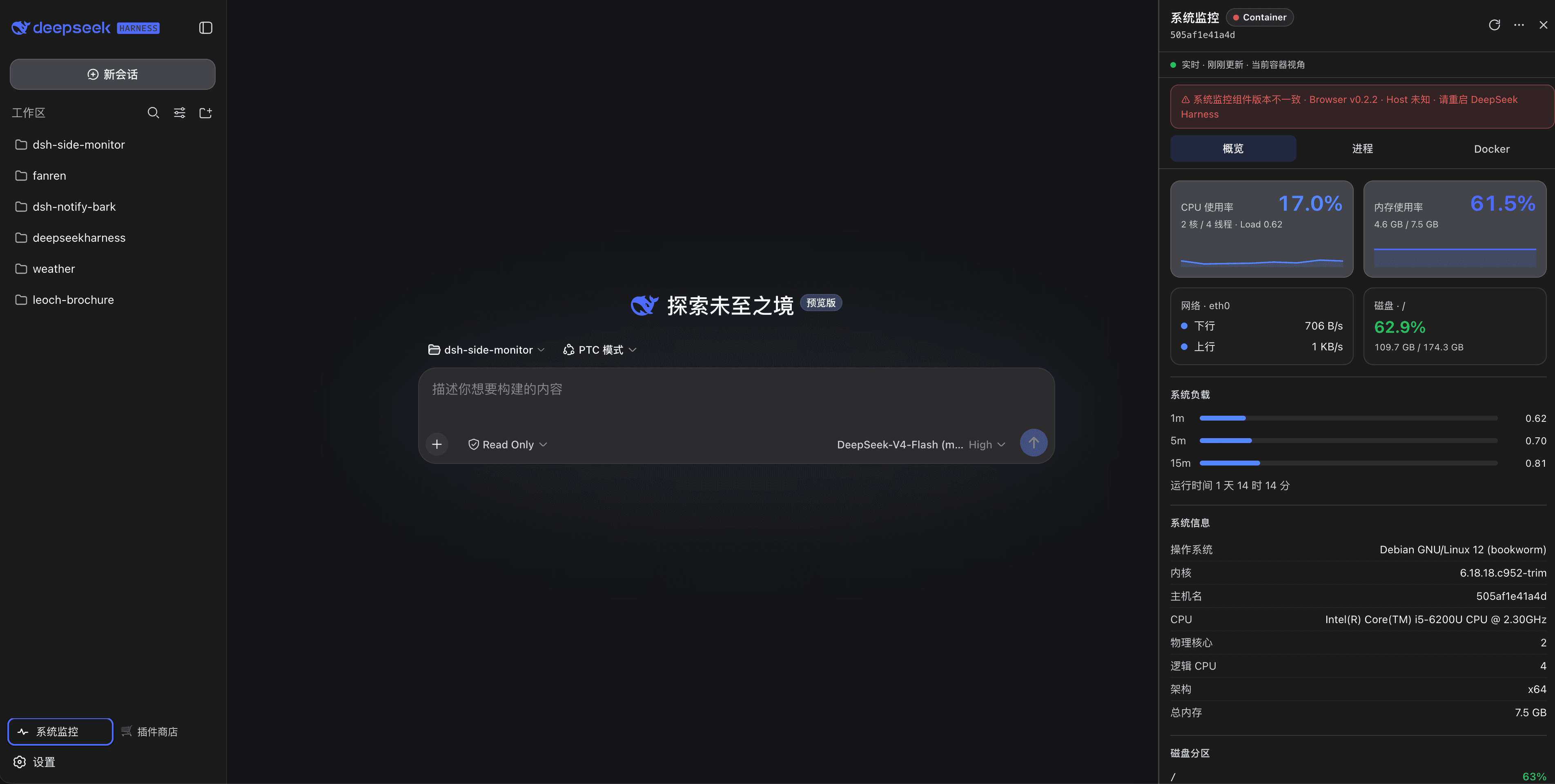
A read-only system monitor for DeepSeek Harness (DSH) Web: a “System Monitor” entry in the left sidebar footer opens a right-side monitor drawer that shows live host (the machine DSH runs on) overview, process list, and Docker container status.
Read-only by design: no docker restart/stop, no process kill, no exec, no shell. Built for quick resource checks, troubleshooting, and container observation.
v0.3.0 — stopped/issue split, perf, capabilities & drift checks
- Docker stopped / issue semantic split: a cleanly stopped container (exit code 0) is now just "Stopped" — it no longer inflates the issue count. Issues are reserved for real problems: unhealthy, health-starting, crash-looping (restarting), dead, or non-zero exits. The Overview + Docker tabs show separate Total / Running / Stopped / Issues chips and filters; crashed containers display their exit code (Crashed (137)).
- Host network probe performance: the
--net=hostnetns probe now runs at most every 15s (was 5s) and never blocks the overview poll — stale snapshots are reused while the refresh happens in the background, with a baseline guard so the container-netns fallback never diffs against host-netns counters. - Client version auto-sync:
lib/client.js'sCLIENT_VERSIONis regenerated frompackage.jsonbytools/sync-generated.mjs(replacestools/convert-i18n.mjs), which also regenerates the inline i18n dictionary and lints for the no-concatenation rule;npm run check:genverifies there is no drift. - i18n no-string-concatenation: every user-visible sentence is a placeholder message — no
t("a") + t("b")splicing anywhere in the client, enforced by the generator's lint. - Label & header polish:
Received/Sent->RX/TX;DSH Container->DSH running in container(DSH on host->DSH running on host); the status line under the header no longer repeats the data source (it was duplicated with the header badge) and the view label is properly spaced (Host view, neverHostview). - meta status细分 + capabilities: the
metaendpoint reports fine-grained status (mode, per-source state, network probe, consistency) and Host capabilities (Host Mount mode, Docker socket, host-netns probe, process aggregation, container stats) — shown in new Status / Capabilities sections of the About dialog. - Process aggregate details: grouped cards expand to show the command, distinct users and total RSS.
- Memory chart transparency: the memory sparkline fill opacity is tuned for legibility (0.2 vs 0.12 for CPU); Docker cards are compressed further.
v0.2.3 — i18n & host networking
…

