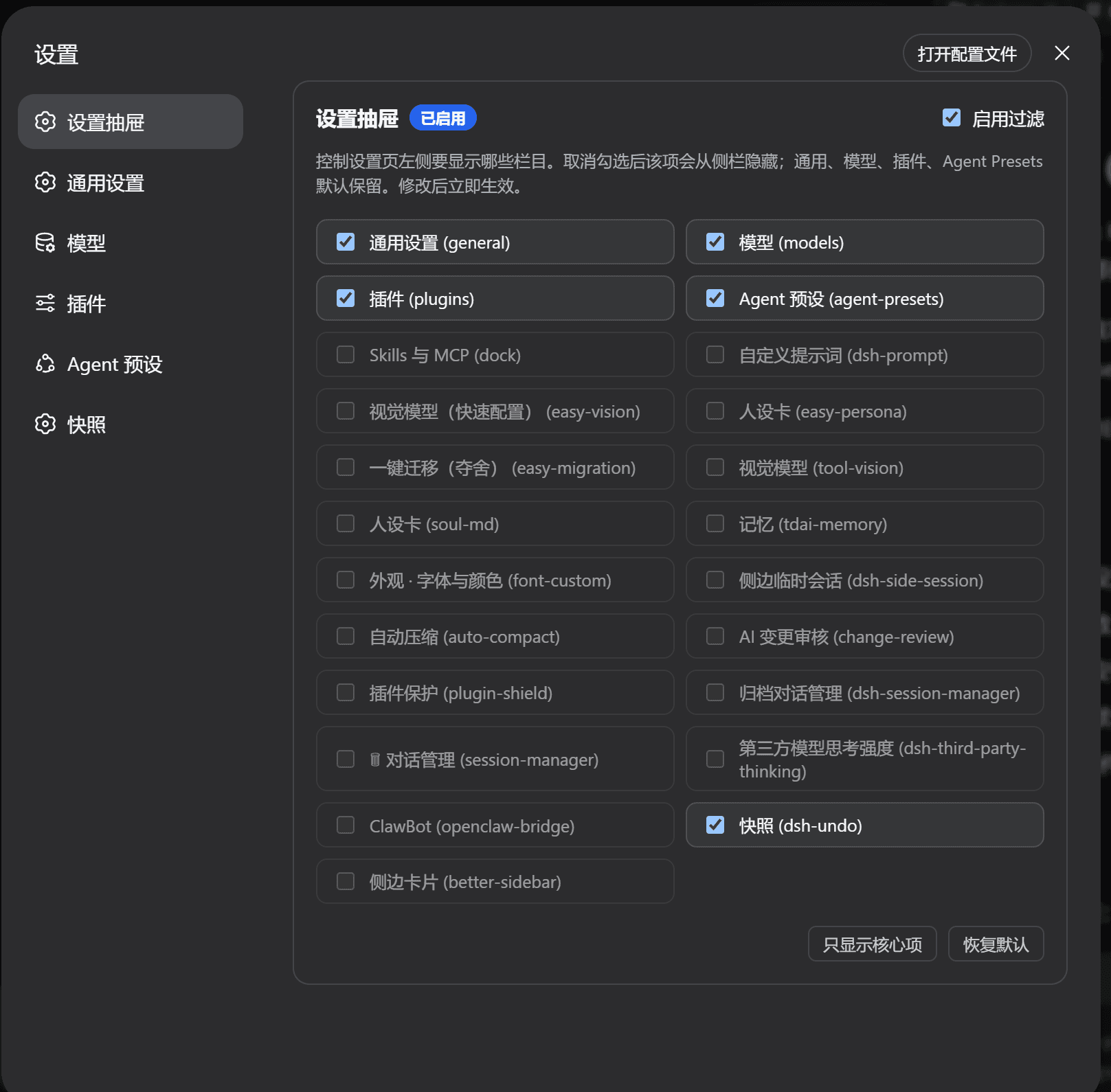
zizhongfeiyang/dsh-settings-drawer
dsh-settings-drawer
dsh-settings-drawer is a community DeepSeek Harness plugin. Read the repository README before installing.
Install
npx @deepseek-ai/dsh plugin --profile web add github:zizhongfeiyang/dsh-settings-drawerRestart `dsh web` after install. Bundle APIs can change during the developer preview.
README badge

[](https://dshhub.dev/plugins/dsh-settings-drawer)Paste this into your README. The star count updates with every catalog sync.
From the README
Excerpt from zizhongfeiyang/dsh-settings-drawer, cleaned of badges and images.
Settings Drawer (dsh-settings-drawer)
A DeepSeek Harness web UI plugin that lets you choose which items appear in the settings left nav.
Unchecking an item hides it from the sidebar immediately. Core pages (General, Models, Plugins, Agent Presets) stay visible by default.
Preview
Features
- Hide or show any settings section from the left navigation.
- Changes apply immediately and persist in your browser.
- Automatically discovers newly installed plugins that register a settings section.
- Removed plugins no longer linger: the list only shows currently registered sections.
- Manual refresh button (
⟳) re-syncs the list and prunes stale local config. - Core settings pages stay protected by default.
- Pure client-side UI plugin — no extra services, no network calls.
Install
From GitHub:
dsh plugin --profile web add github:zizhongfeiyang/dsh-settings-drawer
Desktop / EAC users typically use the web-desktop profile:
dsh plugin --profile web-desktop add github:zizhongfeiyang/dsh-settings-drawer
From the packed tarball (attached to each release):
dsh plugin --profile web add ./dsh-settings-drawer-1.2.0.tgz
After installing, restart the web service or refresh the page.
Usage
- Open Settings.
- Open 设置抽屉 (Settings Drawer) at the top of the left nav.
- Uncheck items you do not want to see. They disappear from the sidebar immediately.
Configuration
| Item | Value |
|---|---|
| npm package name | dsh-settings-drawer |
| UI display name | 设置抽屉 / Settings Drawer |
| localStorage key | dsh_settings_drawer_config_v2 |
| Default visible sections | General, Models, Plugins, Agent Presets |
Tested with
- DSH 0.1.0-rc.6 / 0.1.0-rc.7
- Deepseek Harness EAC 3.0.1 / 4.1.0
- Chrome-based DSH web UI on Windows
Development
npm pack
The package contains:
lib/index.js— host entrylib/client.js— browser clientcordis.patch.yml— bundle patchREADME.md,README.zh.md
Feedback
Found a bug or have a feature request? Open an issue and use the provided templates.
License
MIT

