EugeneVl/dsh_session_folders
dsh-session-folders
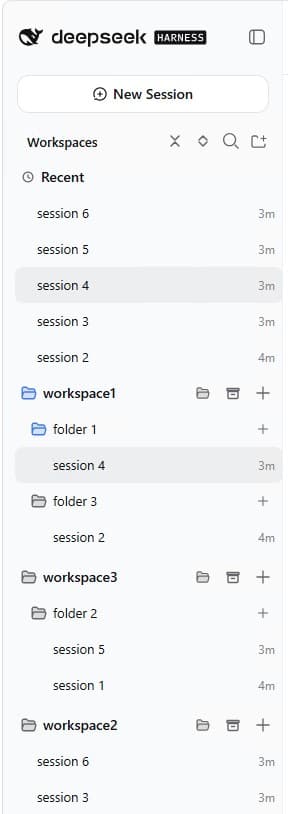
Session folders for the DSH web sidebar: one-level named folders per workspace, drag-and-drop or context menu to group sessions, server-side persistence. No harness changes.
Install
npx @deepseek-ai/dsh plugin --profile web add dsh-session-foldersRestart `dsh web` after install. Bundle APIs can change during the developer preview.
README badge

[](https://dshhub.dev/plugins/dsh-session-folders)Paste this into your README. The star count updates with every catalog sync.
From the README
Excerpt from EugeneVl/dsh_session_folders, cleaned of badges and images.
dsh-session-folders
中文版 README · Русская версия README
A session-folders plugin for the DeepSeek Harness web UI: the sidebar workspace browser is replaced with a browser that adds session folders — one level of named folders per workspace. Sessions can be dragged into folders or moved via the context menu; folder data is persisted server-side and survives page reloads. Status badges mirror the built-in session browser. No harness changes.
Screenshots
<td><img src="https://raw.githubusercontent.com/EugeneVl/dsh_session_folders/master/assets/screenshot-1.jpg" alt="dsh-session-folders screenshot 1" width="280"></td>
<td><img src="https://raw.githubusercontent.com/EugeneVl/dsh_session_folders/master/assets/screenshot-2.jpg" alt="dsh-session-folders screenshot 2" width="280"></td>
<td><img src="https://raw.githubusercontent.com/EugeneVl/dsh_session_folders/master/assets/screenshot-3.jpg" alt="dsh-session-folders screenshot 3" width="280"></td>
Features
Organization
- Session folders: one level of named folders per workspace; sessions outside folders live in the "inbox" (loose) bucket
- Move sessions: drag-and-drop a session onto a folder, or use the row context menu — "Move to folder…", with a "New folder…" entry that creates a folder and moves the session into it on the spot; the submenu's "Workspace" entry returns a session from a folder to the loose bucket
- Folder management: create, rename, delete (with confirmation); names are unique per workspace (case-insensitive)
- Inline rename: double-click a session title to rename it in place — Enter commits, Esc cancels
- Auto rename: the session context menu offers "Auto rename" — the session's own model reads its first user message and derives a short title of at most 3 words (a description of the process, feature, or task, in the message's language); the result is pinned like a manual rename
- Reorder by drag-and-drop: drag a workspace row to reorder workspaces; drag a folder row to reorder folders inside its workspace (folders stay above the loose sessions, session sorting by time is unchanged); the order is persisted server-side
- Show more / Show less in every folder and the Archive block: at most five sessions are shown until the overflow row is clicked; the expanded state is per folder and local to the browser session
Session actions
…

