ne-ilyxa/dsh-session-drafts
dsh-session-drafts
Cursor-style New Session for DeepSeek Harness (DSH): every click mints a fresh durable draft session — plus a sidebar Drafts switcher to keep several empty chats open at once.
Install
npx @deepseek-ai/dsh plugin --profile web add link:/path/to/dsh-session-draftsRestart `dsh web` after install. Bundle APIs can change during the developer preview.
README badge

[](https://dshhub.dev/plugins/dsh-session-drafts)Paste this into your README. The star count updates with every catalog sync.
From the README
Excerpt from ne-ilyxa/dsh-session-drafts, cleaned of badges and images.
dsh-session-drafts
Cursor-style New Session for DeepSeek Harness (DSH): every click mints a fresh durable blank session — persisted in Session persistence before the first message is ever sent — so you can keep several empty chats open at once, exactly like Cursor's new-chat tabs.
The stock web shell reuses a workspace's single blank session (one empty chat per workspace, silently). This plugin removes that cap and adds a sidebar Drafts switcher to manage the empties.
What it does
- Fresh drafts, never reuse.
workspaces.startSession— the one service entry behind every New Session surface (sidebar button, workspace browser, agent preset) — is patched on the liveWorkspaceRuntimeinstance to always callsession.create(which persists the Session entity host-side) and open the result. The stock target policy is preserved: explicit workspace → current session's workspace → recent workspace; no workspace at all still clears into the pure New Session view. - Drafts switcher. The stock sidebar tree hides blank sessions other than the current one. An add-on
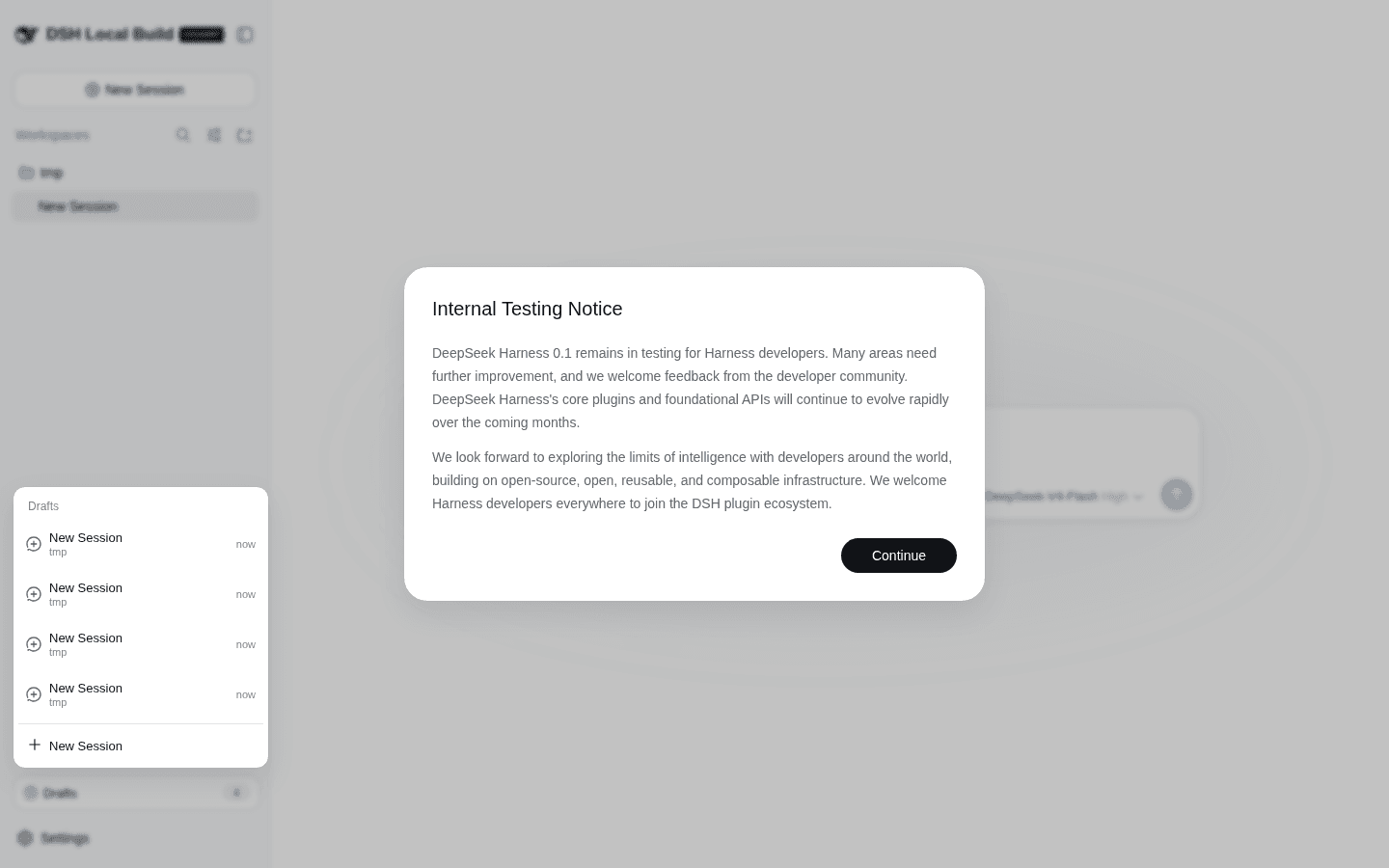
sidebar.footer.actionentry renders a Drafts (N) trigger above Settings with a popover that lists every blank draft (workspace label + age, newest first): click to switch, × to discard (workspace archive — the row hides, the session log remains), or mint another draft from the panel footer. - Zero core edits. Instance-level property shadowing guarded by a
Symbol.formarker (idempotent across HMR), restored on plugin unload, falling back to the stock method on any synchronous failure. No harness files are modified.
Install
dsh plugin --profile web add link:/path/to/dsh-session-drafts
# or from a published copy:
dsh plugin --profile web add @ne-ilyxa/dsh-session-drafts
Then restart the DSH web host (a profile boot composes the client bundle into the boot graph; hot activation is not attempted by this plugin).
Release channels
- npm —
@ne-ilyxa/dsh-session-drafts; published from CI via trusted publishing (OIDC): no stored tokens, no 2FA prompts. Pushing av*tag runs release.yml: tests → prebuilt tarball attached to the GitHub Release →npm publish --provenance. The one-time setup is on npmjs.com: Account Settings → Publishing access → Add trusted publisher (repositoryne-ilyxa/dsh-session-drafts, workflowrelease.yml, environmentrelease). - Prebuilt tarball — every GitHub Release carries
dsh-session-drafts.tgz(built byprepack, installable without npm and without pnpm'sallowBuildsbuild approval).
Keyboard shortcuts
| Shortcut | Action |
|---|---|
Ctrl+Alt+N | Mint a fresh draft from anywhere (works with zero drafts too) |
Ctrl+Alt+D | Open / close the Drafts popover |
Verify it works
- Click New Session twice — two empty chats now coexist (watch the Drafts count go up; no reuse jump).
- Open Drafts in the sidebar foot, switch between the empties, discard one with ×.
- Host truth: each click produced a
session.create— sessions survive a page refresh and the host restart.
Screenshots
Three New Session clicks on one workspace — three independent durable drafts (plus the initial one), no reuse:
Switching between drafts — the accent bar marks the current one:
Development
…

