hunter118/dsh-s7r
dsh-s7r
A System 7-inspired desktop interface for DeepSeek Harness (DSH)
Install
npx @deepseek-ai/dsh plugin --profile web add ./dsh-s7r-0.9.3.tgzRestart `dsh web` after install. Bundle APIs can change during the developer preview.
README badge

[](https://dshhub.dev/plugins/dsh-s7r)Paste this into your README. The star count updates with every catalog sync.
From the README
Excerpt from hunter118/dsh-s7r, cleaned of badges and images.
S7R — System 7 Reimagined for DeepSeek Harness
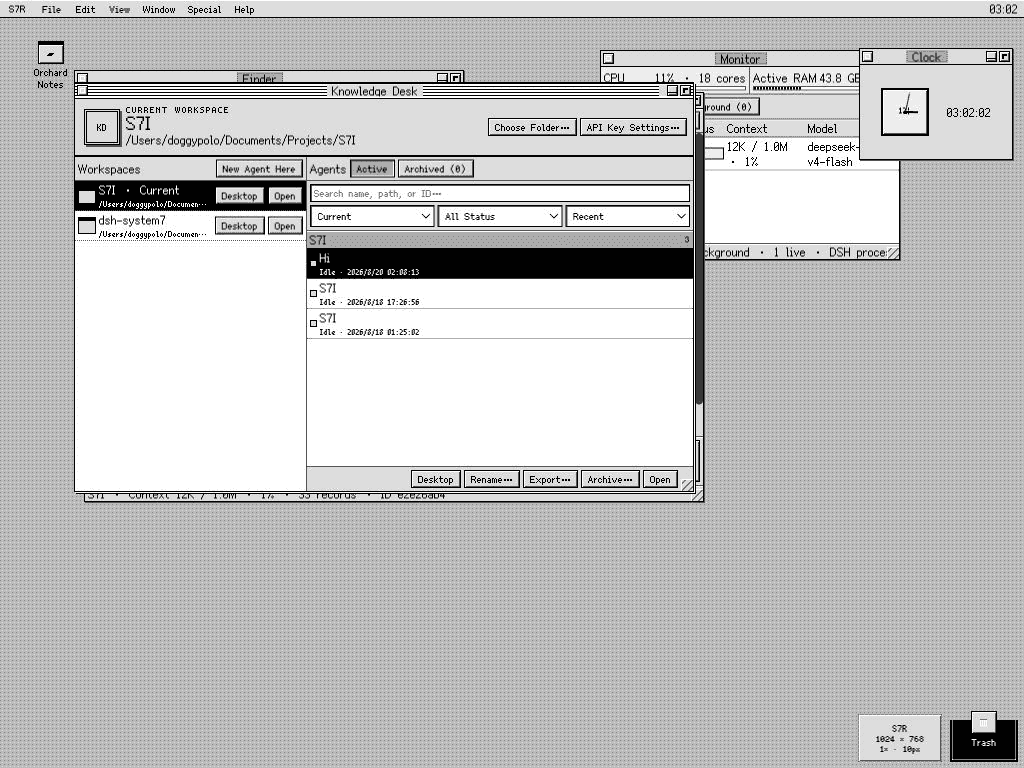
S7R is an original System 7-era workstation shell for the DeepSeek Harness Web UI. It turns real DSH Agents, Workspaces, files, terminals, tools, and persisted history into a coherent multi-window desktop instead of placing a retro skin over a chat page.
S7R is the desktop environment. Knowledge Desk is its Workspace, Agent, and conversation application.
Expanded 1024 × 768 at native 1× magnification. Knowledge Desk remains the center of the workflow while the active Agent, Finder, Monitor, Clock, desktop aliases, and Trash coexist on one persistent desktop.
DSH remains the source of truth. S7R does not copy conversations into its own chat database, start an unrelated shell server, or expose arbitrary host paths. It presents the capabilities already owned by DSH and keeps only desktop preferences—window positions, aliases, display choices, Scrapbook cards, and similar UI state—in the browser.
[!IMPORTANT] S7R's published-package runtime baseline is DSH
0.1.0-rc.7. The adapter has also been built, installed, and browser-tested from the official0.1.0-rc.8source merge. At the verification date, rc.8 packages were not yet available from npm, so ordinary installs still resolve rc.7. DSH is in developer preview and later releases may require adapter updates. See Compatibility.
Feature map
| Area | What it does |
|---|---|
| Workspaces | Registers a real folder with DSH, remembers recent folders, and uses the selected Workspace as the filesystem boundary for Agents, Finder, Preview, TextEdit, Terminal, and Find. |
| Knowledge Desk | Makes the current Workspace explicit; groups and filters Agents by Workspace/state; sorts by recency/name/status; and creates, reopens, renames, exports, archives, restores, or places Agents on the desktop. |
| Agent windows | Streams real DSH output and reasoning, shows tools and attachments, accepts steering/cancellation, reloads persisted history, and optionally renders completed Markdown safely. |
| Native DSH controls | Exposes the selected Agent's real model/reasoning route, Agent Preset, slash-command modes, project Skills, and read-only plugin-loader inventory without inventing parallel S7R settings. |
| Agent Preset Stationery | Creates a new Workspace-owned Agent from an installed DSH Agent Preset, with only an optional name and opening prompt. |
| Context and Timeline | Shows provider-reported context length and pressure, estimates content shares, requests compaction or a summary-carrying successor, and exposes the complete event stream with adjacent chunks folded into runs. |
| Files | Provides Workspace-contained Finder, conflict-aware plain-text editing, image/PDF Preview, and portable path drops into Agents. Host paths are validated again on every request. |
| Terminal | Opens an owner-scoped DSH terminal running /bin/zsh -f -i, even when no Agent window is open, with retained low-latency output and visible command acknowledgement. |
| Find | Searches file/folder names, source contents, visible messages, or all persisted Agent events as independent scopes, then opens the matching file, Agent, or Timeline location. |
| Monitor and notices | Combines live Agent state, background jobs, context pressure, host CPU/active RAM, and DSH process RSS; minimal notices appear when an Agent completes. |
…

