MingoZhou/dsh-replay
dsh-replay
dsh-replay is a community DeepSeek Harness plugin. Read the repository README before installing.
Install
npx @deepseek-ai/dsh plugin --profile <your-profile> add @mingozhou/dsh-replayRestart `dsh web` after install. Bundle APIs can change during the developer preview.
README badge

[](https://dshhub.dev/plugins/dsh-replay)Paste this into your README. The star count updates with every catalog sync.
From the README
Excerpt from MingoZhou/dsh-replay, cleaned of badges and images.
dsh-replay
Time machine for your agent sessions.<br/> Replay · Audit · Cost · Fork tree · Compare — inside the DeepSeek Harness web UI.
🎮 Live demo · 中文文档 · Install · FAQ
😫 Sound familiar?
You kick off an agent task, come back after dinner, and:
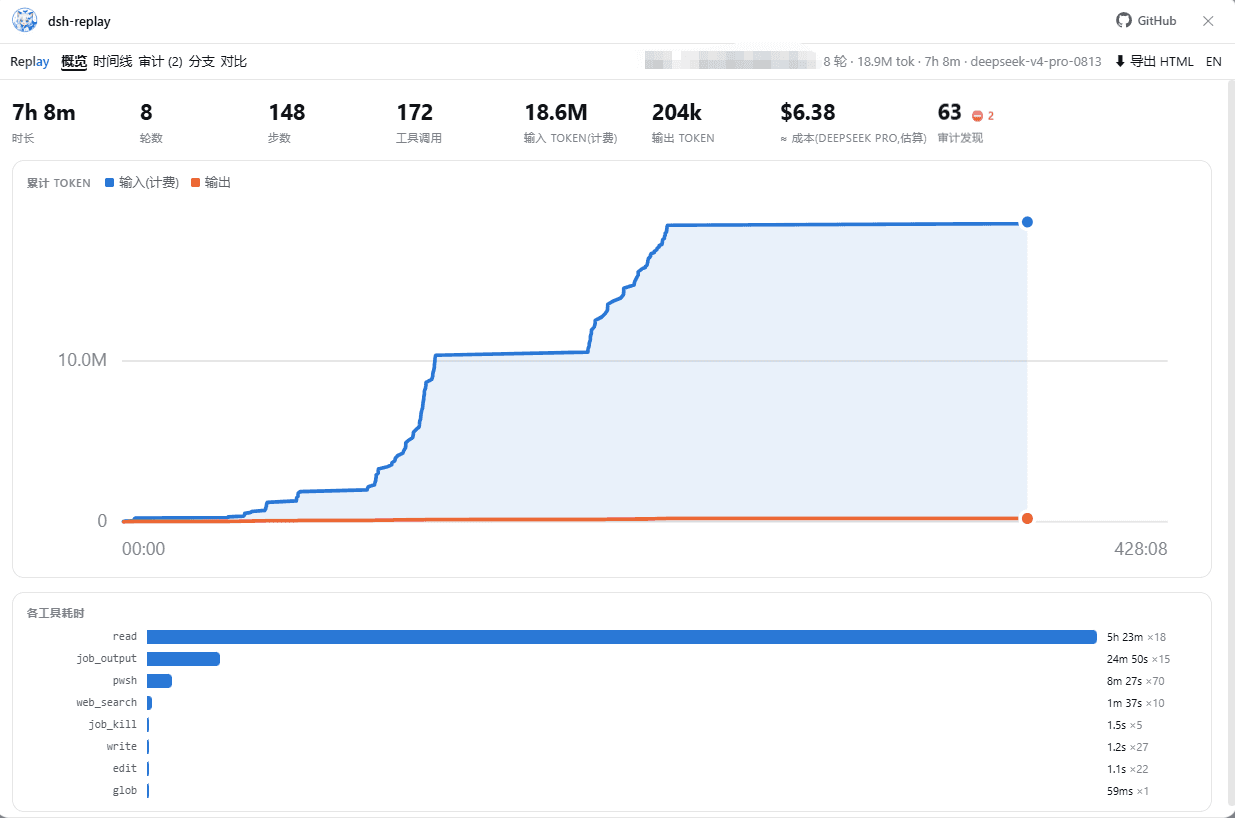
- "It ran for 5 hours and burned 18M tokens — on WHAT?"
- "Which tool call ate all that wall-clock time? Was it stuck?"
- "Did it touch my
.env? Did itrm -rfanything? Who approved that?" - "How much did this session actually cost me?"
- "I forked the session yesterday — where exactly did the two histories diverge?"
- "I want to show a teammate this hilarious failure — do they need to install the whole harness?"
DeepSeek Harness keeps a beautiful append-only log where everything that reached the model is reconstructible — but ships no viewer for it. dsh-replay is that viewer. One plugin, and every question above becomes one click.
✨ What you get
| ⏪ Timeline replay | Scrub through every turn, step, message and tool call; play back at 1–16×; click any event for raw prompt/args/results/durations |
| 📊 Overview dashboard | Hero stats, cumulative token chart with crosshair, tool-time ranking — where the time and tokens actually went |
| 💰 Cost estimate | ≈ dollar cost from disjoint token accounting (cache-aware); editable pricing table, DeepSeek / Claude / OpenAI / Gemini defaults |
| 🛡️ Security audit | Rules-based scan: dangerous shell (rm -rf, sudo, curl-pipe…), sensitive paths (.env, ~/.ssh…), sandbox/permission changes, denied approvals — ranked, clickable, extensible |
| 🌿 Fork tree | The whole session lineage as a clickable tree, fork boundaries labeled, subagents marked |
| ⚖️ Compare | Any two sessions side by side: stats, tool mix, token deltas, exact divergence seq for forks |
| 📤 One-click HTML export | Bake a session into a single offline .html — attach it to a bug report or send to a teammate; they get the full interactive replay with zero installs |
| 🔍 Filter & search | Free-text search across messages/args/results + kind filters, right in the playback bar |
| 🌏 EN / 中文 | Whole UI switches language (findings and meta labels included); auto-detected, one-click toggle |
Dark mode follows the harness theme. Loading and empty states are hosted by Jing Xiaoshen (鲸小深), our original whale-catgirl mascot (hide her with .dshr-mascot { display: none }).
🚀 Quick start
1️⃣ Try it first — zero install
Online demo: https://mingozhou.github.io/dsh-replay/ — three sample sessions, full UI, zero install.
2️⃣ Install into DeepSeek Harness — one npm command
The npm package ships prebuilt: no cloning, no building, no allowBuilds approval.
# released CLI (npm i -g @deepseek-ai/dsh); list your profiles with: ls ~/.dsh/profiles
dsh plugin --profile <your-profile> add @mingozhou/dsh-replay

# harness running from a source checkout (`pnpm dsh web` uses the profile named "web"):
#   run inside the harness repo directory
pnpm dsh plugin --profile web add @mingozhou/dsh-replay
Verify with dsh --profile <your-profile> --dump-config (expect a # == @mingozhou/dsh-replay section), then restart the harness (dsh web --profile <your-profile> / pnpm dsh web) and open http://127.0.0.1:3080. You now have two entries:
…

