AbelKeithsun/dsh-question-nav
dsh-question-nav
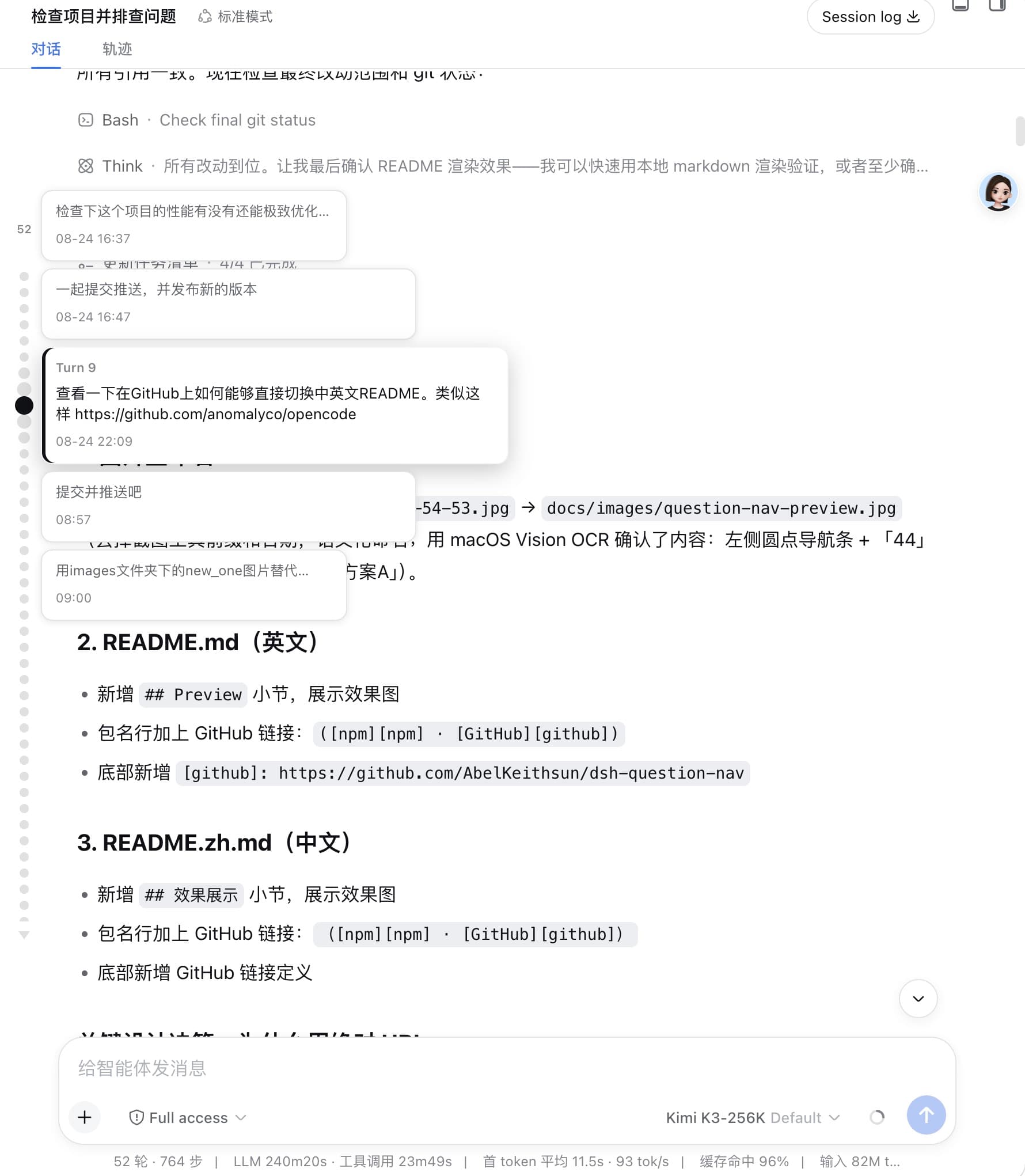
In-session question minimap for the DeepSeek Harness Web GUI: a vertical column of round dots overlaid on the left edge of the conversation column, one dot per user question — hover enlarges and shows full text, click jumps to that message.
Install
npx @deepseek-ai/dsh plugin --profile web add @luziyang2026/dsh-question-navRestart `dsh web` after install. Bundle APIs can change during the developer preview.
README badge

[](https://dshhub.dev/plugins/dsh-question-nav)Paste this into your README. The star count updates with every catalog sync.
From the README
Excerpt from AbelKeithsun/dsh-question-nav, cleaned of badges and images.
dsh-question-nav
<a href="https://github.com/AbelKeithsun/dsh-question-nav/blob/main/README.md">English</a> | <a href="https://github.com/AbelKeithsun/dsh-question-nav/blob/main/README.zh.md">简体中文</a>
In-session question navigator for the [DeepSeek Harness (DSH) Web GUI][dsh]: a vertical column of small round dots overlaid on the left edge of the conversation column — one dot per user question. Hover a dot to magnify it (together with its two neighbors on each side) and reveal a vertical cascade of crisp question cards with each question's full text and sent time (clicking any card jumps to it); click a dot to scroll the chat to that question.
It is an external plugin bundle with zero runtime dependencies — the browser
half (lib/client.js) externalizes everything to the DSH shell, so it adds
only a small bundle to the GUI at load time.
Package: @luziyang2026/dsh-question-nav ([npm][npm] · [GitHub][github]).
Preview
Plugin settings (rail alignment + dots per page):
What it does
- Left-edge dot minimap (embedded, not reserving any width). The rail's anchor edge is configurable — Settings → Plugins → Question Nav → Rail alignment switches it between the left and right edge of the conversation column.
- Height-capped and scrollable: the dot column is vertically centered and uses at most 60% of the conversation height; longer sessions scroll inside that band (wheel over the dots or the gaps between them).
- One dot = one turn that asked a question (strictly aligned with the Trajectory view's turn numbering), with a small count above the dot column.
- Full history, persisted, no render-window expansion: the plugin's host
half registers a
questionIndexsession projection — the projection registry folds the whole event log (read-only, the chat's paged window is never touched), the official projection cache persists it across restarts, and push frames deliver new questions live. - Hover (focus): the dot and its two neighbors on each side magnify
progressively (selected largest), the rail scrolls the selection into view
only when clipped by the band's edges, and a
vertical cascade of five crisp question cards (portal-rendered, no
native-title delay) appears beside the rail — one card per window dot,
stacked top-to-bottom without overlap and centered on the selected dot. Each
card shows the turn's full question text (all of them, when one turn
batched several) and the question's sent time (
HH:MMon the same day,MM-DD HH:MMacross days,YYYY-MM-DD HH:MMacross years). The hierarchy is two-tier: the center card is the focus — full-contrast text, a brand accent bar and a raised shadow — while the four neighbors are clean context cards (same surface, narrower, fewer lines) that light up on hover to show they are clickable too. Clicking any card jumps to that question exactly like clicking its dot. - Click: jumps to that question. Only then does the jump loop page the
window (
loadOlder()) to bring that specific page into view — never the whole history up front. - Paged overflow: when many dots don't fit the 60% band, the native scrollbar is hidden and two small triangle buttons in the dot style appear — ▲ above the dot queue and ▼ below it — each click revealing the next page of hidden dots, which pop in with a short staggered animation as click feedback. The page size is config
…

