StruggleYang/dsh-project-kanban
dsh-project-kanban
dsh-project-kanban is a community DeepSeek Harness plugin. Read the repository README before installing.
Install
npx @deepseek-ai/dsh plugin --profile web add github:StruggleYang/dsh-project-kanbanRestart `dsh web` after install. Bundle APIs can change during the developer preview.
README badge

[](https://dshhub.dev/plugins/dsh-project-kanban)Paste this into your README. The star count updates with every catalog sync.
From the README
Excerpt from StruggleYang/dsh-project-kanban, cleaned of badges and images.
dsh-project-kanban
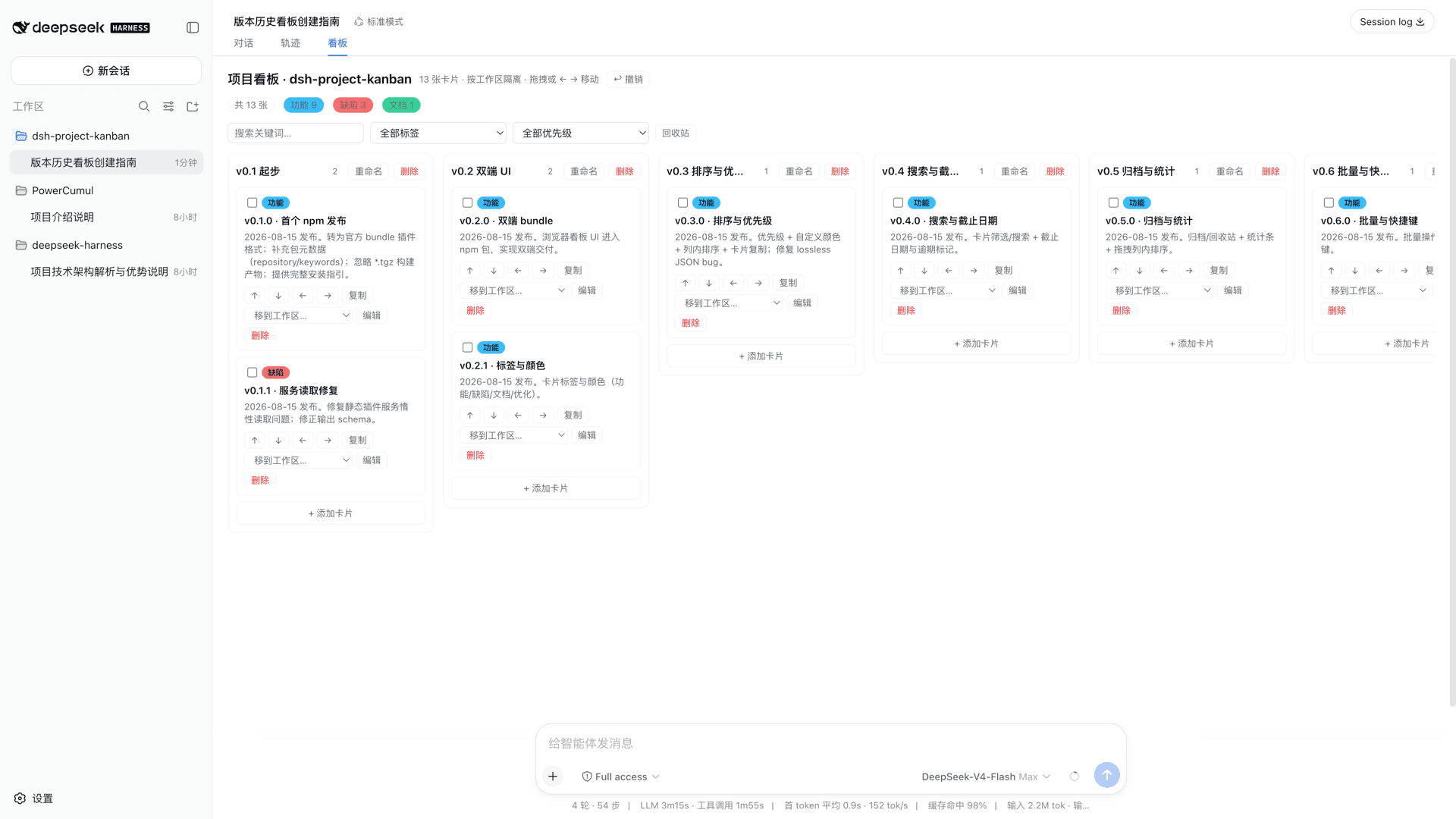
A kanban board inside DeepSeek Harness, integrated with the conversation: the agent writes planning cards via kanban_* tools while you talk, boards are isolated per workspace (project), and data is persisted to disk.
This is an official bundle-format plugin (dsh.bundle declaration + cordis.patch.yml patch layer), installed through the official dsh plugin flow.
Preview
Features
- Agent-driven planning: 9 model tools (
kanban_get,kanban_add_card,kanban_update_card,kanban_delete_card,kanban_move_card,kanban_duplicate_card,kanban_add_column,kanban_rename_column,kanban_delete_column) — the agent writes cards directly during planning and feature breakdown - Per-workspace isolation: each workspace (project) has its own board; agent tools resolve the current workspace automatically
- Disk persistence: every change is written to
kanban-board-<workspaceId>.json— survives page refresh and process restarts - Browser board UI: a "看板" (Kanban) tab in the session header, no extra install
- Labels & colors: 功能 (feature, blue) / 缺陷 (bug, red) / 文档 (docs, green) / 优化 (optimization, orange)
- Priority: high / medium / low with a colored left-edge bar (red / orange / blue)
- Custom card color: any
#rrggbbbackground via the color picker in the edit form - In-column ordering & duplication: ↑ / ↓ buttons (or the
toIndexparameter) reorder cards within a column; one-click duplicate copies label/priority/color - Filtering & search: keyword, label, and priority filters at the top of the board
- Due dates: YYYY-MM-DD deadline with automatic overdue highlighting
- Trash & restore: delete is soft (to the trash); restore or purge from the trash view
- Bulk operations: multi-select cards to move / label / trash in one action
- Stats bar: totals by label, priority, and overdue count
- Drag reordering: drag a card onto another card's position to insert there
- Templates: default / dev / content column presets (adds missing columns only)
- Undo: every write operation is undoable (50-step stack)
- Cross-workspace move: move a card into another project's board
- Session references: cards created by the agent record their source session (click to jump back)
Installation (official flow)
Prerequisites
dshCLI installed (npx @deepseek-ai/dshorpnpm dshfrom source)- Pick the target profile (
webis the default browser profile)
Option 1: from GitHub (recommended)
dsh plugin --profile web add github:StruggleYang/dsh-project-kanban
pnpm ≥ 10 refuses to run a git dependency's prepare script on the first try. Copy the package key pnpm prints into the profile's pnpm-workspace.yaml (at $DSH_HOME/profiles/web/pnpm-workspace.yaml):
allowBuilds:
  dsh-project-kanban: true
Then re-run add.
⚠️ Security note:
allowBuildsgrants install-time code execution on your machine. Only allow sources you trust, and consider pinning a commit:dsh plugin --profile web add github:StruggleYang/dsh-project-kanban#<commit-sha>
Option 2: from a local checkout
git clone https://github.com/StruggleYang/dsh-project-kanban.git
dsh plugin --profile web add ./dsh-project-kanban
Option 3: tarball / npm (no build permission needed)
…

