SmileBuild/dsh-planchart
dsh-planchart
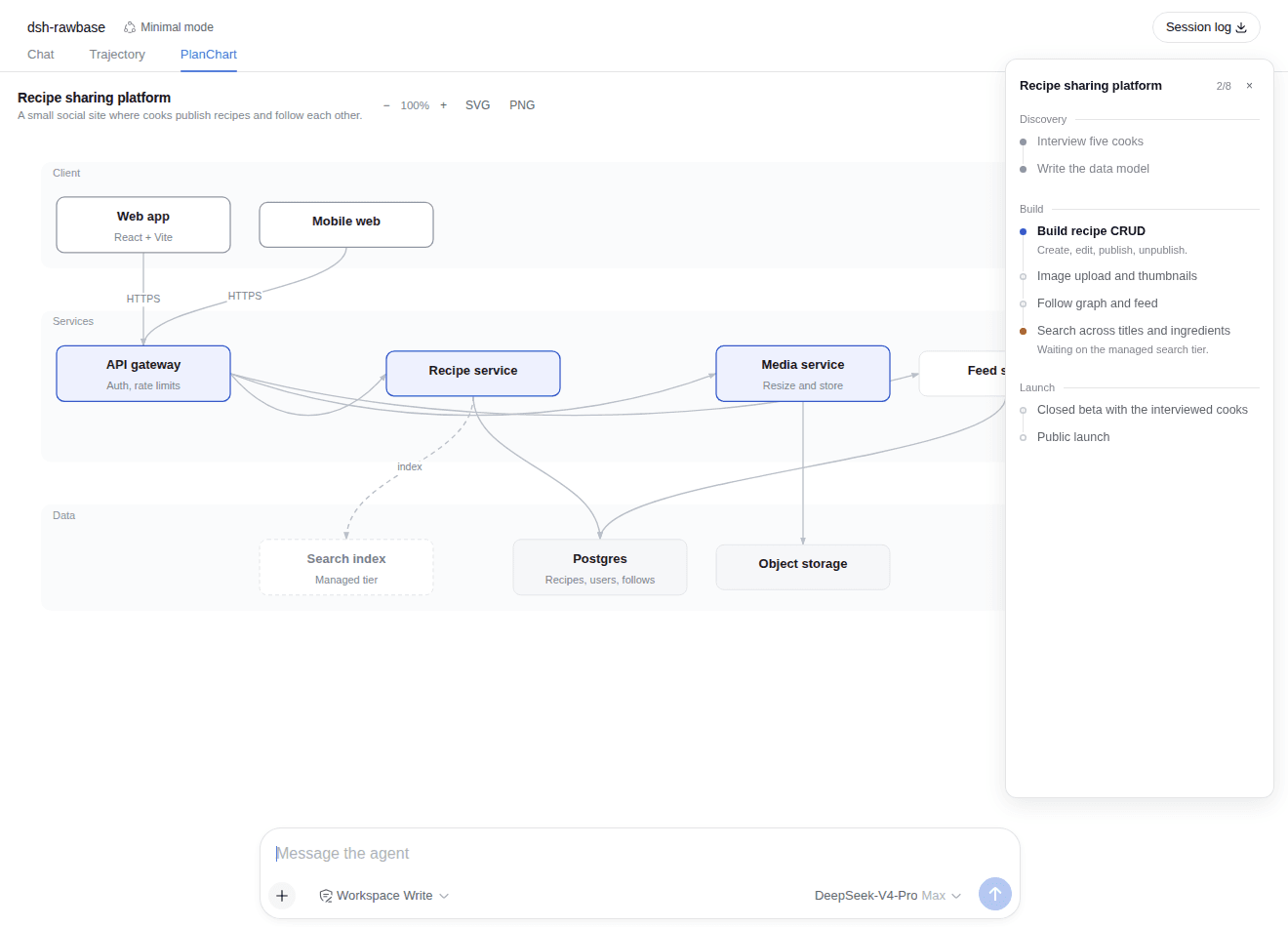
DeepSeek Harness plugin: the agent publishes a project plan as steps in a side panel and a framework diagram in a centre tab, downloadable as SVG or PNG.
Install
npx @deepseek-ai/dsh plugin --profile web add ./dsh-PlanChartRestart `dsh web` after install. Bundle APIs can change during the developer preview.
README badge

[](https://dshhub.dev/plugins/dsh-planchart)Paste this into your README. The star count updates with every catalog sync.
From the README
Excerpt from SmileBuild/dsh-planchart, cleaned of badges and images.
dsh-planchart
A DeepSeek Harness (dsh) plugin that gives the agent a display surface for
project planning. The model calls one tool with the whole plan; the browser
renders it in two places:
- the steps — a panel docked to the right edge of the frame, with phases, status marks and per-step detail;
- the framework — a "PlanChart" tab beside Chat and Trajectory, holding an auto-laid-out architecture diagram that downloads as SVG or PNG.
Talking to the agent again updates both: every planchart_set call replaces the
whole chart, so "mark step 3 done" or "add a cache layer" is an ordinary
follow-up message.
Install
dsh plugin --profile web add ./dsh-PlanChart
Then restart the profile (dsh web) and hard-reload the browser tab. The
plugin declares dsh.bundle.patch, so the installer adds it to the profile's
bundle stack automatically; its browser half is discovered through dsh.client
and served at /plugins/dsh-planchart/client.js.
The reload is not optional. The client plugin table arrives as
window.__DSH_BOOT__, injected intoindex.htmlat page load. A tab that was already open when you restarted keeps its old manifest and will never fetch the new bundle — the tools run, the chart is stored, and the browser shows nothing. This is true of every dsh client plugin, not just this one.
To remove it: dsh plugin --profile web remove dsh-planchart.
Tools
| Tool | What it does |
|---|---|
planchart_set | Publish the whole chart: title, optional summary, steps[], and a framework graph. Replaces the previous chart wholesale. |
planchart_get | Read back the chart currently displayed, as text — for revising a chart the model no longer has in context. |
There is also a /planchart slash command that prints the current chart.
Step shape
{ "id": "…",            // optional; derived from the title when omitted
  "title": "Build recipe CRUD",
  "status": "pending",  // pending | active | done | blocked
  "detail": "create, edit, publish",   // optional
  "phase": "Build" }                   // optional; consecutive steps group under it
Framework shape
{ "direction": "TB",                       // TB (default) or LR
  "groups": [{ "id": "…", "label": "Client" }],
  "nodes":  [{ "id": "…", "label": "Web app", "kind": "entry",
               "note": "React + Vite", "group": "client" }],
  "edges":  [{ "from": "web-app", "to": "api-gateway",
               "label": "HTTPS", "dashed": false }] }
kind chooses how a box is drawn, not what it means. Ids may be omitted
everywhere — one is derived from the label (CJK labels keep their characters),
which is what edges then reference.
Visual language
The diagram is monochrome structure with exactly one accent, so a nine-box graph does not turn into nine competing fills:
kind | Drawn as | Why |
|---|---|---|
core | tinted fill, accent border | the only colour on the canvas — the part that does the work, and where the eye should land first |
entry, output | firm border, no fill | the system's boundary |
store | faint fill, hairline | holds something |
external | dashed hairline, muted text | not yours |
default | hairline | supporting cast |
…

