Johnny-xuan/dsh-paste-to-path
dsh-paste-to-path
A universal path-backed attachment dock for DeepSeek Harness.
Install
npx @deepseek-ai/dsh plugin --profile web add dsh-paste-to-pathRestart `dsh web` after install. Bundle APIs can change during the developer preview.
README badge

[](https://dshhub.dev/plugins/dsh-paste-to-path)Paste this into your README. The star count updates with every catalog sync.
From the README
Excerpt from Johnny-xuan/dsh-paste-to-path, cleaned of badges and images.
dsh-paste-to-path
A universal attachment dock for DSH.
English | 简体中文
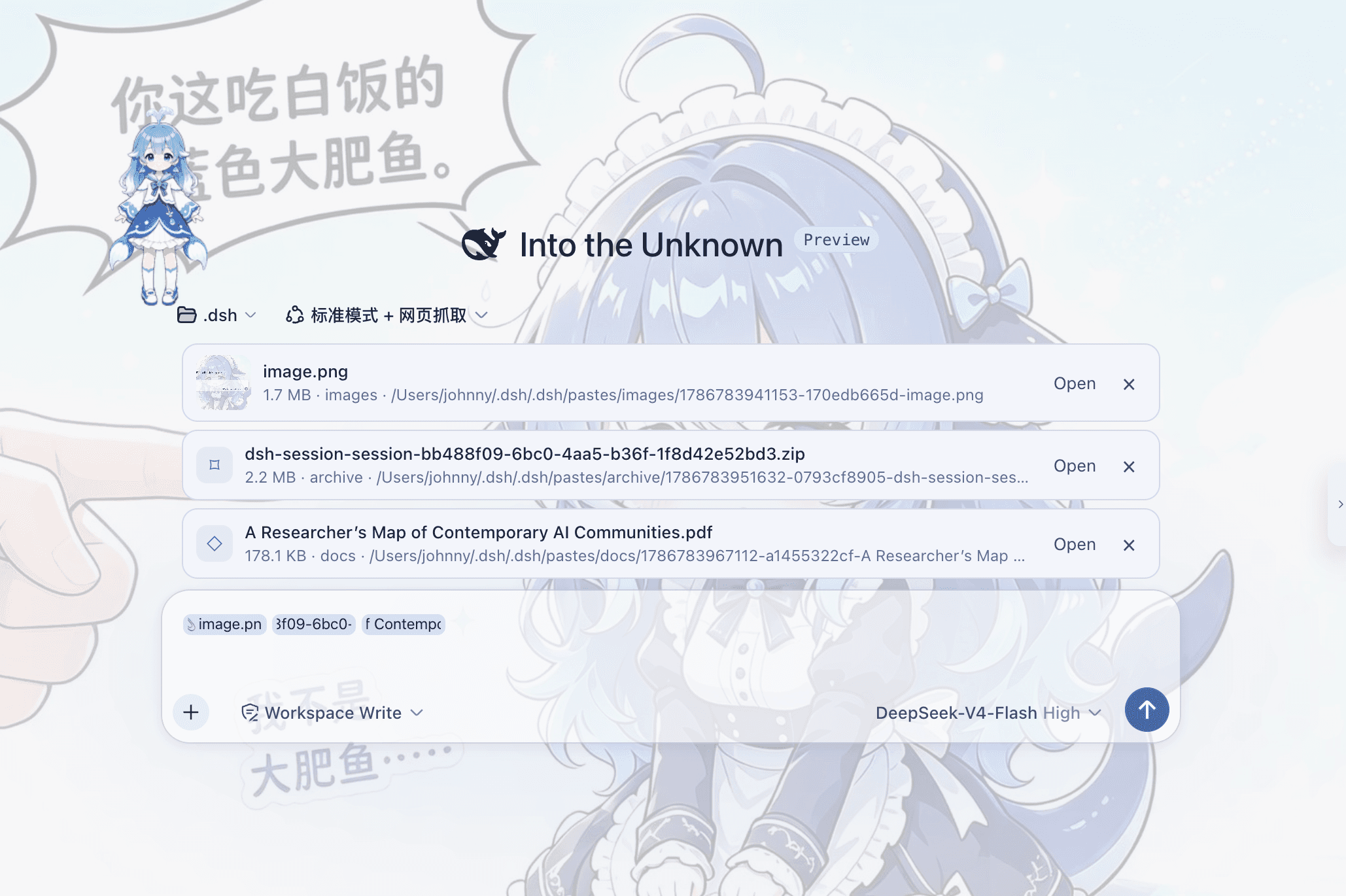
dsh-paste-to-path adds a general-purpose attachment Dock to the DSH Web composer.
Paste, drop, or choose images, PDFs, Word and Excel documents, archives, code, logs, and other files, then review and manage them together before sending.
<p align="center"><em>Images, PDFs, archives, and other formats share one attachment Dock.</em></p>The DSH 0.1.0-rc.6 through 0.1.0-rc.8 Web composer natively accepts PNG, JPEG, WebP, and GIF. PDFs, Office documents, archives, and other formats do not have the same unified attachment entry point. Even an image may fail when the selected model does not support image input or the active adapter is text-only.
dsh-paste-to-path does not extend the model's native content types. It takes a simpler route:
File
  ↓
DSH Host
  ↓
Local path
  ↓
Agent
  ↓
Your own tools
Send images to your own vision tool, PDFs to a document reader, and archives to shell or extraction tools.
The plugin owns attachment intake, management, and path delivery. Your Agent tool stack decides how to read the file.
Path flow at a glance
<p align="center"><em>The file is saved on the DSH Host, then its path is given to the Agent.</em></p>What it does
Universal attachment Dock
Paste, drop, or choose a file and an attachment card appears above the composer. The plugin's paperclip button accepts any file type and routes it through this Dock rather than DSH's native image rail.
Each card shows the file name, size, category, and path. You can remove it before sending.
Images also have thumbnails and lightbox previews.
File-manager clipboard support
The plugin catches every real File object exposed by the browser, including empty files. It can also turn a pasted file: URI or absolute path into a card when that path already exists on the DSH Host.
Path conversion is transactional: every candidate path must exist on the DSH Host. If any candidate is unavailable, the original clipboard text is pasted normally without an attachment error or a partial conversion.
Browsers do not consistently expose non-image files copied from Windows Explorer, Finder, or Linux file managers. If the paste event contains neither file bytes nor a usable Host path, an ordinary web page cannot reconstruct the hidden OS clipboard entry. To address Issue #2, the plugin reads Explorer's FileDropList at this point when DSH runs on a local Windows Host through a direct localhost connection; remote clients never access the Host clipboard. In other cases, use the plugin's paperclip button or drag and drop. A path from a remote browser's device is not a path on the DSH Host.
One flow for many file types
Images, PDFs, Office documents, code, logs, archives, and other binary files all use the same attachment flow:
File → Save on Host → Path reference → Agent
You do not need a separate model-input protocol for every file type.
Turn long pasted text into an attachment
Normal text still pastes normally.
When pasted content crosses the configured threshold, the plugin can save it as a .txt file instead of putting tens of thousands of characters directly into the composer.
The default threshold is 8000 characters.
…

