1321928757/dsh-mysql
dsh-mysql
MySQL connector plugin for DeepSeek Harness: configure connections in settings, switch per session from the composer, and expose mysql_query/mysql_tables/mysql_execute tools to every agent preset.
Install
npx @deepseek-ai/dsh plugin --profile web add github:1321928757/dsh-mysql#v0.1.10Restart `dsh web` after install. Bundle APIs can change during the developer preview.
README badge

[](https://dshhub.dev/plugins/dsh-mysql)Paste this into your README. The star count updates with every catalog sync.
From the README
Excerpt from 1321928757/dsh-mysql, cleaned of badges and images.
dsh-mysql
English | 中文
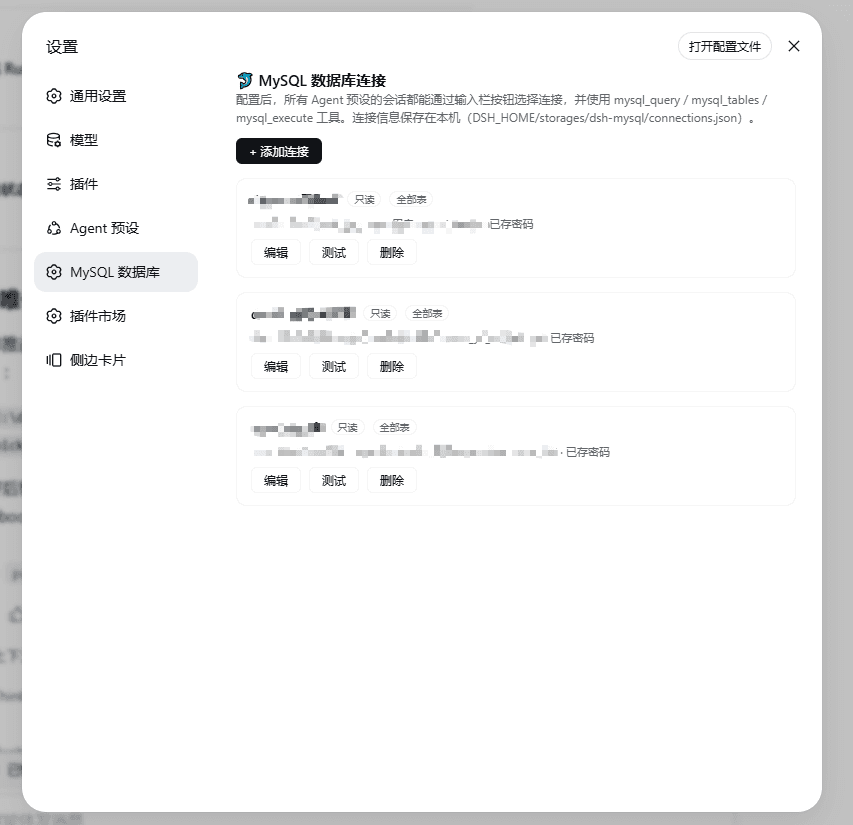
MySQL connector plugin for DeepSeek Harness (DSH): configure multiple MySQL connections in the settings page — each with a table allowlist and a write-permission switch (default off) — then switch the active connection per session from a database button beside the composer. All agent presets immediately get mysql_query / mysql_tables / mysql_execute tools; no preset edits required.
- Settings page (
设置 → MySQL 数据库): add / edit / delete / test connections — host, port, user, password, default database, per-connection table allowlist and write permission. - Composer button (database icon, left of the input bar): pick the connection for the current session; switch any time. The active connection and its readable tables are appended to each turn's runtime-context snapshot, so the model always knows which database to query — the cached system-prompt prefix is never rewritten.
- Global tools (available under every agent preset):
| Tool | Purpose |
|---|---|
mysql_query | Read-only single SELECT/SHOW/DESCRIBE/EXPLAIN against the selected connection. Table allowlist enforced, multi-statement rejected, MAX_EXECUTION_TIME hint injected into SELECT, up to 2000 rows returned with a truncated flag. |
mysql_tables | Inspect the schema (tables, columns, types, keys, comments) of readable tables via information_schema. |
mysql_execute | INSERT/UPDATE/DELETE only, and only when the connection has allowWrite enabled (default off). DDL (DROP/TRUNCATE/ALTER/...) and multi-statement SQL are always rejected. |
- Per-session selection is resolved through the tool execution context (
exec.agent), so the model always queries the database you picked in the composer. - Connections persist in
$DSH_HOME/storages/dsh-mysql/connections.json; passwords only exist on your machine and are never sent back to the browser (the UI only seeshasPassword).
Install
dsh plugin --profile web add github:1321928757/dsh-mysql#v0.1.10
Or from npm (once published):
dsh plugin --profile web add dsh-mysql
PowerShell one-liner (bootstraps pnpm, pins versions, self-checks):
irm https://raw.githubusercontent.com/1321928757/dsh-mysql/v0.1.10/scripts/install.ps1 | iex
Restart dsh web (make sure the old process really exited). After the restart, open 设置 → MySQL 数据库, add a connection and press 测试连接; the database button appears on the left of the composer. Verify:
dsh --profile web --dump-config | findstr dsh-mysql
Uninstall: dsh plugin --profile web remove dsh-mysql
Requirements: DeepSeek Harness (Node ≥ 20). The package ships prebuilt JavaScript (dependencies:
mysql2,zod), so git installs need no build approval. Connections are stored locally; nothing leaves your machine.
Quick start
…

