daetz-coder/dsh-multi-chat
dsh-multi-chat
Multi-window wall for DeepSeek Harness: run & monitor N DSH conversations side-by-side in one screen, plus an authenticated LAN gateway for phone/tablet access. npx dsh-multi-chat install
Install
npx @deepseek-ai/dsh plugin --profile web add dsh-multi-chatRestart `dsh web` after install. Bundle APIs can change during the developer preview.
README badge

[](https://dshhub.dev/plugins/dsh-multi-chat)Paste this into your README. The star count updates with every catalog sync.
From the README
Excerpt from daetz-coder/dsh-multi-chat, cleaned of badges and images.
💬 dsh-multi-chat — Multi-chat, one screen
English | 中文
Run N conversations in DeepSeek Harness at once, watch every Agent's live progress side-by-side, and check in from your phone or tablet. One browser tab goes from "one conversation at a time" to "a panoramic multi-conversation cockpit."
Install a multi-window wall into the official DeepSeek Harness (DSH) Web UI: a grid that shows N running DSH conversation instances simultaneously (each instance runs its own task), so every Agent's live progress, chat, and output are visible at a glance — no more hopping between endless tabs and windows.
✨ What it does
| Capability | Description |
|---|---|
| 📺 Multi-window | One-click entry from the sidebar; the chat area becomes a window grid showing every task side-by-side, one pane per port |
| 🔍 Auto-discovery | Scans a port range to auto-find running DSH instances; manual management is also supported |
| ➕ One-click new window | Launch a brand-new DSH instance right inside the wall to grow your conversation matrix |
| 📱 Phone access | The "Phone access" button starts a built-in authenticated LAN gateway — open the URL on your phone, enter the token, and watch progress |
| 🛑 Window controls | Maximize, refresh, open in a new tab, stop an instance, and switch column count (auto/1/2/3/4/6) |
Multi-chat = multi-port. Start N
dsh web --port <n>instances (each running one conversation/task), open the wall from any of them, and you see all of them side-by-side.
📸 Screenshots
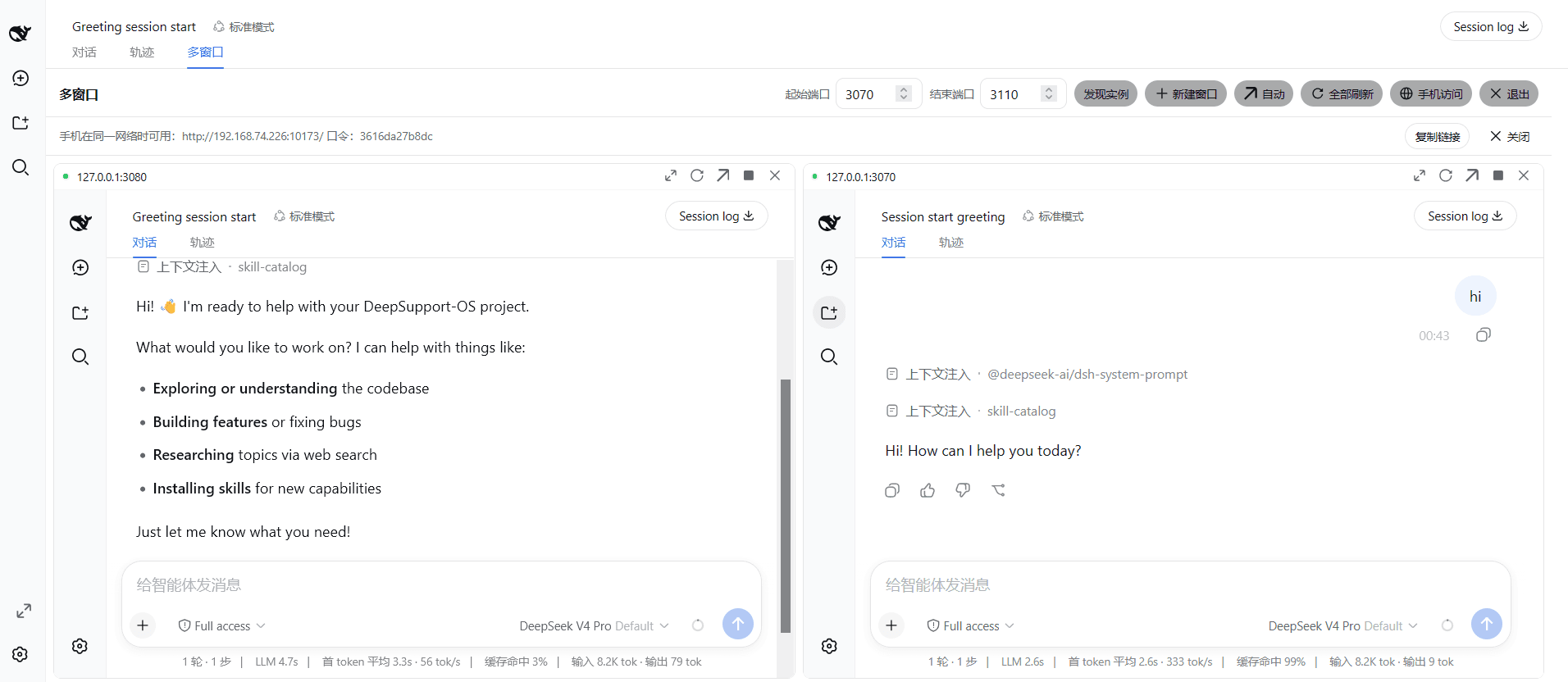
🖥️ Windows · Two chats side-by-side — two running DSH instances laid out together, each pane a full official conversation UI with live online status dots and per-window controls (maximize / refresh / new tab / remove):
📱 iPad · Two chats on mobile — on the same LAN, open the token-authenticated gateway URL on an iPad to watch two Agents' live progress on one tablet screen:
🖥️ Windows · Three-chat panorama — a 3-column grid of three running instances, all Agents on one screen, upgrading you from "one conversation at a time" to "a panoramic multi-conversation cockpit":
🚀 30-second quick start
# 1. Install — ONE command straight from the npm registry (no CLI to download):
dsh plugin --profile web add dsh-multi-chat

#    …or via the plugin's own npx CLI (packs a tarball and installs it):
npx dsh-multi-chat install

# 2. Start a few instances
npx dsh-multi-chat start --ports 3080,3081,3082

# 3. (Re)start any instance and click "Multi-window" in the sidebar footer → done 🎉
Why this approach
…

