lincong1987/dsh-model-switch
dsh-model-switch
dsh-model-switch is a community DeepSeek Harness plugin. Read the repository README before installing.
Install
npx @deepseek-ai/dsh plugin --profile web add github:lincong1987/dsh-model-switchRestart `dsh web` after install. Bundle APIs can change during the developer preview.
README badge

[](https://dshhub.dev/plugins/dsh-model-switch)Paste this into your README. The star count updates with every catalog sync.
From the README
Excerpt from lincong1987/dsh-model-switch, cleaned of badges and images.
dsh-model-switch
English | 中文
Use the right model for each stage of work in DeepSeek Harness.
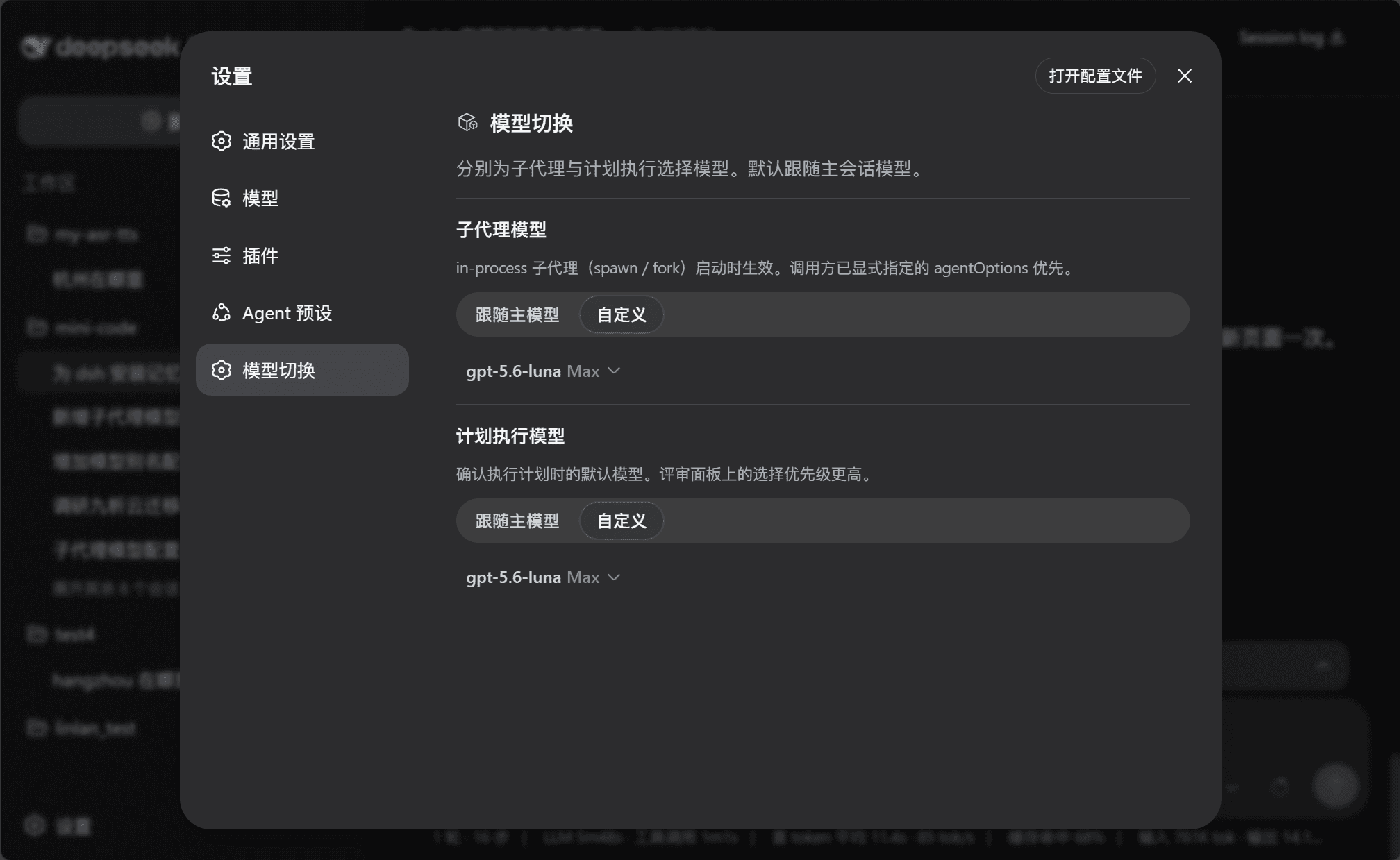
The main conversation, subagents, and plan execution serve different purposes. dsh-model-switch lets each of them use a suitable model without changing the normal DSH workflow.
Why use it
- Match models to tasks — keep your preferred model in the main conversation and use another model for subagents or plan execution.
- Avoid repeated switching — save defaults once instead of changing models before every task.
- Confirm before execution — review or change the model directly in the plan approval panel.
- See what subagents use — display the model, context window, and reasoning effort, such as
GPT-5.6 Sol 1M Max. - Keep the main model unchanged — after plan execution, DSH restores the previous main-session model.
Preview
Configure model defaults
Choose the model for plan execution
<td width="50%"><img src="docs/plan.png" alt="Plan awaiting review" /></td>
<td width="50%"><img src="docs/plan-exec.png" alt="Plan execution model" /></td>
See the model used by subagents
<td width="50%"><img src="docs/subagent.png" alt="Subagent model overview" /></td>
<td width="50%"><img src="docs/subagent-detail.png" alt="Subagent model details" /></td>
Install
Use the GitHub spec. This plugin is not published as an npm package, so do not use @lincong1987/dsh-model-switch.
dsh plugin --profile web add github:lincong1987/dsh-model-switch
Replace web with the profile DSH is actually running. DeepSeek Harness Desktop typically uses desktop.
Restart DSH after installation.
Update DSH
This plugin requires DeepSeek Harness 0.1.1-rc.2 or later. DSH has no dsh update command — install the version you want the same way you originally installed it.
- Check the installed version and what npm currently publishes:
dsh --version
npm view @deepseek-ai/dsh dist-tags
As of 2026-08-21, both latest and next point to 0.1.1-rc.2. Pin the exact version (@0.1.1-rc.2) when reproducibility matters.
- npx (Web):
npx --yes @deepseek-ai/[email protected] web
- Global npm install:
npm install -g @deepseek-ai/[email protected]
dsh --version
Then restart dsh web. DSH needs Node.js ^22.19.0 or >=24.
- Desktop: Fully Exit from the tray, then use Check for Updates in the app (or install a newer Desktop build). Desktop ships its own packaged
dsh; updating npm ornpxdoes not replace that copy. After Desktop finishes updating, restart it.
DSH is still a developer preview and may change on-disk formats between releases. Back up ~/.dsh (Windows: %USERPROFILE%\.dsh) before jumping versions. In particular, rc.8 changed the SQLite storage format incompatibly and the release notes provide no migration path; treat local sessions as non-portable when crossing that boundary.
After DSH is on a compatible version, reinstall this plugin as described below.
Reinstall / after a DSH update
Reinstall the plugin when this repository has a new release, or after you upgrade DeepSeek Harness. The plugin tracks a specific DSH version (currently 0.1.1-rc.2 or later), so a host upgrade should be followed by a plugin reinstall.
- Update DSH first (see Update DSH; skip this step if only the plugin changed).
- Reinstall with
--forceso DSH refreshes the GitHub source:
…

