EternalNight996/dsh-memory-eternal
dsh-memory-eternal
dsh-memory-eternal is a community DeepSeek Harness plugin. Read the repository README before installing.
Install
npx @deepseek-ai/dsh plugin --profile web add memory-eternal`)Restart `dsh web` after install. Bundle APIs can change during the developer preview.
README badge

[](https://dshhub.dev/plugins/dsh-memory-eternal)Paste this into your README. The star count updates with every catalog sync.
From the README
Excerpt from EternalNight996/dsh-memory-eternal, cleaned of badges and images.
🧠 dsh-memory-eternal — 给 AI 装「第二大脑」
🚨 重要:已升级到新版本 memory-eternal
本插件已升级为面向 多智能体通用 的独立新项目,不再只依赖单一 DSH 服务。新功能与持续开发请移步:
- 📦 npm:
npm i memory-eternal(ordsh plugin --profile web add memory-eternal)- 🐙 GitHub / Gitee:
EternalNight996/memory-eternal
<p align="center"><strong>⭐ 觉得好用就点个 Star</strong>! <br/><sub>DSH 一条命令:<code>dsh plugin --profile web add dsh-memory-eternal</code></sub></p>对话结束自动沉淀,跨会话不失忆;召回只取相关小块,省 token 少噪音。 全自研、零第三方记忆框架、不改 DSH 源码、一个记忆库所有 Agent 共享,纯 Markdown 可 git 管理。
🚀 五分钟上手
🟦 DeepSeek Harness(DSH)—— 重点
装(dsh-desktop 用 DSH CLI,一条命令):
# dsh-desktop 用户(推荐):DSH CLI 直接装进 profile
dsh plugin --profile web add dsh-memory-eternal

# 或直接在 profile(pnpm workspace)里更新。注意用 pnpm,npm install 会报 EUNSUPPORTEDPROTOCOL
cd ~/.dsh/profiles/web && pnpm add dsh-memory-eternal@latest
重启 dsh web 后,三样东西立即生效:
| 效果 | 在哪看 |
|---|---|
| 自动沉淀知识卡 | 每轮对话结束自动发生,无需操作 |
memory_recall 工具 | Agent 需要历史时自动调用 |
| 图形化界面 | 侧边栏底部「记忆」按钮 / 设置 → 记忆 |
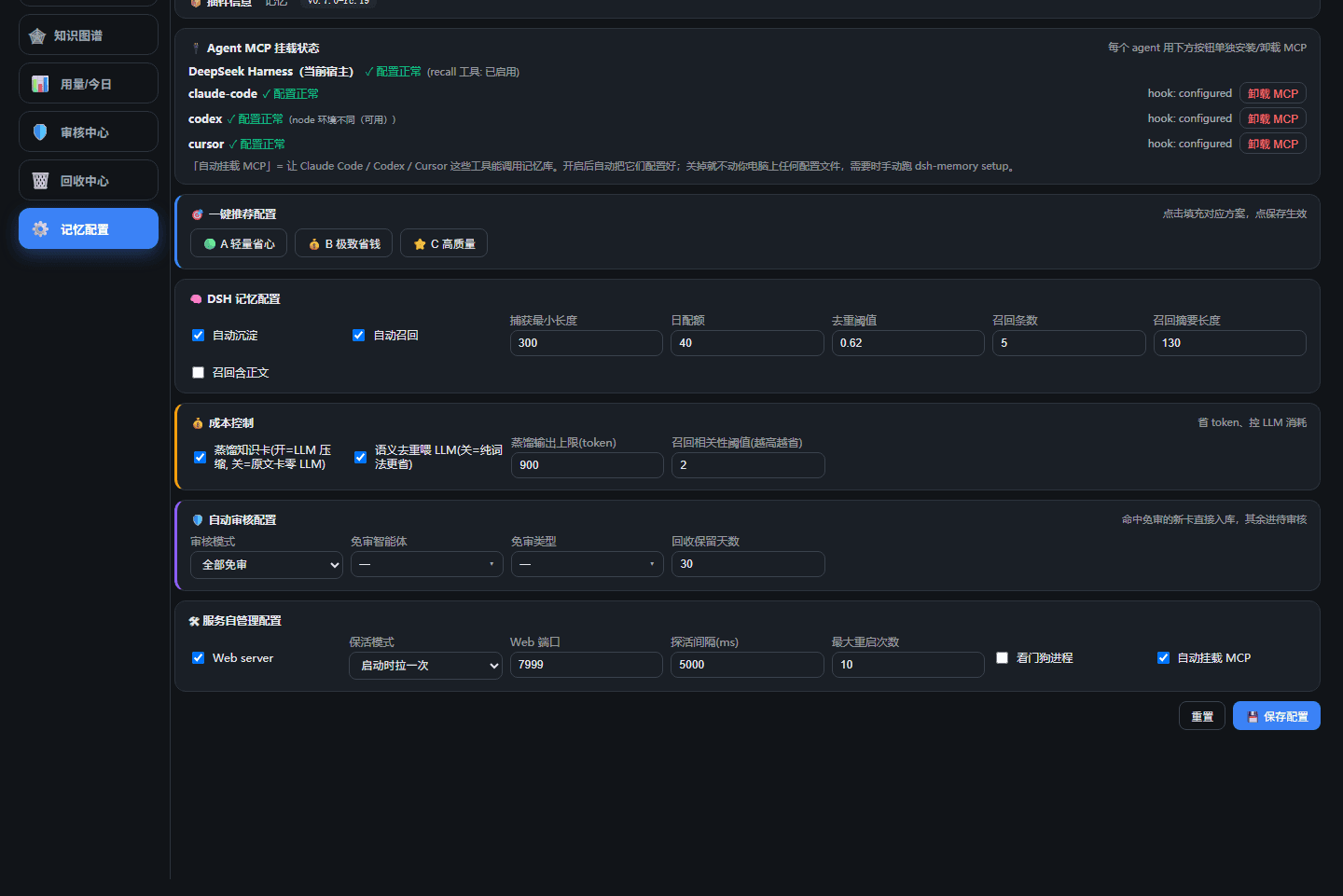
入口:侧边栏底部「记忆」按钮 → 记忆库(左栏含 知识卡 / 知识图谱 / 用量 / 审核中心 / 回收中心 / 记忆配置);「DSH 设置 → 记忆」= 纯配置页。
改配置:记忆库左栏「记忆配置」(或 DSH 设置 → 记忆)→ DSH 记忆配置 / 成本控制 / 自动审核配置 / 服务自管理,点「保存配置」即写入。autoWebMode/watchdogAutoSpawn 的改动需重启 DSH 生效。
🟨 Claude Code
npm i -g dsh-memory-eternal     # 装 CLI + MCP(写 ~/.claude.json mcpServers.memory)
dsh-memory connect claude       # 写 ~/.claude/settings.json 的 SessionEnd hook → 会话结束自动沉淀
装完即用:会话里说「recall 一下数据库选型」→ 自动检索记忆;会话结束 → 自动沉淀进统一 ~/.dsh/memory-vault(新卡 pending 待审核)。
🟧 Codex CLI / Cursor
npm i -g dsh-memory-eternal     # 装完自动写 Codex config.toml / Cursor mcp.json 的 mcpServers.memory
dsh-memory connect codex        # 写用户级 ~/.codex/hooks.json 的 Stop hook → 会话结束自动沉淀(含 Codex Desktop)
dsh-memory connect cursor       # 写 ~/.cursor/hooks.json 的 stop/sessionEnd hook → 自动沉淀
重启工具 → MCP 已在列表,会话里直接:用 memory_recall 查一下项目历史决策;会话结束自动沉淀进统一 ~/.dsh/memory-vault(新卡 pending 待审核)。
三种 agent 同一套库:全部写入
~/.dsh/memory-vault,每卡submittedBy区分作者(DeepSeek Harness / claude-code / codex / cursor),主库只显已审核、审核中心管新卡。
原生插件(可选,平台 Marketplace):仓库含
.claude-plugin/.codex-plugin/.cursor-plugin清单,可claude /plugin marketplace add EternalNight996/dsh-memory-eternal+/plugin install、codex plugin marketplace add EternalNight996/dsh-memory-eternal+codex plugin add、Cursor Settings→Plugins。connect走用户级 hooks.json(更稳,不依赖 Marketplace 审核;Codex Desktop 也走这条)。
只保留本插件(卸载其它记忆插件,如 agentmemory):
dsh-memory只写自己的键(mcpServers.memory/ 含capture.mjs的 hooks),不依赖、也不冲突任何其它记忆插件。卸载其它插件需在其自身配置层删除对应条目(如 Codex 的[marketplaces.*]与hooks.state.*、其hooks.json事件、~/.agentmemory数据目录)。
🟩 浏览器(不依赖任何 Agent)
dsh-memory open # 起 web + 开浏览器(默认 http://127.0.0.1:7999)
统计 / 搜索 / 知识卡(增删改合并导入导出)/ 知识图谱,全在此。与 DSH 内嵌页同一份 UI,数据同步。
zcode(智谱):暂无原生 MCP,经社区 zcode-open-bridge 转 MCP 或用 CLI。
📖 命令速查
…