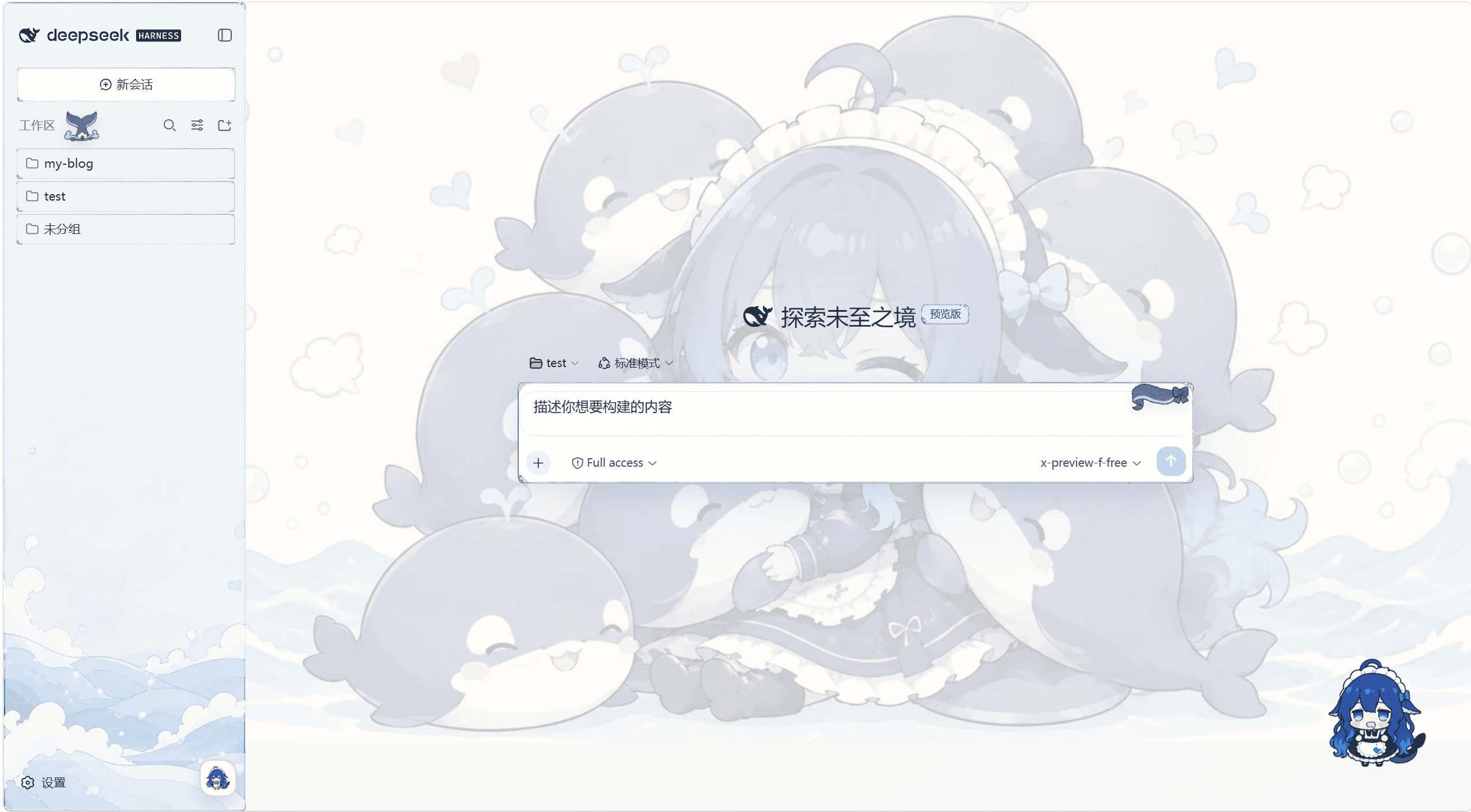
yunxiiQwQ/dsh-maid-whale-webUI
dsh-maid-whale-webui-workspace
dsh-maid-whale-webui-workspace is a community DeepSeek Harness plugin. Read the repository README before installing.
Install
npx @deepseek-ai/dsh plugin --profile web add ./maid-whale-webuiRestart `dsh web` after install. Bundle APIs can change during the developer preview.
README badge

[](https://dshhub.dev/plugins/dsh-maid-whale-webui)Paste this into your README. The star count updates with every catalog sync.
From the README
Excerpt from yunxiiQwQ/dsh-maid-whale-webUI, cleaned of badges and images.
dsh-maid-whale-webUI
English | 中文
DeepSeek Harness Web UI 的鲸鱼女仆主题插件:提供亮暗双主题、海洋插画壁纸、手绘边框,以及随 DSH 启停的原生 Windows 鲸鱼桌宠。
主题和 Pet 预览
以下图片均由本仓库当前版本实际运行后重新截取。
| 亮色模式 | 暗色模式 |
|---|---|
Pet 预览
<img src="maid-whale-webui/preview/pet-working.png" alt="鲸鱼桌宠工作状态预览" width="480">
安装说明
环境要求
- 可正常运行的 DSH(DeepSeek Harness)Web UI。
- Windows 10/11 x64:原生桌宠仅支持 Windows;单独使用 Web UI 主题不受此限制。
- 无需另外安装 Python 或 Node:桌宠帮助程序已包含在插件包中。
让 DSH 安装
直接对 DSH 说:
安装一下这个皮肤包:https://github.com/yunxiiQwQ/dsh-maid-whale-webUI/tree/main/maid-whale-webui
手动安装
# 1. 完全退出 DSH(包括托盘进程)
# 2. 克隆仓库并添加插件
git clone https://github.com/yunxiiQwQ/dsh-maid-whale-webUI.git
cd dsh-maid-whale-webUI
dsh plugin --profile web add ./maid-whale-webui

# 3. 启动 DSH Web UI
dsh --profile web
主题会在启动后自动应用,桌宠也会自动出现。若桌宠未显示,请前往 设置 → 插件 → 插件配置 → 鲸鱼桌宠 检查启用开关。工作区面板右下角的鲸鱼按钮也可即时启停桌宠;同一时间建议只启用一个界面主题。
更新与卸载
# 更新:在仓库目录拉取最新版本,然后重启 DSH
git pull

# 卸载:先完全退出 DSH
dsh plugin --profile web remove @dsh-external/dsh-client-ui-skin-maid-whale-webui
Pet 动作和触发
| 动作 | 触发条件 |
|---|---|
| 待机 | DSH 空闲、没有正在处理的会话 |
| 休眠 | 桌宠与 DSH 断开连接 |
| 思考 | 新任务开始、Agent 分析或整理工具结果 |
| 工作 | Agent 编辑文件、使用普通工具或处于通用工作阶段 |
| 查找 | 搜索、读取、抓取或打开内容 |
| 执行命令 | 执行 Shell、终端、PowerShell 等命令 |
| 验证 | 测试、检查、构建、Lint 或验证 |
| 等待确认 | Agent 提问、请求审批或任务被阻塞 |
| 成功 | 任务正常完成时短暂播放 |
| 错误 | 工具失败、任务异常结束或达到限制 |
| 拖动 | 按住桌宠移动超过拖动阈值 |
| 摸头 | 单击桌宠上半部,或双击桌宠 |
| 戳一戳 | 单击桌宠主体区域 |
| 碰尾巴 | 单击桌宠右侧尾巴区域 |
| 空闲小动作 | 空闲且未开启“减少动态效果”时随机播放 |
交互动作结束后,桌宠会回到最新的 Agent 状态。多会话同时活动时,显示优先级为:等待确认 → 错误 → 工作 → 思考 → 空闲。
声明
- 代码使用 BSD-3-Clause 许可证。
- 本项目是非官方社区主题,与 DeepSeek 官方无隶属或背书关系;角色与插画素材来源于社区二创。
- 桌宠的 Node 侧伴侣代码与 Python runtime 基于 QCYTSN/dsh-dafeiyu(MIT),完整归属说明见
maid-whale-webui/NOTICE。 - 插件仅使用 DSH 官方客户端插件机制,不修改 DeepSeek Harness 源码,也不介入模型请求。
- 桌宠不存储密钥、不截图、无遥测、不新增网络端口,只响应 DSH 自身事件。

