NOirBRight/dsh-llm-cursor
dsh-llm-cursor
Cursor subscription login and chat for DeepSeek Harness
Install
npx @deepseek-ai/dsh plugin --profile web add github:NOirBRight/dsh-llm-cursor#v0.2.5Restart `dsh web` after install. Bundle APIs can change during the developer preview.
README badge

[](https://dshhub.dev/plugins/dsh-llm-cursor)Paste this into your README. The star count updates with every catalog sync.
From the README
Excerpt from NOirBRight/dsh-llm-cursor, cleaned of badges and images.
dsh-llm-cursor
English | 中文
Unofficial Cursor subscription login and chat for DeepSeek Harness. This plugin is a separate provider route (cursor) and settings namespace (llm-cursor). It is not affiliated with Anysphere / Cursor, is not the official Cursor CLI, and it does not call official Cloud Agents or @cursor/sdk.
Ban risk — read this first. Cursor staff treat this class of private-client usage as against the Terms of Service. Your Cursor account can be restricted or banned. Installing, signing in, or sending a chat is enough. This is not a grey area and running it only on your own machine does not protect the account. Details: Risk and Terms of Service.
The package root exposes the Cordis plugin contract. The same artifact exports ./client, which contributes the Cursor card under Settings → LLM Providers.
Installation
DeepSeek Harness 0.1.0-rc.6 or later is required. Install directly from GitHub. Signing in after install uses the same unofficial session as the rest of this plugin, so the ban risk above applies immediately:
dsh plugin --profile web add github:NOirBRight/dsh-llm-cursor#v0.2.5
dsh web
The repository tracks release-ready lib artifacts, so GitHub installation needs no build-script allowlist. A source checkout can use a link installation after running pnpm run build.
Web configuration
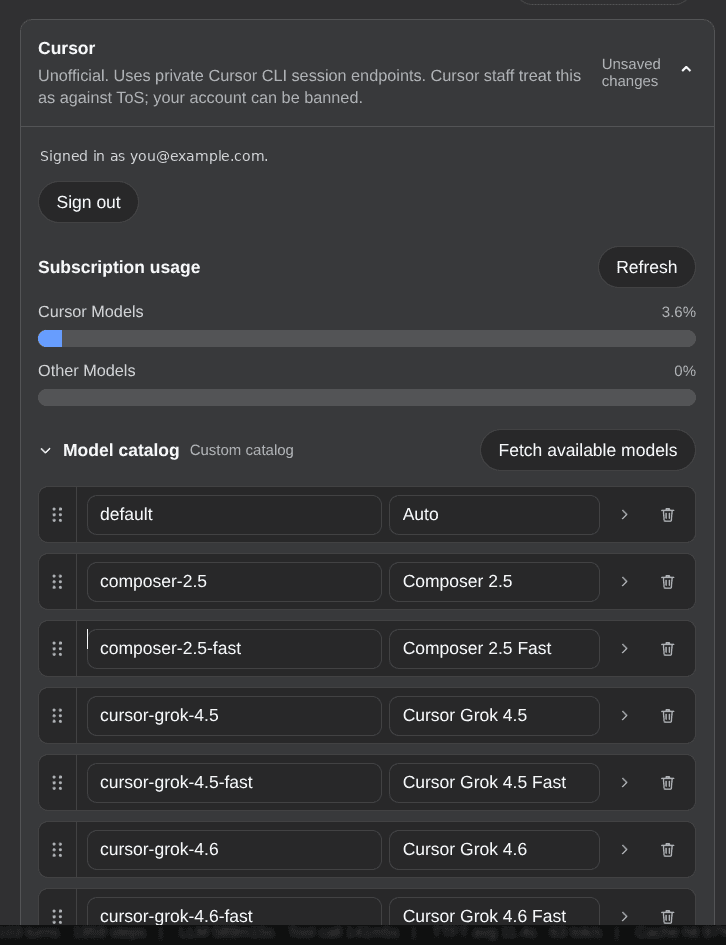
Open Settings → LLM Providers → Cursor. The card subtitle is the same warning as above: unofficial private endpoints; Cursor staff treat this as against ToS; the account can be banned.
Sign in with Cursor starts a Host-owned Deep Control PKCE flow (the same session entry the official CLI uses), opens the system browser, and polls until the login completes. The session is stored only on the Host at $DSH_HOME/cursor-oauth.json (mode 0600). The card then shows the account email when known. Sign out deletes that file. The browser never receives tokens.
This plugin does not read or write ~/.cursor or official CLI credential files. There is no paste-code box and no Dashboard crsr_… API-key login.
After sign-in, Fetch available models reads the account catalog with GetUsableModels. Cursor lists every thinking-level SKU as a separate wire id; the plugin collapses those into one family and maps the chat thinking-level picker back to the matching wire id. Fast SKUs stay their own models. Fetch offers a sibling -1m row only for families Cursor actually has Max Context for (for example claude-opus-5-1m), not for every maxMode flag; saving keeps only the rows you picked. You can then reorder, rename, or edit capability flags. Chat uses that saved catalog.
Chat itself goes through HTTP/2 Connect+protobuf POST https://api2.cursor.sh/agent.v1.AgentService/Run. DSH remains the only agent loop and tool executor. When signed in, the card also shows subscription usage from the Cursor dashboard rails (Cursor Models / Other Models, and On-Demand when it has spend or a cap). Logged-out cards do not request usage; an unrecognized surface is shown as unsupported, not as an error.
Chat without a session fails MISSING_CREDENTIAL. A stored session whose refresh fails is cleared and fails AUTH.
Compatibility headers
The Cursor session entry currently requires CLI-shaped request headers. This package sends:
…

