NOirBRight/dsh-llm-codex
dsh-llm-codex
ChatGPT Codex login, sortable catalog, and Fast models for DeepSeek Harness
Install
npx @deepseek-ai/dsh plugin --profile web add github:NOirBRight/dsh-llm-codex#v0.2.8Restart `dsh web` after install. Bundle APIs can change during the developer preview.
README badge

[](https://dshhub.dev/plugins/dsh-llm-codex)Paste this into your README. The star count updates with every catalog sync.
From the README
Excerpt from NOirBRight/dsh-llm-codex, cleaned of badges and images.
dsh-llm-codex
English | 中文
ChatGPT Codex integration for DeepSeek Harness. This plugin is a separate provider route (codex) and settings namespace (llm-codex). It does not declare apiKeyEnv, does not read or write ~/.codex/auth.json, and does not share a credential file with dsh-codex-connect.
The package root exposes the Cordis plugin contract. The same artifact exports ./client, which contributes the Codex card under Settings → LLM Providers.
Installation
DeepSeek Harness 0.1.0-rc.6 or later is required. Install directly from GitHub:
dsh plugin --profile web add github:NOirBRight/dsh-llm-codex#v0.2.8
dsh web
The repository tracks release-ready lib artifacts, so GitHub installation needs no build-script allowlist. A source checkout can use a link installation after running pnpm run build.
Web configuration
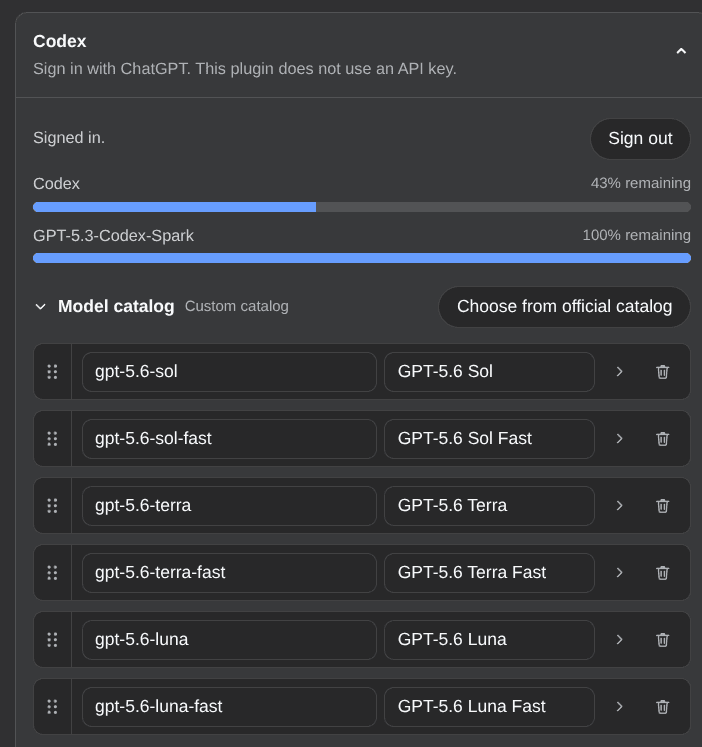
Open Settings → LLM Providers → Codex. Sign in with ChatGPT starts the official ChatGPT OAuth flow, opens the system browser, and stores the session only on the Host at $DSH_HOME/codex-oauth.json (mode 0600). The card then shows usage limits. Sign out deletes that file. The browser never receives tokens.
Model catalog
The conversation picker uses the displayed catalog stored as settings.models. The default is six rows:
gpt-5.6-sol/gpt-5.6-sol-fastgpt-5.6-terra/gpt-5.6-terra-fastgpt-5.6-luna/gpt-5.6-luna-fast
Fast and 1M are first-class picker rows, not checkboxes. Chat still uses the official wire id; Fast rows send service_tier: "priority". 1M rows (gpt-5.6-sol-1m, gpt-5.6-sol-1m-fast, and the Terra/Luna equivalents) set contextWindow to 1,000,000 so DSH compaction waits until 80% of that budget (800k). They are not in the default six-row catalog; add them from the official picker. The overlay can also add gpt-5.5, gpt-5.4, gpt-5.4-mini, gpt-5.3-codex-spark, and Fast variants. Custom ids can be added manually.
Default reasoning effort is per model and editable on the row: Luna uses max, Terra xhigh, Sol high, and every other official Codex model xhigh. Fast and 1M rows use their base model's default. A reasoning effort explicitly selected in a conversation takes precedence.
Chat goes through pi-ai openai-codex-responses against https://chatgpt.com/backend-api. Chat without a session fails MISSING_CREDENTIAL. A stored session whose refresh fails is reported as AUTH.
Optional capabilities
Search, view_image, and codex_generate_image are implemented but default off. Enabling any of them and clicking Save registers or unregisters it immediately; no restart is required. Search registers a standalone Codex WebSearchProvider (POST /codex/alpha/search). It does not write web.searchProvider or agent-default-model. The search-model dropdown lists official non-Fast models and defaults to gpt-5.6-luna. The plugin also registers web/openai-codex-search-llm-request so session logs written by dsh-codex-connect remain readable after that plugin is uninstalled. Search modes match official Codex:
cached(default): OpenAI-maintained index, no live fetchindexed: live fetch only when the search index gates the requestlive: unrestricted live retrieval
view_image is a model-invoked tool for local files and public-network HTTP(S) images. Spark is text-only.
…