283Gawin/dsh-heatmap
dsh-client-ui-activity-heatmap
DSH Web GUI activity heatmap plugin: GitHub-style commit/token/spend heatmap in the sidebar with per-model cost estimation
Install
npx @deepseek-ai/dsh plugin --profile web add link:$PWDRestart `dsh web` after install. Bundle APIs can change during the developer preview.
README badge

[](https://dshhub.dev/plugins/dsh-heatmap)Paste this into your README. The star count updates with every catalog sync.
From the README
Excerpt from 283Gawin/dsh-heatmap, cleaned of badges and images.
dsh-activity-heatmap
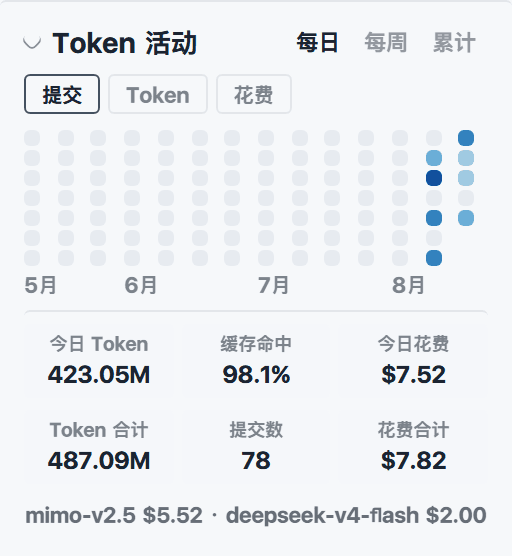
DSH Web GUI 左侧栏活动热力图插件:常驻显示近 90 天的活动热力图,可在 「提交次数 / Token 用量 / 估算花费」三个维度间切换;热力图下方固定一行显示 今日所有会话消耗的 Token 总数、缓存命中率,并按每次调用实际使用的模型 自动计算花费(USD,可配汇率显示 CNY)。
效果图
左侧栏热力图面板(浅色 / 深色模式):
| 浅色 | 深色 |
|---|---|
设置页「插件」分区中的配置卡片(浅色 / 深色模式):
| 浅色 | 深色 |
|---|---|
功能
- 近 90 天热力图(固定窗口):GitHub 贡献图式网格(周一至周日 × 按周 分列),颜色深浅按所选维度分级(对数刻度);鼠标悬停显示当日明细 (提交数 / Token / 花费)。
- 维度切换:提交(所有 DSH 工作区 git 仓库,不含 merge)、Token(billed 总量)、花费(按模型定价)。选择记忆在浏览器 localStorage。
- 统计块(参考 Codex 个人资料页形态):今日 Token 总量、今日缓存命中率 (cacheRead / (cacheRead + cacheWrite + miss input))、今日花费,以及 近 90 天窗口的 Token / 提交 / 花费合计与今日按模型的花费细分。
- 常驻侧栏:面板常驻左侧栏底部(工作区列表下方),自愈式挂载(React 重渲染后自动复位),可点击标题折叠,折叠状态持久化。
- 设置卡片:注册在设置页「插件」分区(settings.plugin.item),支持主题 (蓝色 / 绿色)、enabled、includeMerges、USD→CNY 汇率配置;也支持插件行 config。
- 数据来源:host 进程经官方 SDK 读取——sessionPersistence 列出全部会话 并重放其 durable 日志(assistant/message 携带的 provider usage、 request/header 与 request/context 携带的模型名),subprocess 跑 git log 统计各工作区每日提交。聚合结果 TTL 缓存 60s, 经 GET /activity-heatmap/stats 提供。
安装
git clone https://github.com/283Gawin/dsh-heatmap
cd dsh-heatmap
pnpm install && pnpm build          # link 安装需要构建产物(lib/)
dsh plugin --profile web add link:$PWD
或从 npm 发布版安装:
dsh plugin --profile web add @linxin666/dsh-client-ui-activity-heatmap
重启 dsh web 后,左侧栏即出现热力图面板。
设置页暴露:DSH 宿主对配置客户端可见的 settings namespace 有一个 白名单(
dsh-host-apiproxy的WEB_SETTINGS_NAMESPACES,官方包内 hardcode)。新插件必须把它的 namespace 加进该白名单,否则设置页卡片显示 "Settings not available for this plugin."。本插件需要把"activity-heatmap"追加到该数组;升级 dsh 后该修改会被覆盖,需重新 打补丁。修改后重启 dsh web 生效。
配置
设置页「插件 → 活动热力图」卡片可配置以下字段(等价于插件行 config):
| 键 | 类型 | 默认 | 含义 |
|---|---|---|---|
| theme | string | blue | 热力图主题色:blue / green |
| enabled | boolean | true | 插件总开关 |
| includeMerges | boolean | false | 提交数是否计入 merge 提交 |
| usdCnyRate | number | 0 | USD→CNY 汇率,0 表示不显示人民币 |
| priceOverrides | 文本行 | {} | 模型定价覆盖(见下) |
插件行 config 示例:
- insert:
    - id: ui-activity-heatmap
      name: '@linxin666/dsh-client-ui-activity-heatmap'
      config:
        theme: green
        usdCnyRate: 7.2
        priceOverrides:
          my-model:
            inputPerM: 0.5
            outputPerM: 2
修改后重启 dsh web 生效。
内置定价
内置表以厂商公开 API 定价为准(USD / 1M tokens),并按 xiufengsun/TokenTracker 的 curated price overrides 校准(2026-06/07 对照官方页验证)。DeepSeek 系按 官方页标注 cache_write = 输入价;Anthropic 系 cache_write 计费 (0.25 × 输入);其余厂商通常无 write 附加费。
…

