SiriLee/dsh-edit-approval
dsh-edit-approval
DeepSeek Harness plugin: per-edit approval with red/green line diff before write/edit/str_replace_editor (approve / reject / always allow)
Install
npx @deepseek-ai/dsh plugin --profile web add dsh-edit-approvalRestart `dsh web` after install. Bundle APIs can change during the developer preview.
README badge

[](https://dshhub.dev/plugins/dsh-edit-approval)Paste this into your README. The star count updates with every catalog sync.
From the README
Excerpt from SiriLee/dsh-edit-approval, cleaned of badges and images.
dsh-edit-approval
Per-edit approval for DeepSeek Harness: every write / edit / str_replace_editor call asks before the file is touched — a red/green line-level diff, then approve once or reject; master switch in Settings → General.
English | 中文
✨ Features
| Feature | Description |
|---|---|
| Pre-write approval | Intercepts write / edit / str_replace_editor on the tools/pre-execute seam and asks before any file is modified |
| Red/green line diff | Line-level diff (added / removed / context) computed per tool semantics; rendered per-line in the approval panel, with unchanged runs collapsed to … |
| Panel collapse | Long diffs can be collapsed via the button at the strip's right end to reveal the agent's output; CSS-only hide/show, expanding restores the exact view |
| Approve once / reject | Two actions, mirroring the Claude Code edit-approval flow; rejection reports back to the model |
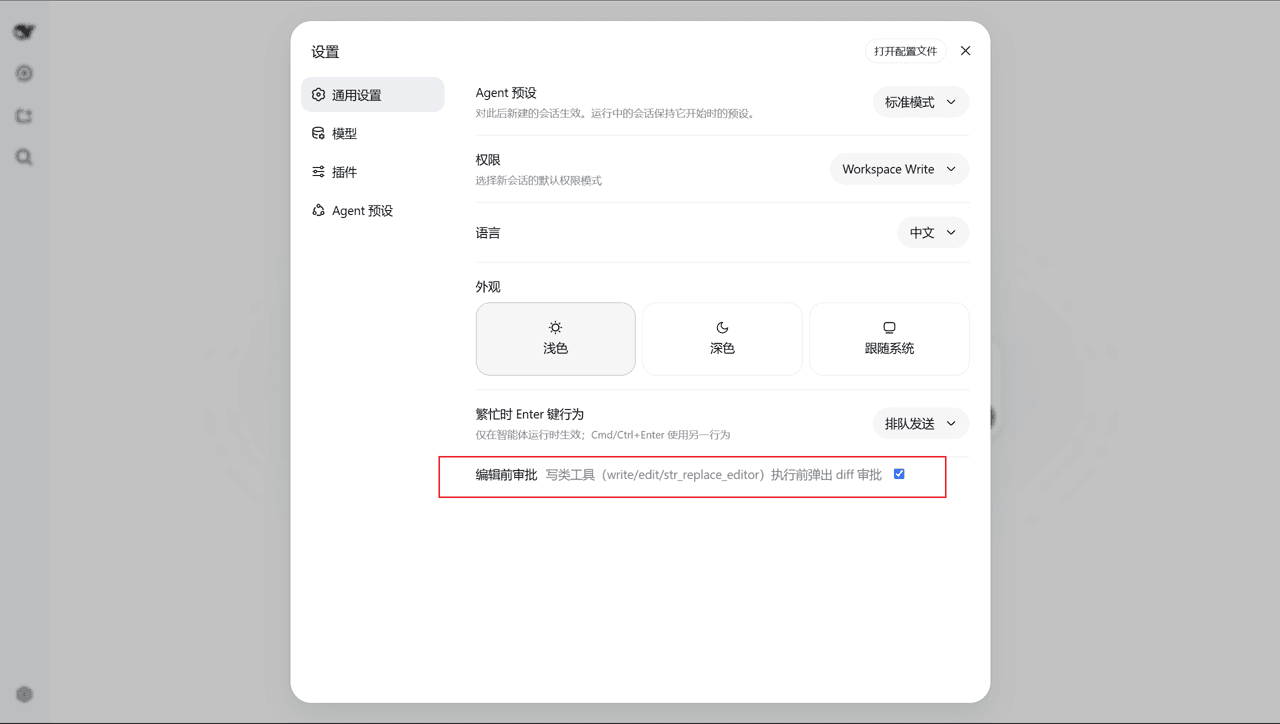
| Master switch | Settings → General "Edit approval" row, backed by the /approval-edit on|off|status host command (same source) |
| Policy-aware | Respects the session approval policy: ask intercepts, never (full access) runs edits through untouched |
| Thresholds | minDiffLines, includeCreate, includeDelete for fine-grained control |
📸 Screenshots
<td align="center"><img src="assets/screenshots/settings-switch.png" width="440" alt="Master switch in Settings → General"><br><sub>Master switch in Settings → General</sub></td>
<td align="center"><img src="assets/screenshots/status-command.png" width="440" alt="The /approval-edit command and its arguments"><br><sub>The /approval-edit command and its arguments</sub></td>
<td align="center" colspan="2"><img src="assets/screenshots/approval-panel.png" width="760" alt="Approval panel with the red/green line diff"><br><sub>Approval panel — red/green line diff</sub></td>
📦 Install
Published to npm — the registry path is the recommended one. Restart dsh web (--profile web) after installing.
dsh plugin --profile web add dsh-edit-approval
For contributors: local checkout (dsh plugin --profile web add /path/to/dsh-edit-approval), a pinned GitHub commit (dsh plugin --profile web add github:SiriLee/dsh-edit-approval#<sha>), or an offline tarball (npm pack then dsh plugin --profile web add ./dsh-edit-approval-<version>.tgz). A git install fails on first run until you add an allowBuilds key to the profile's pnpm-workspace.yaml (pnpm blocks git dependencies from running build scripts); after that it runs the plugin's prepare and installs it. npm pack also runs prepare, so a tarball always carries a prebuilt lib/ (with .d.ts) and the LICENSE.
How it works
The plugin listens on the tools/pre-execute waterfall (the seam the harness
runs before a tool executes) and matches a whitelist of registered tool names:
write, edit, str_replace_editor. For each intercepted call it:
…

