s3yf1337/dsh-easyvision
dsh-easyvision
DeepSeek Harness plugin: describe images through a dedicated vision model from the dsh model list, called over the harness's own LLM runtime
Install
npx @deepseek-ai/dsh plugin --profile NAME add dsh-easyvision`).Restart `dsh web` after install. Bundle APIs can change during the developer preview.
README badge

[](https://dshhub.dev/plugins/dsh-easyvision)Paste this into your README. The star count updates with every catalog sync.
From the README
Excerpt from s3yf1337/dsh-easyvision, cleaned of badges and images.
dsh-easyvision
Give your text-only agent eyes — with one command and zero extra APIs.
A DeepSeek Harness (dsh) plugin that lets a text-only conversation model "see" images by delegating them to a vision model from your own dsh model list, called over the harness's own LLM runtime.
Why
Your main model (e.g. deepseek-v4-flash) is text-only, so dsh's built-in
read_image tool refuses to send image blocks to it. dsh-easyvision fixes
that in two complementary ways:
- Attached images in the web chat just work. When you drop an image into the composer and send it, the message is admitted and the image is described through the vision model — no more "The current model does not support images; switch to a model that does" refusal. This happens only while the plugin is active, configured, and resolves a vision-capable model; if anything is wrong with the plugin you get an actionable "configure EasyVision" error instead.
describe_imagetool — the model can also inspect image files on its own by calling the tool, which hands the picture to the vision-capable model and returns the description as plain text.
No external API keys. No extra plumbing. Just a model that can see, picked from the models you already have.
Features
- One command install — idempotent, safe to re-run
- Zero external APIs — the vision call goes through
ctx.llm, the exact same runtime the agent loop uses: your keys, your retry policy, your middleware - Any vision model — pick anything from your dsh model list in Settings → EasyVision; no vendor lock-in
- Live configuration — model changes apply immediately, no restart
- Multiple images per call — validated PNG/JPEG/WebP/GIF, same
attachment pipeline as
read_image - Composer image drops — images attached to a chat message are described automatically when the conversation model is text-only
Screenshots
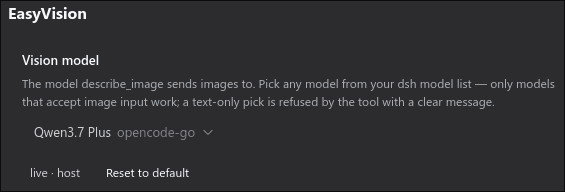
Configure the vision model in the dsh Settings UI — no file editing:
Quick start
curl -fsSL https://raw.githubusercontent.com/s3yf1337/dsh-easyvision/main/install.sh | bash
That's it. Then open Settings → EasyVision and pick a vision-capable
model from your list (the default is qwen3.7-plus on opencode-go).
Only models that declare image input work — a text-only pick is refused by the tool with a clear message.
Demo
$ dsh "what's in testpics/1.jpg?"

  ✦ describe_image(file_paths=["testpics/1.jpg"])
  ✓ qwen3.7-plus (opencode-go) · 1024×1024

  A futuristic cityscape at night — glowing cyan and blue towers
  under three moons, rendered in a digital painting style.
How it works
Two entry points, one pipeline:
…