ChrisZhangWG/dsh-codex-meter
dsh-codex-meter
Native Settings → Usage dashboard for DeepSeek Harness: balance, official token and cost analysis, trends, context warnings, and API activity.
Install
npx @deepseek-ai/dsh plugin --profile <name> add dsh-codex-meterRestart `dsh web` after install. Bundle APIs can change during the developer preview.
README badge

[](https://dshhub.dev/plugins/dsh-codex-meter)Paste this into your README. The star count updates with every catalog sync.
From the README
Excerpt from ChrisZhangWG/dsh-codex-meter, cleaned of badges and images.
dsh-codex-meter
DeepSeek API 用量监控插件(DSH web GUI):原生 Settings → Usage 页面,实时显示账户余额、官方今日消费、Token 构成与月度趋势。界面全部为英文。
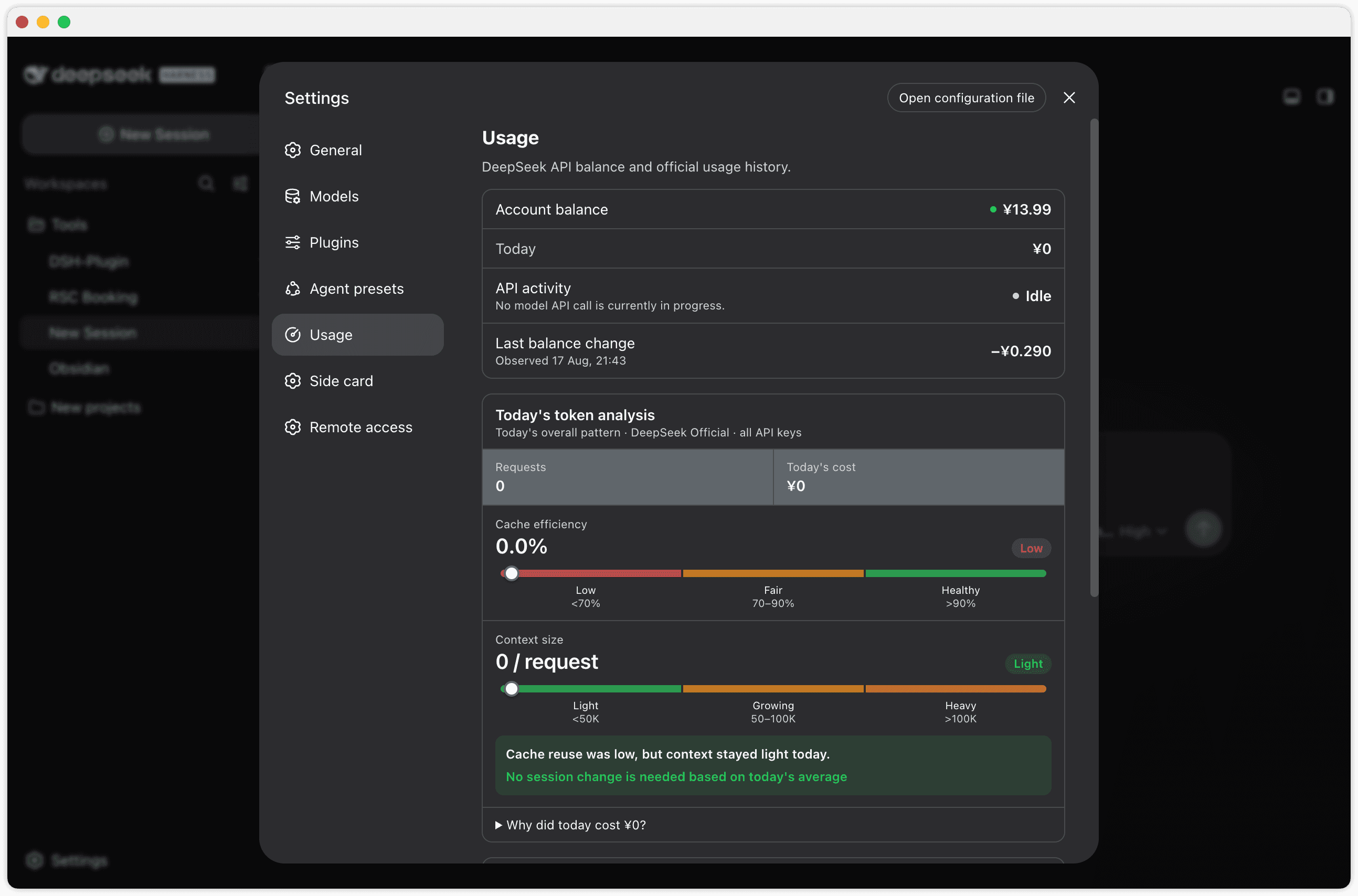
Usage overview and token analysis
Cost breakdown, trend, and daily records
功能
- Settings → Usage 原生页面(设置 → 通用 → Usage),不再是右下角悬浮胶囊
- 圆形仪表图标:Settings 侧栏 Usage 入口使用自定义圆形仪表图标(非默认齿轮)
- 数据项均为英文标签:
Account balance— DeepSeek API 剩余余额(官方/user/balance,实时准确)Today— 今日已消费(配置平台 token 后为官方数据;否则≈本地估算,估算值明确带≈前缀)Last balance change— 最近一次观测到的余额变动(含观测时间,+/−带符号显示)
- Today's token analysis 官方今日分析:
- 请求数、今日费用,以及 Cache efficiency / Context size 两条区间尺
- Cache efficiency:
Low <70%/Fair 70–90%/Healthy >90% - Context size:
Light <50K/Growing 50–100K/Heavy >100K(按今日平均输入/请求) - 组合生成今日整体趋势与行动建议,明确不将今日聚合值误称为当前 Session 的精确诊断
- Cache hit input / Cache miss input / Output 的 Token 与费用拆分折叠到
Why did today cost …? - 可展开的小时级请求、Token 与官方费用记录
- 聚合所有 API Key 后再传给浏览器,不返回 API Key 名称或标识
- Official cost trend 官方费用趋势折线图:
7D/Month两个视图切换;今天之后的日期会被过滤掉(平台对本月剩余日期返回零值占位,不画进图里)- 每个每日费用点都显示数据标签(悬停还有 tooltip)
- 周期统计:
Total(合计)/Daily avg(日均)/Peak(峰值) Official daily records (N)可展开查看逐日官方明细
- API activity 实时 API 活动状态:
Active= 确有 llm/stream 模型请求在运行(显示进行中的调用数与已耗时);Idle= 无模型 API 请求- 工具执行、权限等待等不会被误报为活跃 API 调用;Active 仅表示计费可能在进行中,最终费用以官方数据为准
- 活动状态轮询是纯本地的(1s 本地路由),不会产生额外的 DeepSeek 模型调用
View full usage on DeepSeek Platform按钮:打开 DeepSeek 平台用量页(明细 + 充值)- 窗口隐藏/最小化时暂停轮询,恢复可见立即补刷;数值无变化时不触发重渲染
- 平台 token 过期/失效时,Today 行标签变为
Today (refresh needed),不会静默退回估算 - 只使用
--dsw-*主题变量,跟随浅色 / 深色模式与应用字号缩放 - 密钥不出本机:浏览器只访问宿主本地路由;仓库中不存储任何密钥值,也不会把密钥发送给浏览器
用量缓存(Usage cache)
打开 Settings → Usage 时,页面会先立即显示最近一次成功获取的用量统计,同时并行拉取最新数据,请求成功后替换显示;缓存存活 7 天。
- 刷新期间显示
Showing saved data · refreshing… - 刷新失败时保留已有数据并显示
Refresh failed · showing the last saved data. - 只缓存展示型统计数据:余额(balance)、今日消费(Today)、官方 Token 分析(todayAnalysis)、官方历史(usageHistory)与观测到的余额变动(balanceChanges)
- 绝不缓存
DEEPSEEK_PLATFORM_TOKEN、API Key、凭据等任何密钥(缓存结构里没有这些字段) - API activity 不缓存:Active/Idle 始终来自实时活动接口
/api/codex-meter/api-activity - 首次打开(无缓存)会等待一次真实请求,属预期行为
安装(桌面版手动方式)
本插件按 DSH 标准 bundle 插件设计(dsh.bundle.patch + dsh.client)。推荐从 npm 安装:
dsh plugin --profile <name> add dsh-codex-meter
也可直接从 GitHub 安装:dsh plugin --profile <name> add github:ChrisZhangWG/dsh-codex-meter。
桌面版(DSH Desktop 2.x)的手动接线方式:
-
将本包放入 profile 的 node_modules:
PROFILE=~/.dsh/profiles/desktop mkdir -p "$PROFILE/node_modules" cp -R dsh-codex-meter "$PROFILE/node_modules/" -
桌面版 profile 的 node_modules 为空,插件的宿主依赖需软链到桌面自带 bundle:
mkdir -p "$PROFILE/node_modules/@deepseek-ai" ln -sfn "/Applications/DSH Desktop.app/Contents/Resources/app.asar.unpacked/node_modules/@deepseek-ai/dsh-credentials" \ "$PROFILE/node_modules/@deepseek-ai/dsh-credentials" -
在
$PROFILE/cordis.patch.yml追加 loader 条目:- insert: - id: codex-meter name: dsh-codex-meter -
完全重启 DSH Desktop(退出再打开)。重启后进入 Settings → Usage 查看。
若用 CLI 版
dsh web:profile 自带完整 pnpm workspace,直接dsh plugin --profile web add dsh-codex-meter即可,无需手动接线。
配置
…

