hytime/dsh-client-ui-shortcuts
dsh-client-ui-shortcuts
Profile-aware keyboard shortcuts for the DeepSeek Harness Web Client
Install
npx @deepseek-ai/dsh plugin --profile web add @hytime/[email protected]Restart `dsh web` after install. Bundle APIs can change during the developer preview.
README badge

[](https://dshhub.dev/plugins/dsh-client-ui-shortcuts)Paste this into your README. The star count updates with every catalog sync.
From the README
Excerpt from hytime/dsh-client-ui-shortcuts, cleaned of badges and images.
DSH Client UI Shortcuts
English | 中文
Browser-safe, profile-aware keyboard control for DeepSeek Harness Web.
This plugin runs inside DSH Web, adds predictable keyboard control for question and approval flows, and provides Session and Workspace navigation when the corresponding DSH capabilities are available. It does not modify DSH core, the agent loop, or the model protocol.
Why install it
- Answer DSH questions and approvals without leaving the keyboard.
- Choose Standard, Vim, or Custom profiles for interaction cards and global actions.
- Navigate Sessions and Workspaces with explicit physical
Meta,Ctrl,Alt, andShiftmodifiers. - Automatically expand a collapsed target Workspace before opening an existing eligible Session.
- Keep unavailable actions out of routing and shortcut lists when DSH does not provide the required capability.
- Stay within browser and operating-system boundaries: reserved shortcuts may never reach a web page.
Screenshots
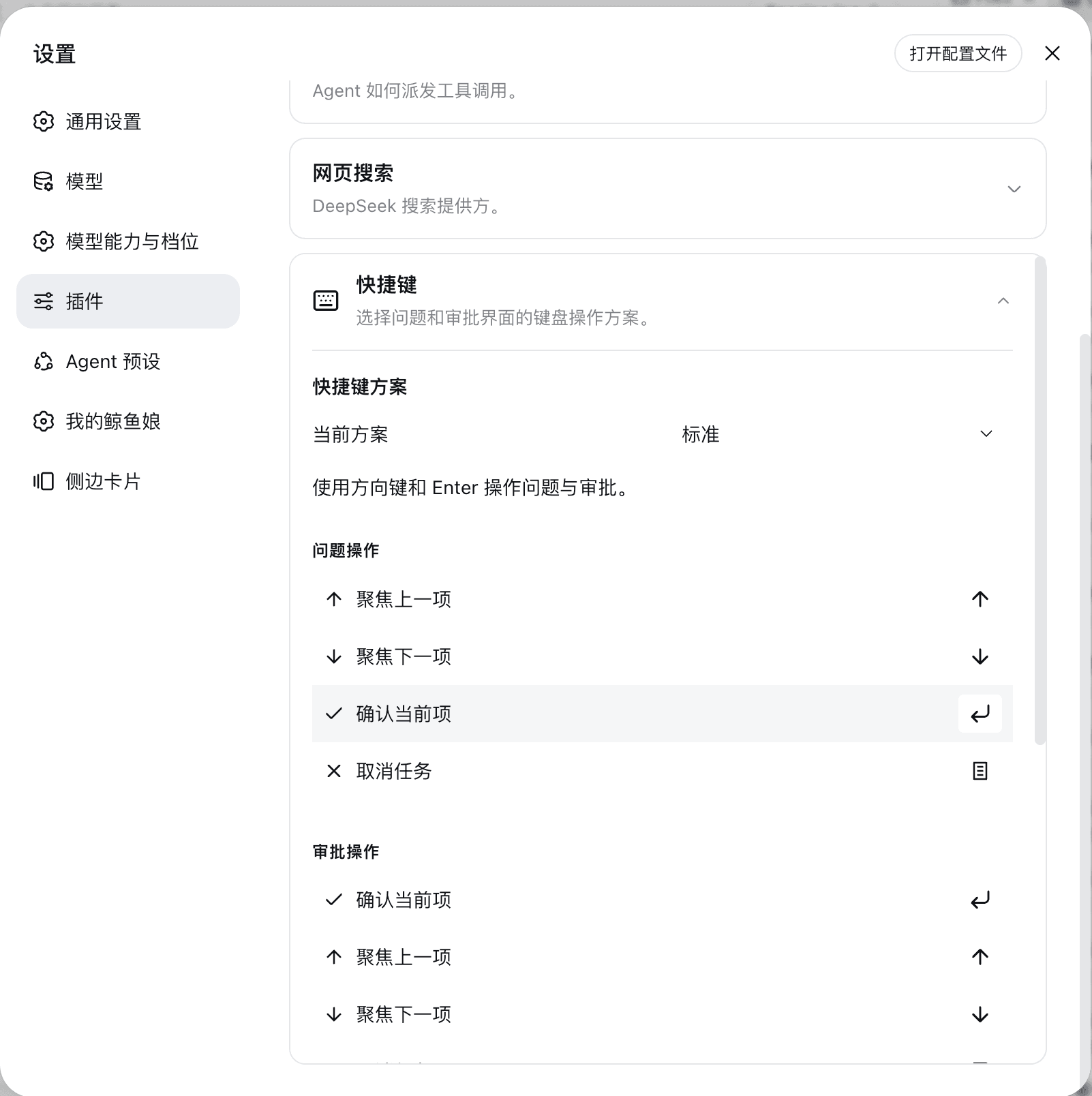
Question and approval interaction shortcuts:
Global Session and Workspace shortcuts with platform keycaps:
Install in 60 seconds
The recommended path is the npm release because it includes prebuilt lib/ artifacts and requires no install-time build. Install it through the DSH CLI, then restart or reload the Web composition:
dsh plugin --profile web add @hytime/[email protected]
dsh --profile web
To install the GitHub source instead, pin a release tag or commit rather than the default branch:
dsh plugin --profile web add github:hytime/dsh-client-ui-shortcuts#v0.1.13
A Git install runs the package's prepare script during installation. pnpm may require the exact package key from its error message to be added to the profile's allowBuilds; grant that permission only for trusted, pinned source. The installation guide has the complete steps.
The plugin is not a standalone React or Vite application. Do not open apps/web directly and do not install it into a DSH profile with npm install, pnpm add, or manual edits to the profile manifest or lockfile.
For upgrades, removal, local tarballs, profile inspection, and troubleshooting, see the installation guide.
What is included
- Question cards with single-select, multi-select, custom-answer, skip, previous-question, and submit flows.
- Approval cards with allow once, reject, details, cancel, and keyboard-confirmation flows.
- Standard, Vim, and editable Custom profiles with one active profile at a time.
- Explicit physical
Meta,Ctrl,Alt, andShiftmodifiers, alternatives, and two-stroke chords. - Browser-reserved shortcut denylist and conflict validation.
- Capability checks for DSH features that are not available in the current composition.
- Session, Workspace, session-branch, and theme actions when the corresponding DSH capabilities are available.
Shortcut reference
Question and approval cards
| Command | Question | Approval |
|---|---|---|
| Focus previous item | ArrowUp | ArrowUp |
| Focus next item | ArrowDown | ArrowDown |
| Activate current item | Enter | Enter |
| Cancel current task | Escape | Escape |
The Vim profile replaces the two focus bindings with k and j; confirmation and cancellation keep Enter and Escape. These bindings are scoped to the active interaction card.
Global actions
…

