ChuanTianML/dsh-chat-tidy
dsh-chat-tidy
Restrained chat typography and layout for DeepSeek Harness Web
Install
npx @deepseek-ai/dsh plugin --profile web add github:ChuanTianML/dsh-chat-tidyRestart `dsh web` after install. Bundle APIs can change during the developer preview.
README badge

[](https://dshhub.dev/plugins/dsh-chat-tidy)Paste this into your README. The star count updates with every catalog sync.
From the README
Excerpt from ChuanTianML/dsh-chat-tidy, cleaned of badges and images.
dsh-chat-tidy
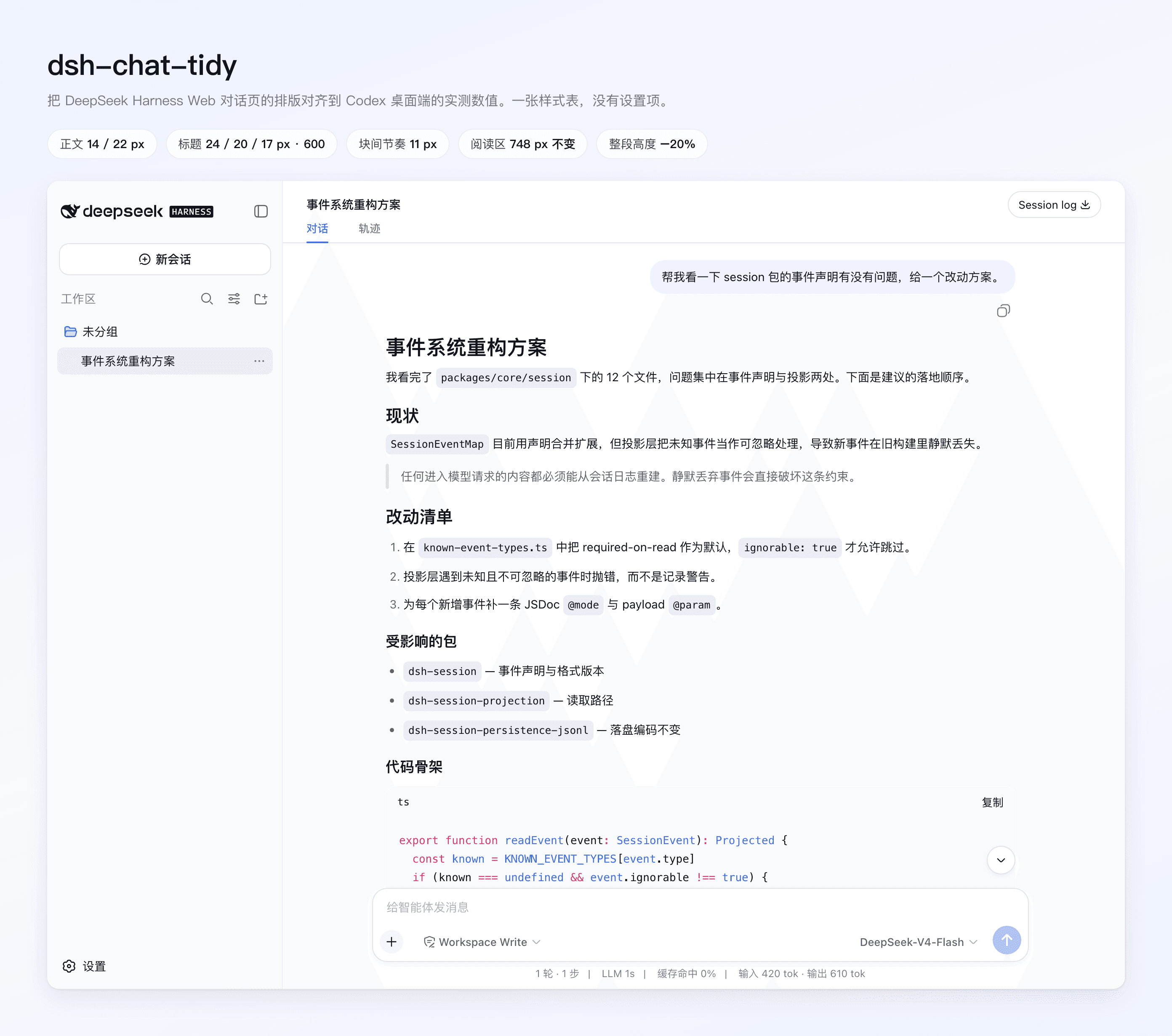
Tidy Chat aligns the DeepSeek Harness Web conversation page with the reading rhythm of a mature coding-agent client. Every metric is measured from the Codex desktop app, then applied to DSH's own chat anchors. The Markdown renderer, theme, tool calls, reasoning, and session behavior are untouched.
What changes
| Item | DSH default | Tidy Chat (Codex-measured) |
|---|---|---|
| Body | 16 / 28 px | 14 / 22 px |
| h1 – h6 | 24 / 22 / 20 / 16 / 16 / 16 px, weight 700 | 24 / 20 / 17 / 17 / 15 / 15 px, weight 600 |
| Heading margin | 32 px above, 16 px below | 20 px above, 10 px below |
| Block rhythm | 16 px | 11 px |
| List indent · item gap | 18 px · 6 px | 21 px · 8 px |
Rule (hr) | 32 px | 28 px |
| Blockquote | 2 px square border | rounded 4 px bar, 18 px inset |
| Table cells | 15 / 25 px, 10 × 16 px padding | 14 / 22 px, 8 × 12 px padding |
| Activity rows | 24 px, 14 / 24 px label | 22 px, 13 / 22 px label |
The reading column stays at DSH's 748 px, because Codex measures ≈730 px — the existing width was already right. Two earlier over-tightenings are reversed: list items go back out to 8 px and horizontal rules to 28 px.
Side by side
Both captures come from the same seeded session in the real assembled Web app, at the same viewport and device scale. The only difference between the two panes is the plugin stylesheet.
The same reply rendered end to end is 1411 px tall by default and 1127 px with Tidy Chat — 20 % less scrolling for identical content.
Design posture
Tidy Chat is a stylesheet and nothing else. There is no preference, no Settings row, and no stored state — disabling or uninstalling the plugin is the off switch. It does not:
- parse or sanitize Markdown;
- replace
conversation.chat.noderenderers; - hide reasoning, context injection, or tool calls;
- observe and rewrite React DOM nodes;
- change model output, session logs, or host data.
Selectors use DSH's semantic anchors (data-chat-flow, data-chat-flow-kind, data-slot, data-disclosure-row, data-composer-card, data-turn-tail, data-time-hover-root), never generated CSS-module class names. Each one carries a leading body so it outranks the equal-specificity module default regardless of stylesheet order. Colors continue to come from --dsw-* tokens, so built-in themes and token-based theme plugins keep palette ownership. See DESIGN.md for the measurement record.
Install
dsh plugin --profile web add github:ChuanTianML/dsh-chat-tidy
Restart dsh web. The new layout applies immediately.
The GitHub repository includes verified host and client bundles, so installation does not need to run a dependency build script or change pnpm's allowBuilds policy.
For local development:
dsh plugin --profile web add -w /absolute/path/to/dsh-chat-tidy
The -w flag is required because the Web profile is a pnpm workspace root.
Compatibility
- Built-in light/dark themes: supported.
- dsh-skin: compatible; Tidy Chat owns geometry while dsh-skin owns colors.
- dsh-ux: both plugins change chat typography and flow spacing. Use one layout plugin at a time to avoid competing overrides.
- Alternative conversation views: Tidy Chat only affects views that reuse DSH's semantic chat-flow anchors.
Colors keep coming from the host, so the dark theme changes geometry only:
…

