wsz987/dsh-channels
dsh-channels
dsh-channels is a community DeepSeek Harness plugin. Read the repository README before installing.
Install
npx @deepseek-ai/dsh plugin --profile web add -wRestart `dsh web` after install. Bundle APIs can change during the developer preview.
README badge

[](https://dshhub.dev/plugins/dsh-channels)Paste this into your README. The star count updates with every catalog sync.
From the README
Excerpt from wsz987/dsh-channels, cleaned of badges and images.
dsh-channels
将微信、QQ、钉钉、飞书和 Telegram 接入 DeepSeek Harness
多渠道集成,统一配置,并在各平台与 Agent 对话
支持图片与文件收发,Agent 可直接读取 PDF、DOCX、XLSX 和文本内容
English | 简体中文
本项目是社区维护的 DeepSeek Harness 渠道扩展,不是 DeepSeek Harness 或各消息平台的官方项目。项目参考各平台面向 OpenClaw 提供的渠道接入方案,结合官方 SDK / API 适配到 DeepSeek Harness;运行时不依赖 OpenClaw。
效果预览
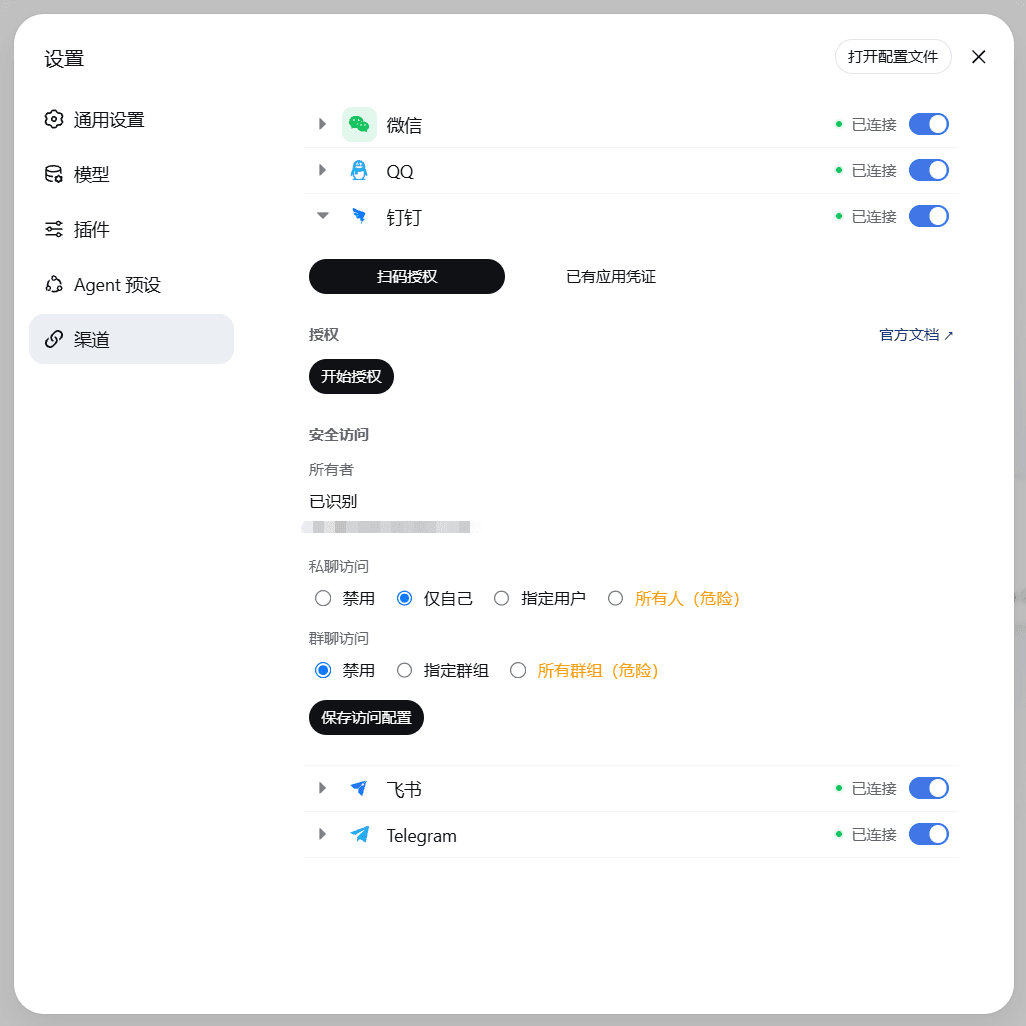
接入后,在 Harness Web“设置 → 渠道”面板统一配置与扫码授权,并在各平台对话框中直接与 Agent 对话(图片来源:docs/ScreenShot):
Harness Web · 渠道设置与 Telegram 接入示例(图片与文件收发、附件内容读取)
各平台对话框
能力总览
| 渠道 | 文本 | 图片 | 文件 | 流式回复 | 状态 |
|---|---|---|---|---|---|
| 微信 | 支持 | 收发 | 入站读取 | - | ✅ |
| 支持 | 收发 | 收发 | 支持 | ✅ | |
| 钉钉 | 支持 | 收发 | 收发 | 支持 | ✅ |
| 飞书 | 支持 | 收发 | 收发 | 支持 | ✅ |
| Telegram | 支持 | 收发 | 收发 | 支持 | 实验性,待 live gate |
- 支持视觉的多模态模型可直接识别图片;PDF、DOCX、XLSX 和文本附件可提取内容供 Agent 读取(入站单文件上限 100 MiB);音频和视频暂为降级处理。
使用前须知
- 确认
npx @deepseek-ai/dsh可运行,且 Harness Web 普通会话可正常对话。 - 0.5.x 版本线要求 DeepSeek Harness
0.1.1-rc.2及以上、Node22.19+;仍在使用 Harness0.1.0-rc.7的用户请停留在0.4.x(版本线对照见 兼容矩阵)。 - 渠道会话通常使用
Workspace Write;仅在确需访问 Workspace 外文件且信任当前任务时启用Full access。 - 项目仍在快速迭代,升级前请备份数据。
从 0.3.x 或更早版本升级? 0.4.1 起收紧了渠道访问权限。升级后请前往 Harness Web → 设置 → 渠道 → 选择已启用的渠道 → 安全访问,重新确认允许使用 Bot 的账号和群聊。完成前,即使渠道显示连接正常,普通消息也可能无法进入 Agent。
安装
# 安装稳定版 bundle
npx @deepseek-ai/dsh plugin --profile web add -w @wsz987/dsh-channels@latest

# 检查 bundle 是否合并到 profile
npx @deepseek-ai/dsh --profile web --dump-config

# 启动 Harness Web
npx @deepseek-ai/dsh web
安装完成后,在 Harness Web 的“设置 → 渠道”中配置或登录需要使用的渠道,并完成“安全访问”设置。
更新与卸载
安装、更新和卸载时请保留 -w 参数。
跨版本线升级(如 0.4.x → 0.5.x)?
update只在 package.json 当前版本范围内更新,跨版本线必须先升级 Harness CLI,再用add ...@latest重新安装(顺序不能颠倒,否则旧宿主上会出现运行不兼容):npm i -g @deepseek-ai/dsh@latest # 先升级 Harness(0.5.x 需要 0.1.1-rc.2+,Node ≥ 22.19) npx @deepseek-ai/dsh plugin --profile web add -w @wsz987/dsh-channels@latest
# 在当前 package.json 版本范围内更新
npx @deepseek-ai/dsh plugin --profile web update -w @wsz987/dsh-channels

# 卸载 bundle
npx @deepseek-ai/dsh plugin --profile web remove -w @wsz987/dsh-channels
新版本提示(仅提示,不自动安装)
运行时会定期检查 npm 上 @wsz987/dsh-channels 是否有比本地更新的版本(默认每 24 小时一次;离线或检查失败时静默跳过)。发现新版本时:
- Web「设置 → 渠道」页面顶部会显示新版本提示条,并给出升级命令;跨版本线(如 0.4.x → 0.5.x)时提示两步升级(先升 Harness CLI,再重装 bundle),同版本线提示单条 update 命令。
- 渠道会话内发送
/version可查看当前版本与同样的升级提示。
该功能只做提示,绝不会自动安装或升级。浏览器不直接访问 npm registry(检查由 host 侧完成,页面只读净化后的结果)。如需关闭或调整频率,可在 profile patch 中覆盖 channels-control(注意 patch 是整体替换,需保留完整字段):
- id: channels-control
  name: '@wsz987/dsh-channels/control'
  inject: [channels, credentials]
  config:
    updateCheck:
      enabled: true       # 设为 false 关闭新版本检查
      intervalHours: 24   # 两次检查的最小间隔(小时)
配置与登录
| 渠道 | 必要信息 | 登录方式 |
|---|---|---|
| 微信 | 无 | 扫码登录,凭据自动持久化 |
| AppID、AppSecret | QQ 开放平台创建机器人 | |
| 钉钉 | clientId、clientSecret(可选) | 扫码或在钉钉开放平台创建应用 |
| 飞书 | AppId、AppSecret | 在飞书开放平台创建应用,或扫码创建智能体 |
| Telegram | Bot Token | 在 @BotFather 创建机器人并填写 Token |
密钥由 Harness 凭据管理,cordis.patch.yml 只填写 appSecretRef 等引用。完整示例见 minimal-profile;配置 patch 会整体替换 config,不会深度合并。
…