hatsuyuki0103/dsh-at-any
dsh-at-any
Codex-style @file mentions for DeepSeek Harness web GUI - all file formats, no index truncation
Install
npx @deepseek-ai/dsh plugin --profile web add https://github.com/hatsuyuki0103/dsh-at-any/archive/refs/tags/v0.1.0.tar.gzRestart `dsh web` after install. Bundle APIs can change during the developer preview.
README badge

[](https://dshhub.dev/plugins/dsh-at-any)Paste this into your README. The star count updates with every catalog sync.
From the README
Excerpt from hatsuyuki0103/dsh-at-any, cleaned of badges and images.
dsh-at-any
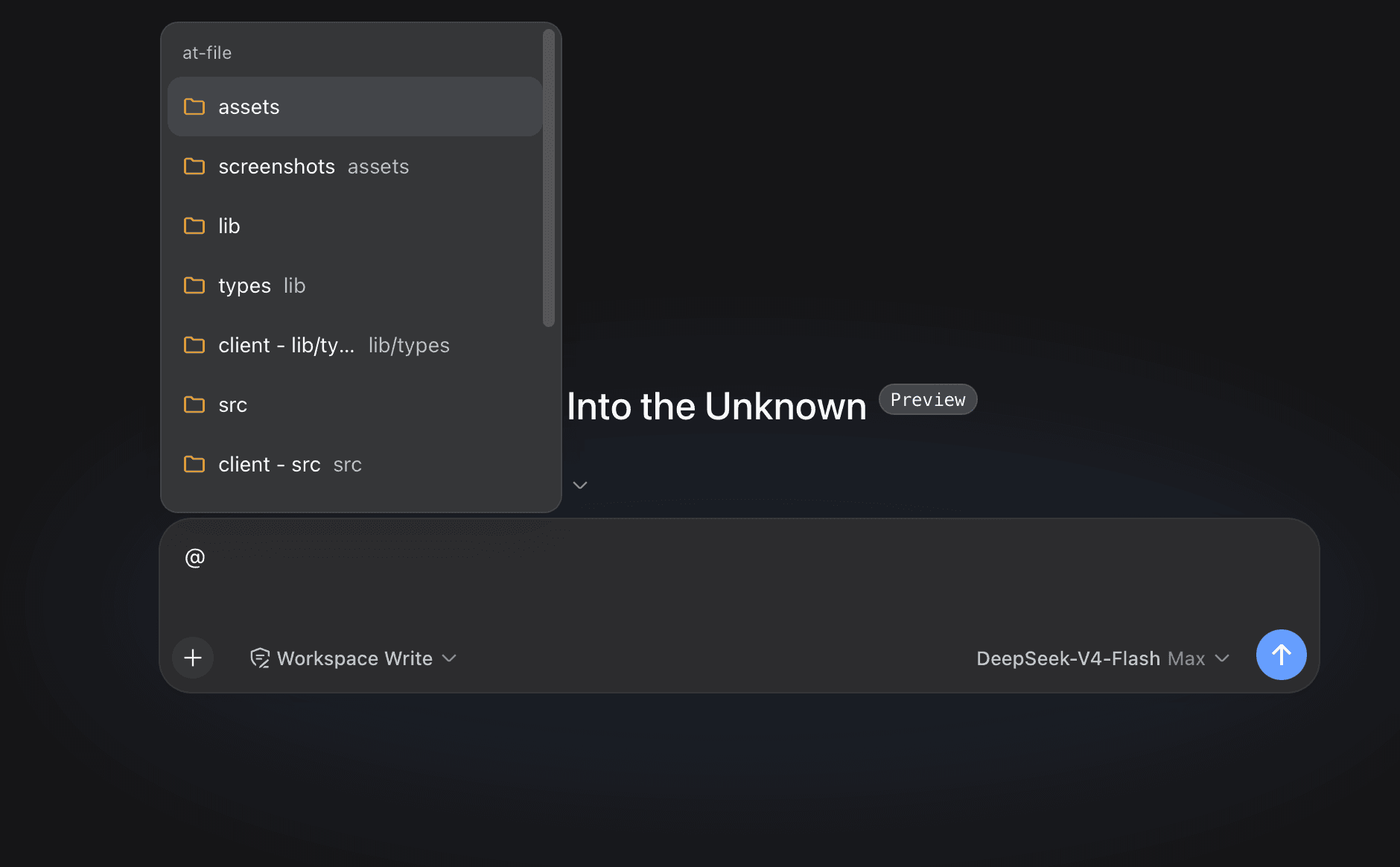
Workspace path references for the DeepSeek Harness web interface. Type @ in the composer to search the current workspace and insert a file or directory path.
Why dsh-at-any instead of dsh-at-file: the original plugin capped its index at 5000 entries by default, which silently dropped .java/.vue and other source files in workspaces with more files (the bug this fork fixes). dsh-at-any removes the practical cap (default 1,000,000) and indexes every source format — .java, .vue, .ts, XML, YAML, images, PDFs, extension-less and hidden files (.env, ...). Build-artifact directories (target/dist/node_modules/...) are still skipped by default.
Usage
Choose a result from the @ menu. The selected path remains visible in the draft and can be opened or removed from the reference bar.
Review @docs/spec.pdf
Before the agent starts a step, the plugin confirms that the path exists inside the active workspace. It then adds a short reference message:
<workspace-reference path="docs/spec.pdf" kind="file" />
The reference contains the workspace-relative path and its kind. The plugin does not open the referenced file or list the contents of a referenced directory. The agent can inspect the path with the tools available in the current session when the task requires it.
File format and file size do not change this behavior. A PDF follows the same path-reference flow as any other workspace file.
This mechanism applies to version 0.3.0 and later. Earlier releases read file content during submission and enforced file-size limits.
Path Picker
Plain queries match filenames. Exact names, prefixes, and compact matches rank ahead of looser results, without matching letters scattered across a long directory path.
A query containing / matches path segments in order. For example, src/view can find src/client/view.ts. A trailing slash such as src/ searches within that path.
When a directory is highlighted, press ArrowRight to enter it. The draft advances to @path/ without a trailing space, and the candidate menu stays open for the next selection. Enter and pointer selection keep the existing behavior and finish the directory reference.
Each result shows the filename first and its parent directory underneath. Duplicate filenames include the parent directory in the main label. Built-in SVG icons distinguish folders, source files, text, PDFs, images, data and configuration files, archives, and other files.
The default index skips common version-control directories, IDE metadata, dependency trees, caches, and build output. The list covers VS Code, Visual Studio, JetBrains IDEs, Fleet, Eclipse, Android and Gradle, Xcode, CMake, Flutter, .NET, Unity, Unreal, and common JavaScript and Python output directories. OS metadata files named desktop.ini, Thumbs.db, and .DS_Store are excluded by default.
Install or Update
dsh plugin --profile web add https://github.com/hatsuyuki0103/dsh-at-any/archive/refs/tags/v0.1.0.tar.gz
Use the same command to update an existing installation. Restart dsh web after installation so the Host and browser client load version 0.1.0.
…

