SiriLee/dsh-approval-hotkeys
dsh-approval-hotkeys
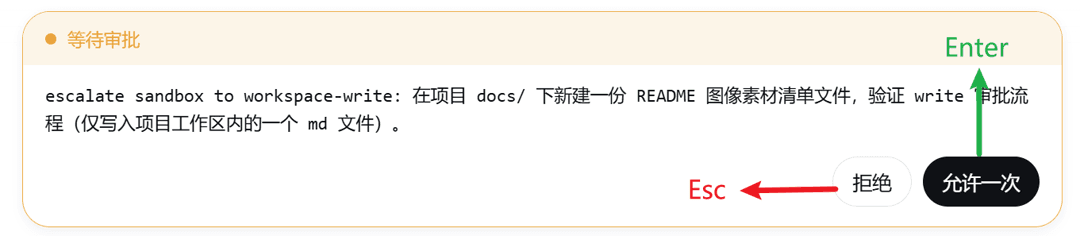
DeepSeek Harness plugin: approval-panel hotkeys — Enter approves once, Esc rejects, Esc pauses a running agent
Install
npx @deepseek-ai/dsh plugin --profile web add dsh-approval-hotkeysRestart `dsh web` after install. Bundle APIs can change during the developer preview.
README badge

[](https://dshhub.dev/plugins/dsh-approval-hotkeys)Paste this into your README. The star count updates with every catalog sync.
From the README
Excerpt from SiriLee/dsh-approval-hotkeys, cleaned of badges and images.
dsh-approval-hotkeys
Approval-panel hotkeys for DeepSeek Harness, for every approval source — not just edits.
English | 中文
A deliberately minimal plugin with one generic rule: Enter always presses the confirm button (the primary, right-most action); Esc always presses the cancel button — on every button-bearing interaction panel the harness renders.
| Panel | Enter → confirm | Esc → cancel |
|---|---|---|
Approval ([data-approval-key]) | Allow once | Reject |
Question / choice ([data-question-key]) | Submit / Next | Discard the group |
Plan review ([data-plan-review-key]) | Approve | Decline (or discuss) |
The panel anchors are harness-generic, so the hotkeys work on every interaction the GUI shows — edit approvals, permission escalations, tool questions, plan reviews. This is the Claude Code habit: confirm with Enter, refuse with Esc.
Approval panel
Every approval — edits, permission escalations, anything routed through the ApprovalPanel. Enter presses Allow once, Esc presses Reject.
Question / choice panel
Tool questions (ask_user_question). Enter presses Submit / Next,
Esc presses Discard the group.
Plan review panel
Enter presses Approve, Esc presses Decline (or Discuss when the panel has no decline action).
Install
dsh plugin --profile web add dsh-approval-hotkeys
Restart dsh web — or, since this plugin is pure browser-side, just refresh the page when the host side did not change. No configuration, no settings page.
For contributors: install from a local checkout or a pinned commit — dsh plugin --profile web add /path/to/dsh-approval-hotkeys or dsh plugin --profile web add github:SiriLee/dsh-approval-hotkeys#<sha>. A git install fails on first run until you add an allowBuilds key to the profile's pnpm-workspace.yaml (pnpm blocks git dependencies from running build scripts); after that it runs the plugin's prepare and installs it.
How it works
- Enter → confirm: clicks the panel's primary button — the last button
of its action row ("Allow once", "Submit/Next", "Approve"). The harness's
Buttoncomponent has no stabledata-variantattribute (variants are CSS-Modules hash classes), so the plugin anchors on the layout contract that the confirm action always renders last — which is exactly the primary-colored button. - Esc → cancel: clicks the panel's cancel button — Reject (first), Discard (header), Decline (footer second-last, or Discuss when the panel has no decline action). Without a panel, Esc is left alone (no pause/stop binding — the GUI's own stop button and shortcuts own that).
Guards (what the plugin deliberately does NOT do)
- Never while typing: keydown inside an input / textarea / select /
contentEditable (the composer owns
Enter/Escthere — e.g.Shift+Enternewline,Escdismisses suggestions). - Enter with focus on a button: left to the browser (it activates the focused button natively) and to the panel itself (the question composer's options submit on Enter) — acting again would double-fire.
- Never on chords or repeats:
Ctrl/Meta/Alt+keycombinations and held-key repeats are left alone. - Esc with no panel: left alone — the plugin never stops or pauses the agent; panels are the only surface it acts on.
Button resolution contract (data-hotkey="none")
…

