HaoyueQin/deepseek-harness-background
deepseek-harness-background
deepseek-harness-background is a community DeepSeek Harness plugin. Read the repository README before installing.
Install
npx @deepseek-ai/dsh plugin --profile web add deepseek-harness-backgroundRestart `dsh web` after install. Bundle APIs can change during the developer preview.
README badge

[](https://dshhub.dev/plugins/deepseek-harness-background)Paste this into your README. The star count updates with every catalog sync.
From the README
Excerpt from HaoyueQin/deepseek-harness-background, cleaned of badges and images.
DeepSeek Harness Background
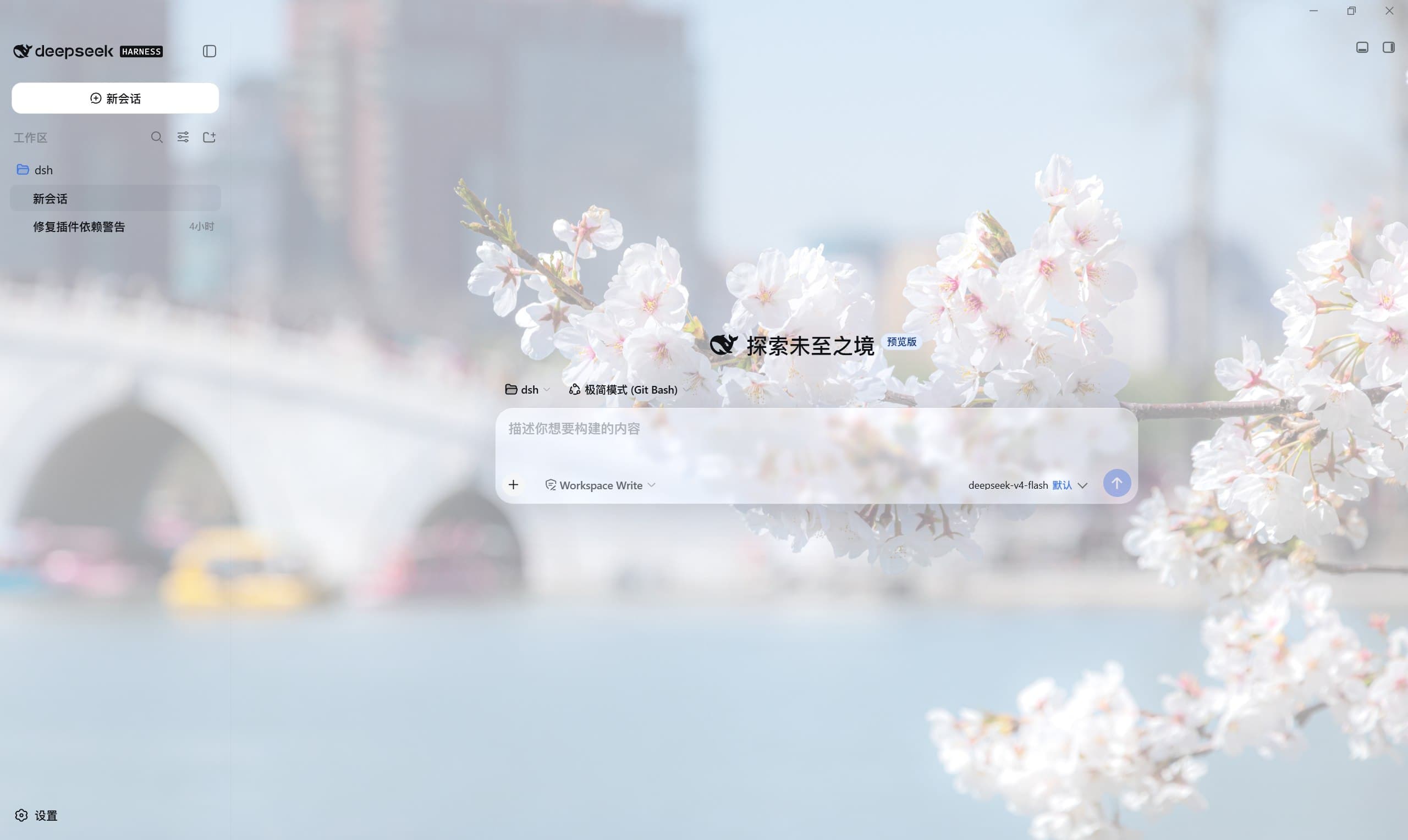
A custom background image plugin for the DeepSeek Harness Web GUI (dsh web): upload a local picture, or paste an image URL, and render it behind the whole app surface with adjustable opacity, readability scrim, panel transparency and frosted-glass blur — everything live-previewed inside the settings panel and committed automatically on release.
The look (fixed wallpaper layer + theme-aware scrim + translucent glass panels driven by --dsw-* design tokens) is modeled on the community dsh-wallpaper-engine implementation.
Screenshots
| Home | <img src="docs/images/home.jpg" alt="Custom background on the home screen" width="640"> |
| Conversation | <img src="docs/images/conversation.jpg" alt="Custom background behind the conversation" width="640"> |
| Settings | <img src="docs/images/settings.jpg" alt="Background settings row with live preview" width="640"> |
Features
- Local upload — pick a JPG / PNG / WebP / GIF from your computer; the plugin stores it under the harness home and serves it over a same-origin route (admitted only when the declared MIME, detected signature and extension all agree).
- Paste a URL — drop an
http(s)image link and press Enter. - In-panel live preview — a preview surface at the top of the row renders the image + scrim + a frosted glass bubble; dragging any slider repaints it instantly.
- Stepped sliders — ratio controls snap in 5% steps, blur radii in 1/2px steps; dragging only repaints, release commits (one write per gesture, no jank).
- Five controls — wallpaper opacity, readability scrim, panel opacity, frosted-glass blur, and wallpaper blur.
- Fit modes —
cover(fill, crop) orcontain(whole image). - Theme-aware scrim — the light theme uses a white veil (lifts the art so dark text keeps contrast); the dark theme automatically switches to a black veil (dims the art so light text keeps contrast).
- Frosted glass (whitelisted) — while a background is active, only the surfaces that float as small cards over the wallpaper turn into translucent glass (specular sheen +
backdrop-filter): the composer card and message bubbles, code blocks / terminal / diff / tool-IO cards / skill & MCP call cards and inline code, the agent task strips and their takeover panels (approval / question / plan review), the chrome buttons (new session, composer plus, scroll-to-bottom), the load-earlier history button, the subagent lineage popover, the sidebar build badge, and the home hero "preview" badge — every glassed surface carries the full recipe (fill + sheen + blur), never translucency without frost. Reading surfaces — dialogs, the settings UI, menus, tooltips, toasts, hover fills and every accent (the send button stays blue) — keep their official opaque paints so nothing legible turns washy. The blur radius is driven by the glass-blur slider;panelOpacityat 100% restores the official paints on the whitelisted list too. - Conversation timeline — a DeepSeek-web-style scroll-navigation rail at the right edge of long conversations: one tick per user message on a frosted capsule; hovering expands it into a frosted panel listing every question (active one highlighted in brand blue); clicking jumps the chat to that message. Key-point bookmarks — star a question in the expanded panel (persisted per session): marked questions show a gol
…

