loadingvx/deepseeh-harness-ultra-slash
deepseek-harness-ultra-slash
/steer commands for deepseek-harness
Install
npx @deepseek-ai/dsh plugin --profile web add [email protected]Restart `dsh web` after install. Bundle APIs can change during the developer preview.
README badge

[](https://dshhub.dev/plugins/deepseeh-harness-ultra-slash)Paste this into your README. The star count updates with every catalog sync.
From the README
Excerpt from loadingvx/deepseeh-harness-ultra-slash, cleaned of badges and images.
deepseek-harness-ultra-slash
English | 中文
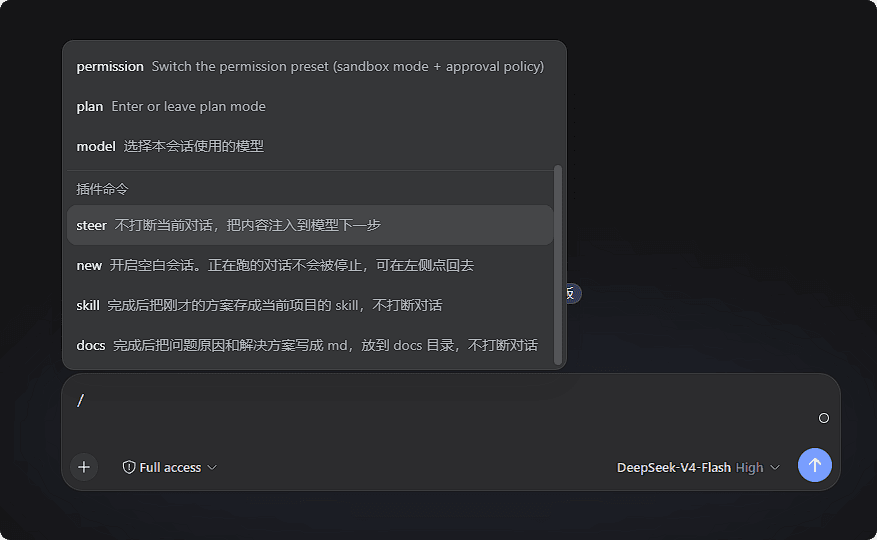
DeepSeek Harness 的 Ultra Slash 插件:在会话输入框的 / 菜单里单独一组「插件命令」,和 DSH 自带命令分开。
功能
| 命令 | 做什么 |
|---|---|
/steer 内容 | 把内容交给模型的下一步,不打断当前对话 |
/new | 开启空白会话 |
/skill | /steer +「完成后把方案存成当前项目的 skill」 |
/docs | /steer +「完成后把原因和方案写成 docs 里的 md」 |
还可以在 设置 → 插件命令 里给常用的 /steer 内容起短名字,例如 /review。
安装
需要已安装 DeepSeek Harness,并能启动 dsh web。
从 npm 安装
dsh plugin --profile web add [email protected]
@0.2.2 不能省略:pnpm 对刚发布的版本有 24 小时保护,不带版本号可能装到旧版。
从 GitHub 安装
dsh plugin --profile web add github:loadingvx/deepseeh-harness-ultra-slash
GitHub 安装用的是仓库里已经构建好的文件,默认分支上需要有 lib/index.js 和 lib/client.js。
装完后请重启 dsh web。如果以前装过旧包名 dsh-steer,先卸掉再装新包:
dsh plugin --profile web remove dsh-steer
许可证
MIT

