kirkchinese/CiteCiter
citeciter-workspace
Verifiable, source-bound, read-only investigations for DSH responses—without interrupting the main task.
Install
npx @deepseek-ai/dsh plugin --profile web add @kirkchinese/[email protected]Restart `dsh web` after install. Bundle APIs can change during the developer preview.
README badge

[](https://dshhub.dev/plugins/citeciter)Paste this into your README. The star count updates with every catalog sync.
From the README
Excerpt from kirkchinese/CiteCiter, cleaned of badges and images.
<a href="README.zh.md">简体中文</a> · <a href="https://www.npmjs.com/package/@kirkchinese/dsh-citeciter">npm</a> · <a href="https://github.com/kirkchinese/CiteCiter/issues">Issues</a>
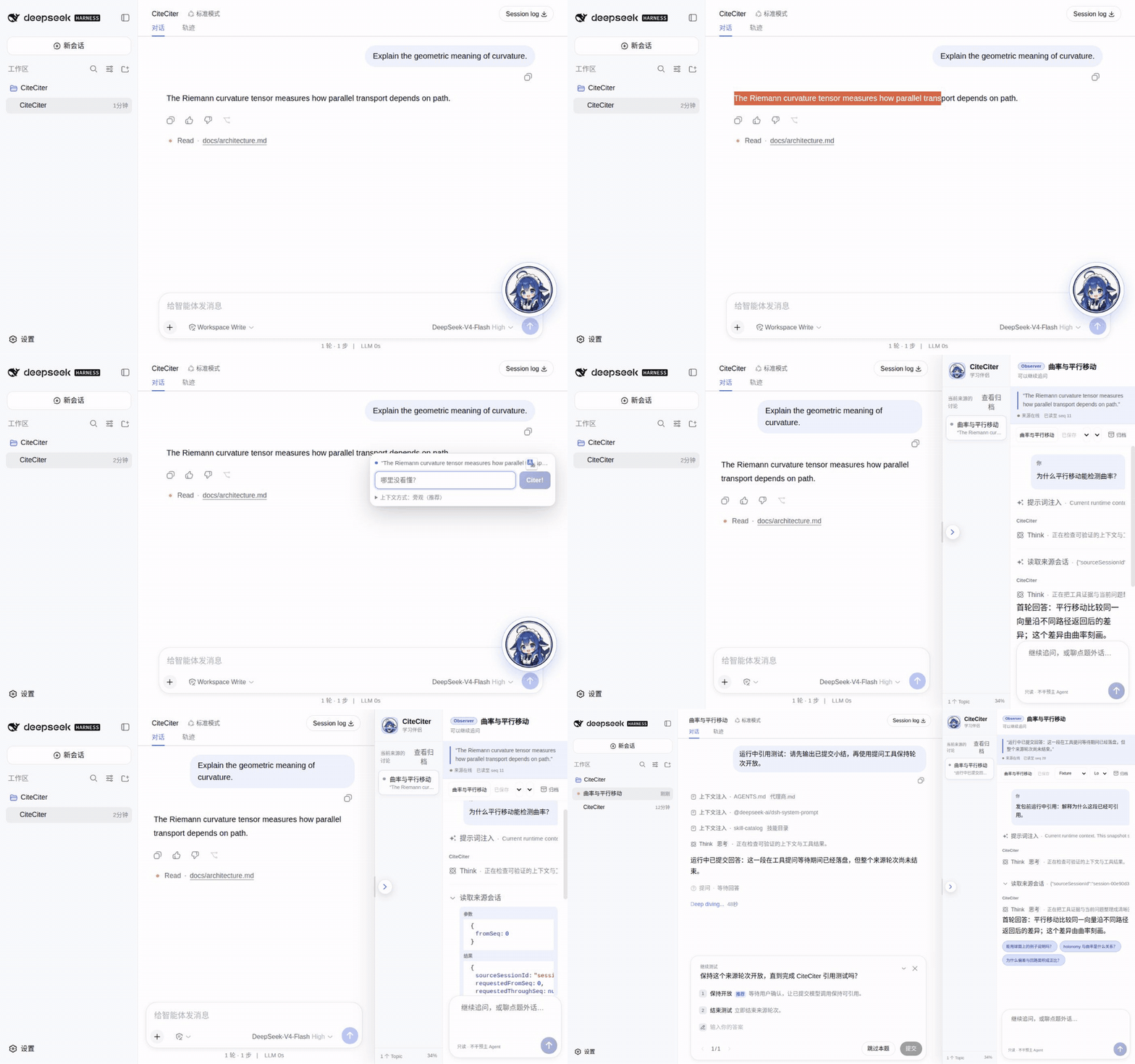
<p align="center"><sub>Select, right-click, and ask beside the source while the main Agent keeps working. Recorded in a deterministic test environment; this demonstrates the workflow rather than real-provider acceptance.</sub></p>CiteCiter is for the moments when a long-running Agent says something worth pausing over, but the task itself should not pause. It opens a separate investigation beside the conversation, keeps that investigation tied to the exact source text, and leaves the source Session and workspace unchanged.
Why CiteCiter
- Cite the exact words. The selected excerpt is checked against the committed assistant response before a Topic is created.
- Ask before the Agent finishes. A committed model response is enough; the surrounding Agent turn may still be running.
- Keep the investigation alive. Each Topic supports natural follow-up questions and can be reopened after a refresh or restart.
- Check the evidence. CiteCiter can inspect committed source-Session events and search or read project files through read-only tools.
- Protect the original task. The investigation runs in its own read-only Session. It cannot write to the source Session or source workspace.
Who it is for
CiteCiter is especially useful when you:
- run long, interactive DSH tasks and want to clarify one claim without diverting the main Agent;
- review AI-assisted code and need to test an explanation against the Session record or repository;
- learn an unfamiliar codebase and want a persistent thread for “why does this work?” questions.
It is not intended for every DSH workflow. TUI, headless, and fully automated runs do not currently have a CiteCiter interaction adapter.
Install after the 0.4.1 release
CiteCiter 0.4.1 is currently a source candidate and has not cleared release acceptance. It supports Node.js ^22.19.0 || >=24.0.0 and DSH >=0.1.1-rc.1 <0.1.1-rc.3.
For DSH Web:
dsh plugin --profile web add @kirkchinese/[email protected]
Restart DSH Web and refresh the page. For DSH Desktop, open the tray terminal and run:
dsh plugin add @kirkchinese/[email protected]
Packaged Desktop already includes Node.js, pnpm, and its pinned DSH runtime. An external DSH installation can target the Desktop profile explicitly:
dsh plugin --profile desktop add @kirkchinese/[email protected]
Restart DSH Desktop after installation.
Use
- Select text inside a committed assistant response. The surrounding Agent turn may still be running.
- Right-click the selection, enter the first question, and choose
Citer!. - Continue the discussion in the panel beside the source conversation.
- Reopen, rename, archive, or resume earlier Topics from the Topic rail.
Each Topic keeps its own model, reasoning effort, title, messages, and source binding. Changing any of them does not change the source Session.
Evidence without write access
…