988hj7tczd-oss/dsh-computer-use
dsh-computer-use
Cross-platform Computer Use plugin for DeepSeek Harness: observable desktop automation with an isolated virtual cursor, AX/UIA observation, screenshot vision, and 12 guarded tools.
Install
npx @deepseek-ai/dsh plugin --profile web add github:988hj7tczd-oss/dsh-computer-useRestart `dsh web` after install. Bundle APIs can change during the developer preview.
README badge

[](https://dshhub.dev/plugins/988hj7tczd-oss-dsh-computer-use)Paste this into your README. The star count updates with every catalog sync.
From the README
Excerpt from 988hj7tczd-oss/dsh-computer-use, cleaned of badges and images.
dsh-computer-use
让 DeepSeek Harness 像人一样操作桌面。 观察屏幕、定位界面元素、移动独立虚拟光标、点击、输入、滚动和拖拽。
Give DeepSeek Harness a safe, observable Computer Use layer. Observe desktop applications, locate UI elements, and act through an isolated virtual cursor.
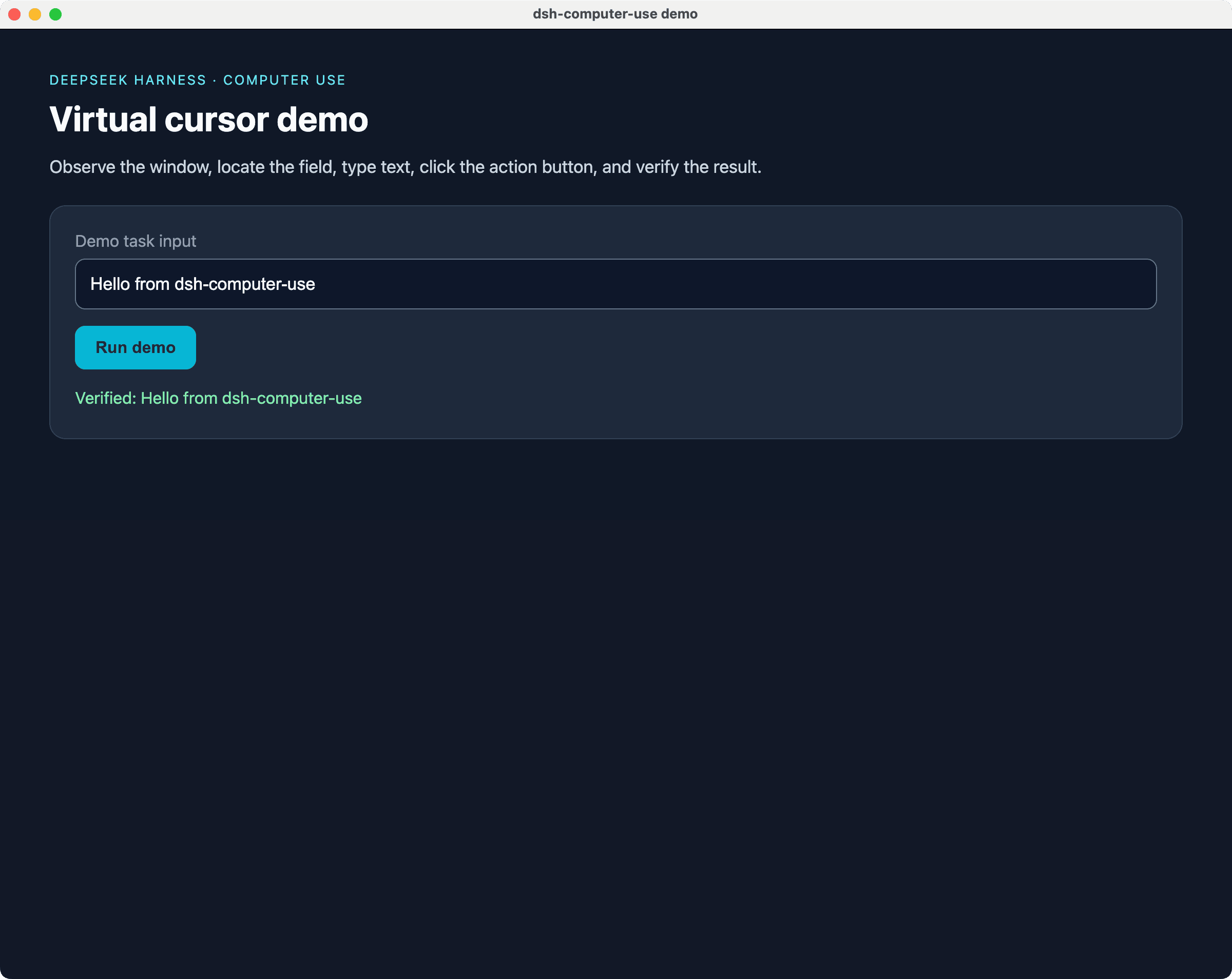
真实演示 · Real demo: a local, non-sensitive page was observed, filled, clicked, and verified through the Computer Use action loop.
中文文档 · English documentation
生态入口 · Ecosystem
| 入口 | 作用 | Link |
|---|---|---|
| harness-desktop | 开箱即用的 DeepSeek Harness 桌面客户端 · Ready-to-use desktop client | 下载 / Download |
| AI House | 发现 AI 工具、模型和 Agent · Discover AI tools and agents | 工具中心 / Tools |
| npm | 安装和查看包信息 · Install and inspect the package | dsh-computer-use |
| awesome-dsh-plugin | 发现更多 DeepSeek Harness 插件 · Discover more plugins | Plugin list |
| Gitee 镜像 | 国内访问入口 · China mirror | Gitee |
中文文档
这是什么?
dsh-computer-use 是 DeepSeek Harness 的跨平台 Computer Use 插件,为 AI Agent 增加一套可观察、可约束、可验证的桌面操作能力。
它不是传统的鼠标宏:Agent 必须先观察目标窗口,再基于新鲜快照执行动作。点击、双击和右键操作通过 cua-driver 的独立虚拟光标完成,用户可以看到操作过程,而不是让程序悄悄发送一串不可见事件。
适合用于:
- 让 DeepSeek Harness 操作原生 macOS、Windows 和 Linux 桌面应用;
- 操作 Electron、Canvas 或游戏等 Accessibility/AX 信息不完整的界面;
- 构建“打开应用 → 观察 → 点击 → 输入 → 再观察验证”的 Agent 闭环;
- 为桌面自动化、内部工具和个人工作流增加可审计的 Computer Use 执行层;
- 研究 Computer Use、视觉定位和安全护栏。
本项目是开源社区插件,不是 DeepSeek 官方产品,也不代表 DeepSeek 的官方立场。
为什么需要它?
普通文本 Agent 可以生成答案,但无法直接完成很多桌面任务。dsh-computer-use 把桌面交互拆成三个阶段:
观察 Observation → 决策 Decision → 受约束执行 Guarded Action
flowchart LR
    A[DeepSeek Harness Agent] --> B[dsh-computer-use]
    B --> C[安全护栏 Guard]
    C --> D[AX / UIA 界面树]
    C --> E[虚拟光标与键盘]
    D --> F[cua-driver]
    E --> F
    F --> G[桌面应用 Desktop Apps]
核心原则:
- 先观察,再操作:没有新鲜观察快照时,动作会被拒绝;
- 模型所见即所点:元素编号和坐标来自同一窗口截图空间;
- 语义优先:优先使用
element编号,坐标模式保留视觉操作自由度; - 失败关闭:目标不明确、快照过期、应用不在白名单时不继续执行。
能力一览
| 能力 | 说明 |
|---|---|
| 屏幕观察 | 读取目标窗口元数据、Accessibility/AX/UIA 元素和坐标 |
| 三种观察模式 | ax 零视觉 Token、native 主模型直读图片、vision 视觉观察者 |
| 独立虚拟光标 | 点击、双击、右键会显示虚拟光标移动和操作过程,不抢用户真实鼠标 |
| 文本与快捷键 | 输入文本、发送 return、cmd+c、ctrl+shift+p 等按键 |
| 滚动与拖拽 | 支持上下左右滚动和窗口本地截图坐标拖拽 |
| 应用管理 | 列出运行中的应用,后台启动应用,按需前置窗口 |
| 安全护栏 | 快照 TTL、应用白名单、危险操作审批、密码框保护 |
| 跨平台 | macOS 已验证;Windows/Linux 需按真实环境完成平台验收 |
12 个模型工具
| 工具 | 作用 | 主要参数 |
|---|---|---|
screen_observe | 获取窗口、AX/UIA 元素、坐标或截图 | window, mode, query, maxElements |
screen_zoom | 截取并放大窗口局部区域 | window_id, pid, x1, y1, x2, y2 |
computer_click | 点击元素或截图坐标 | element 或 x,y,可选 count |
computer_double_click | 双击元素或坐标 | element 或 x,y |
computer_right_click | 右键点击元素或坐标 | element 或 x,y |
computer_type | 向焦点或指定元素输入文本 | text, 可选 element |
computer_key | 发送按键或快捷键 | key,例如 return、cmd+c |
computer_scroll | 在目标窗口滚动 | direction, amount, 可选 element |
computer_drag | 拖拽窗口中的区域 | from_x, from_y, to_x, to_y |
computer_wait | 等待界面加载或动画完成 | ms,最大 60000 |
app_list | 列出正在运行的应用 | 无 |
app_launch | 启动应用 | name 或 bundle_id,可选 bring_to_front |
快速开始
方式一:使用 harness-desktop
…